RM3620E
_59
Vehicle Exterior
_076527
WINDOW / GLASS
_0373367
WINDSHIELD DEICER SWITCH(w/ Heated Windshield Defroster System)
G
WINDOW / GLASS WINDSHIELD DEICER SWITCH(w/ Heated Windshield Defroster System) INSPECTION
PROCEDURE

 84795
1.INSPECT FRONT WINDOW DEICER SWITCH
a.
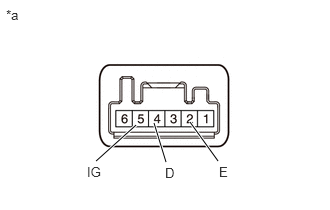
1,1.677 1.417,1.302
true
1.729,1.688 1.604,1.281
true
2.271,1.677 1.979,1.271
true
2.281,1.708 2.438,1.906
0.156,0.198
10
false
E
1.719,1.719 2.042,1.948
0.323,0.229
10
false
D
0.906,1.708 1.177,1.896
0.271,0.188
10
false
IG
0.063,0.073 0.375,0.271
0.313,0.198
10
false
*a
| *a | Component without harness connected
(Front Window Deicer Switch) |
Inspect the front window deicer switch.
i.
Measure the resistance according to the value(s) in the table below.
- Standard Resistance:
Tester Connection Switch Condition Specified Condition If the result is not as specified, replace the front window deicer switch.
5 (IG) - 2 (E) Front window deicer switch off 10 kΩ or higher Front window deicer switch on Below 1 Ω
ii.
Check the indicator light illuminates.
- OK:
Battery Connection Specified Condition If the result is not as specified, replace the front window deicer switch.
Battery positive (+) → 5 (IG)
Battery negative (-) → 4 (D)Illuminates
b.
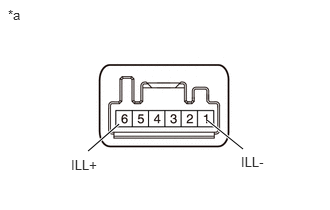
1.24,1.292 0.917,1.573
true
2.156,1.25 2.531,1.552
true
0.74,1.635 1.354,1.833
0.615,0.198
10
false
ILL+
2.51,1.604 3.125,1.802
0.615,0.198
10
false
ILL-
0.083,0.073 0.396,0.271
0.313,0.198
10
false
*a
| *a | Component without harness connected
(Front Window Deicer Switch) |
Check the illumination.
i.
Apply battery voltage to the connector and check the illumination conditions.
- OK:
Battery Connection Specified Condition If the result is not as specified, replace the front window deicer switch.
Battery positive (+) → 6 (ILL+)
Battery negative (-) → 1 (ILL-)Illuminates