NAVIGATION / MULTI INFO DISPLAY NAVIGATION SYSTEM SYSTEM DESCRIPTION
NAVIGATION SYSTEM OUTLINE
Vehicle position tracking methods
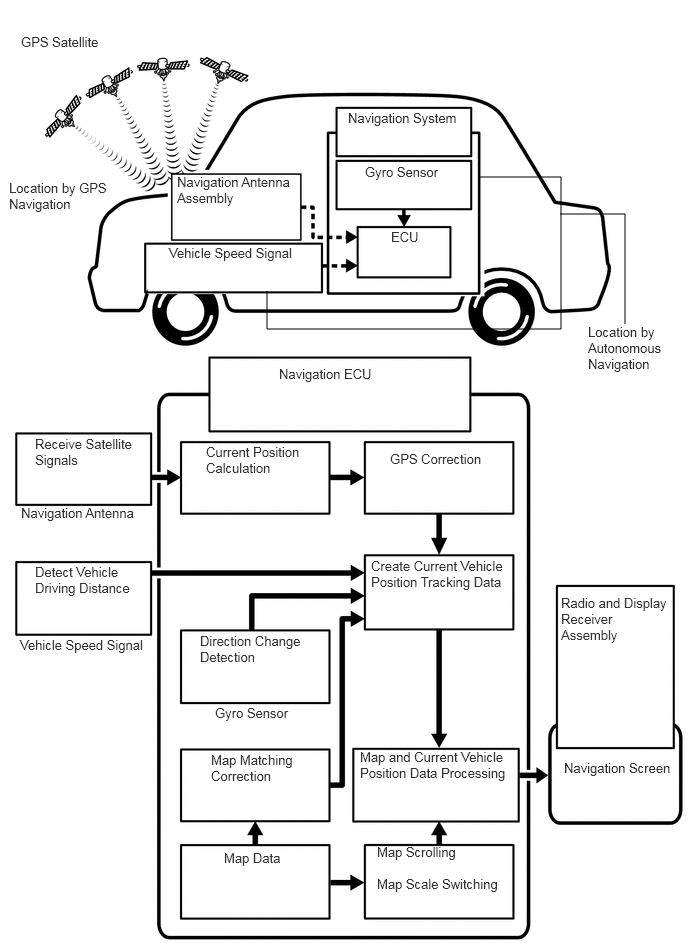
It is essential that the navigation system correctly tracks the current vehicle position and displays it on the map. There are 2 methods to track the current vehicle position: autonomous (dead reckoning) and GPS* (satellite) navigation. Both navigation methods are used in conjunction with each other.
*: GPS (Global Positioning System)
| Operation | Description |
|---|---|
| Vehicle Position Calculation | The navigation ECU calculates the current vehicle position (direction and current position) using the direction deviation signal from the gyro sensor and driving distance signal from the vehicle speed sensor and creates the driving route. |
| Map Display Processing | The navigation ECU processes the vehicle position data, vehicle driving track and map data from the internal memory. |
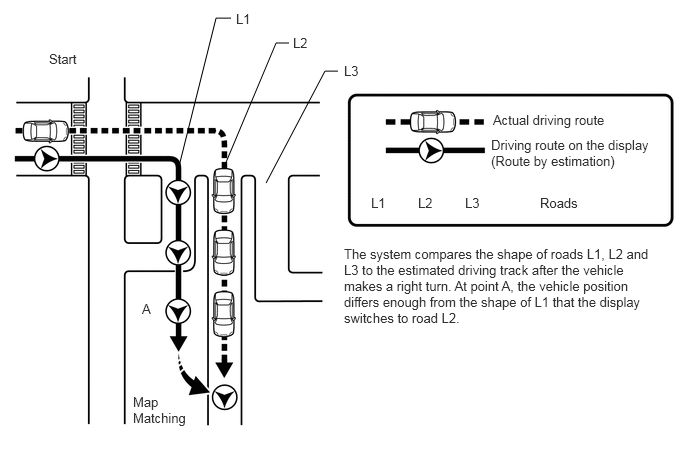
| Map Matching | The map data from the internal memory is compared to the vehicle position and driving track data. Then, the vehicle position is matched with the nearest road. |
| GPS Correction | The vehicle position is matched to the position measured by the GPS. Then, the GPS measurement position data is compared with the vehicle position and driving track data. If the position is very different, the GPS measurement position is used. |
| Distance Correction | The vehicle speed signal includes the error caused by tire wear and slippage between the tires and road surface. Distance correction is performed to account for this. The navigation ECU automatically offsets the signal to make up for the difference between it and the distance data of the map. The offset is automatically updated. |
- HINT:
-
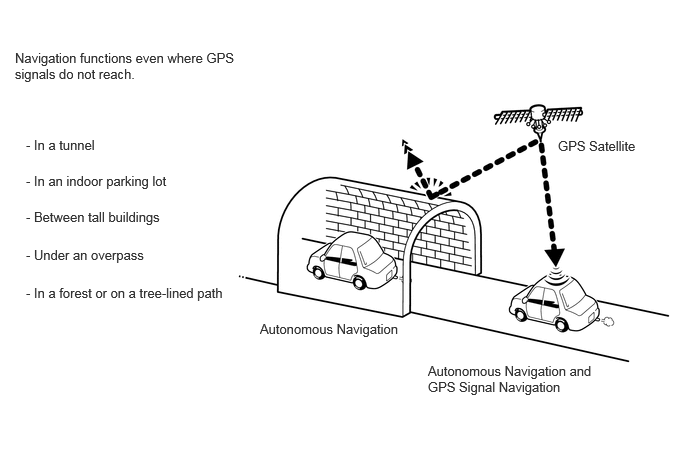
The combination of autonomous and GPS navigation makes it possible to display the vehicle position even when the vehicle is in places where GPS signals cannot be received. When only autonomous navigation is used, however, the mapping accuracy may slightly decrease.
Autonomous navigation
This method determines the relative vehicle position based on the driving track determined by the gyro sensor located in the navigation ECU and the vehicle speed signal.
Gyro sensor
Used to calculate the direction by detecting angular velocity. It is located in the navigation ECU.
Vehicle speed signal
Used to calculate the vehicle driving distance.
GPS* navigation (Satellite navigation)
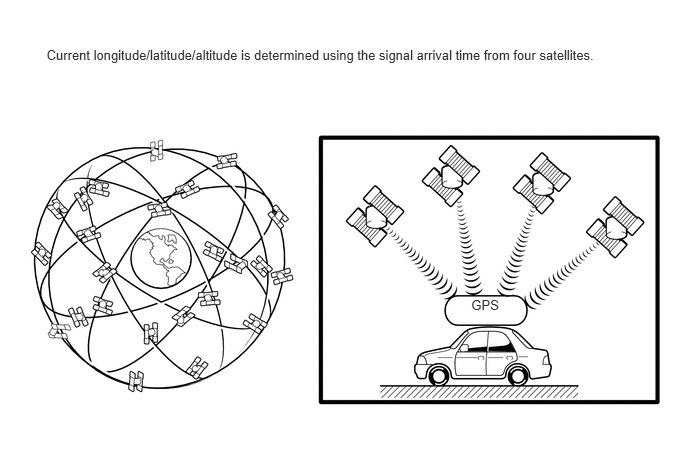
This method detects the absolute vehicle position using radio waves from GPS satellites.
*: GPS satellites were launched by the U.S. Department of Defense for military purposes.
| Number of Satellites | Measurement | Description |
|---|---|---|
| 2 or less | Measurement is impossible | Vehicle position cannot be obtained because the number of satellites is not enough. |
| 3 | 2-dimensional measurement is possible | Vehicle position is obtained based on the current longitude and latitude. (This is less precise than 3-dimensional measurement.) |
| 4 | 3-dimensional measurement is possible | Vehicle position is obtained based on the current longitude, latitude and altitude. |
Map matching
The current driving route is calculated by autonomous navigation (according to the gyro sensor and vehicle speed signal) and GPS navigation. This information is then compared with possible road shapes from the map data in the internal memory and the vehicle position is set onto the most appropriate road.
USB AUDIO SYSTEM FUNCTION OUTLINE
The No. 1 stereo jack adapter assembly is equipped with a USB connector. Connecting a USB device or "iPod" to the No. 1 stereo jack adapter assembly allows music files to be played. Not only is it possible to play music from a USB device with audio functions, it is also possible to play MP3, WMA, AAC, WAV (LPCM), FLAC, ALAC or OGG Vorbis music files that are stored on a USB device. In addition, "iPod" control software is installed, allowing file selection from playlists and operation using shuffle mode.
- HINT:
-
Operation through the controls of a USB device or "iPod" cannot be performed while it is connected.
USB audio system compatible devices
USB device
The following device formats can be used:
| Compatible USB device formats | ·
USB communication format: USB 2.0 HS (480 Mbps) ·
File format: FAT16/32 (Windows) ·
Class: Mass storage class |
MP3, WMA, AAC, WAV (LPCM), FLAC, ALAC or OGG Vorbis files written to a USB device with any format other than those listed above may not be played correctly, and their names and folder names may not be displayed correctly.
Items related to standards and limitations are as follows:
Maximum directory hierarchy: 8 levels
Maximum number of folders in device: 3000 (including the root folder)
Maximum number of files in device: 9999
Maximum number of files per folder: 255
"iPod"
"iPhone", "iPod", "iPod classic", "iPod nano" and "iPod touch" are trademarks of Apple Inc., registered in the U.S. and other countries.
The following "iPod", "iPod nano", "iPod touch" and "iPhone" devices can be used with this system.
"iPhone 7 Plus"
"iPhone 7"
"iPhone 6s plus"
"iPhone 6s"
"iPhone SE"
"iPhone 6 plus"
"iPhone 6"
"iPhone 5s"
"iPhone 5c"
"iPhone 5"
"iPhone 4s"
"iPhone 4"
"iPhone 3GS"
"iPhone 3G"
"iPod touch" (6th generation)
"iPod touch" (5th generation)
"iPod touch" (4th generation)
"iPod touch" (3rd generation)
"iPod touch" (2nd generation)
"iPod touch" (1st generation)
"iPod nano" (7th generation)
"iPod nano" (6th generation)
"iPod nano" (5th generation)
"iPod nano" (4th generation)
- HINT:
- ·
Depending on differences between models or software versions etc., some models might be incompatible with this system.
·"iPod video" is not supported.
USB VIDEO SYSTEM FUNCTION OUTLINE
Playable video file standards
| File format | MPEG-4, AVI Container, Windows Media Video |
| Corresponding screen size | MAX 1920 x 1080 |
| Corresponding frame rate | MAX 60i/30p |
HIGH-RESOLUTION SOUND SOURCE OUTLINE
This device supports high-resolution sound sources.
The definition of high-resolution is based on the standards of groups such as the CTA (Consumer Technology Association).
The following formats and media can be used:
| Supported formats | WAV (LPCM), FLAC, ALAC, OGG Vorbis |
| Playable media | USB |
FILE INFORMATION OUTLINE
Playable MP3 file standards
| Compatible standard | MPEG1 LAYER3, MPEG2 LSF LAYER3 |
| Compatible sampling frequency | ·
MPEG1 LAYER3: 32, 44.1, 48 (kHz) ·
MPEG2 LSF LAYER3: 16, 22.05, 24 (kHz) |
| Compatible bit rate | ·
MPEG1 LAYER3: 32 to 320 (kbps) ·
MPEG2 LSF LAYER3: 8 to 160 (kbps) ·
Compatible with VBR |
| Compatible channel mode | Stereo, joint stereo, dual channel, monaural |
Playable WMA file standards
| Compatible standard | WMA Ver. 7, 8, and 9 |
| Compatible sampling frequency | 32, 44.1, 48 (kHz) |
| Compatible bit rate (Only compatible with 2-channel playback) | ·
Ver. 7, 8: CBR48 to 192 (kbps) ·
Ver. 9: CBR48 to 320 (kbps) ·
Compatible with VBR |
Playable AAC file standards
| Compatible standard | MPEG4/AAC-LC |
| Compatible sampling frequency | 11.025, 12, 16, 22.05, 24, 32, 44.1, 48 (kHz) |
| Compatible bit rate | ·
8 to 320 (kbps) ·
Compatible with VBR |
Playable WAV (LPCM) file standards*
|
*: Files with a sample rate higher than 48kHz are down-converted to 48kHz/24bit. |
|
| Compatible sampling frequency | 8/11.025/12/16/22.05/24/32/44.1/48/88.2/96/176.4/192 (kHz) |
| Compatible bit rate | 16/24 (bit) |
Playable FLAC file standards*
|
*: Files with a sample rate higher than 48kHz are down-converted to 48kHz/24bit. |
|
| Compatible sampling frequency | 8/11.025/12/16/22.05/24/32/44.1/48/88.2/96/176.4/192 (kHz) |
| Compatible bit rate | 16/24 (bit) |
Playable ALAC file standards*
|
*: Files with a sample rate higher than 48kHz are down-converted to 48kHz/24bit. |
|
| Compatible sampling frequency | 8/11.025/12/16/22.05/24/32/44.1/48/64/88.2/96 (kHz) |
| Compatible bit rate | 16/24 (bit) |
Playable OGG Vorbis file standards*
|
*: Files with a sample rate higher than 48kHz are down-converted to 48kHz/24bit. |
|
| Compatible sampling frequency | 8/11.025/16/22.05/32/44.1/48 (kHz) |
| Compatible bit rate | ·
32-500 (kbps) ·
Compatible with VBR |
ID3 tag, WMA tag, AAC tag, TAG and Vorbis comment
Additional text information called an ID3 tag can be input to MP3 files. Information such as song titles and artist names can be stored.
- HINT:
-
This player is compatible with ID3 tags of ID3 Ver. 1.0 and 1.1, and ID3 Ver. 2.2 and 2.3. (Number of characters complies with ID3 Ver. 1.0 and 1.1, and ID3 Ver. 2.2 and 2.3.)
Additional text information called a WMA tag can be input to WMA files. Information such as song titles and artist names can be stored.
Additional text information called an AAC tag can be input to AAC files. Information such as song titles and artist names can be stored.
Additional text information called a TAG can be input to WAV (LPCM), FLAC, ALAC files. Information such as song titles and artist names can be stored.
Additional text information called a Vorbis comment can be input to OGG Vorbis files. Information such as song titles and artist names can be stored.
Usable media
USB devices can be used to play MP3/WMA/AAC/WAV (LPCM)/FLAC/ALAC/OGG Vorbis files.
Usable media format
Standards and restrictions
| Maximum directory levels | 8 levels |
| Maximum number of characters for a folder name/file name | 32 characters |
| Maximum number of folders | 192 (Including empty folders, root folders, and folders that do not contain MP3/WMA/AAC files) |
| Maximum number of files in a disc | 255 (Including non-MP3/WMA/AAC files) |
File names
Only files with an extension of ".mp3", ".wma", ".m4a", ".wav", ".flac", ".alac", ".ogg" and ".oga" can be recognized and played as MP3, WMA, AAC, WAV (LPCM), FLAC, ALAC or OGG Vorbis files.
Save MP3, WMA, AAC, WAV (LPCM), FLAC, ALAC or OGG Vorbis files with an extension of ".mp3", ".wma", ".m4a", ".wav", ".flac", ".alac", ".ogg" or ".oga".
- NOTICE:
-
If non-MP3, non-WMA, non-AAC, non-WAV (LPCM), non-FLAC, non-ALAC or non-OGG Vorbis files are saved with an extension of ".mp3", ".wma", ".m4a", ".wav", ".flac", ".alac", ".ogg" or ".oga", those files may be wrongly recognized as MP3, WMA, AAC, WAV (LPCM), FLAC, ALAC or OGG Vorbis files and played. A loud noise may occur and damage to the speakers may result.
"Bluetooth" OUTLINE
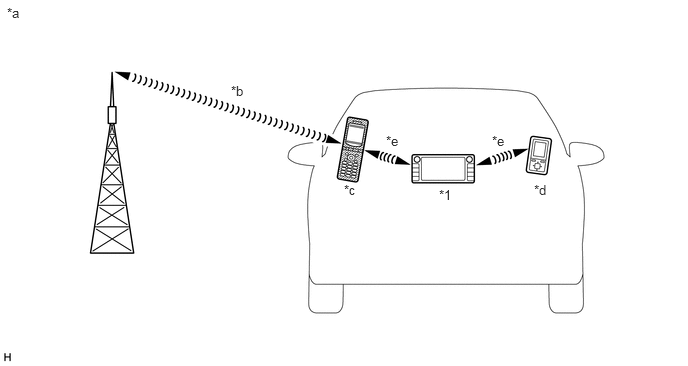
| *1 | Radio and Display Receiver Assembly
(Built-in "Bluetooth" Antenna) |
- | - |
| *a | Example | *b | Cellular Network |
| *c | Cellular Phone
("Bluetooth" Compatible Type) |
*d | Portable Audio Player
("Bluetooth" Compatible Type) |
| *e | "Bluetooth" Wireless Connection | - | - |
"Bluetooth" is a trademark owned by Bluetooth SIG, Inc.
"Bluetooth" is a wireless connection technology that uses the 2.4 GHz frequency band.
- HINT:
-
The communication performance of "Bluetooth" may vary depending on obstructions or radio wave conditions between communication devices, electromagnetic radiation, communication device sensitivity or antenna capacity.
Hands-free function
The "Bluetooth" built-in radio and display receiver assembly and a "Bluetooth" compatible cellular phone* can be connected using a "Bluetooth" wireless connection. This enables the use of the hands-free function on the cellular phone even if the phone is in a pocket or bag. For this reason, it is not necessary to use a connector or cable to connect the cellular phone.
*: Some versions of "Bluetooth" compatible cellular phones may not function properly.
The hands-free function uses a "Bluetooth" wireless connection. A "Bluetooth" wireless connection can be affected by uncertain elements, such as vehicle location, time of day, etc. Therefore, problems related to establishing connection may be caused temporarily by "Bluetooth" connection conditions. It is necessary to check the frequency of occurrence, connection conditions using another cellular phone, etc. when performing diagnosis.
Compatible hands-free devices
| Required "Bluetooth" specifications | Ver. 2.0 or higher (Ver. 4.1 recommended) |
| Compatible profiles | ·
HFP (Hands-Free Profile) Ver. 1.0 or higher (Ver. 1.7 or higher recommended)*1 ·
OPP (Object Push Profile) Ver. 1.1 or higher (Ver. 1.2 or higher recommended)*2 ·
PBAP (Phone Book Access Profile) Ver. 1.0 or higher (Ver. 1.2 or higher recommended)*2 ·
SPP (Serial Port Profile) Ver. 1.1 or higher (Ver. 1.2 or higher recommended)*3 ·
MAP (Message Access Profile) Ver. 1.0 or higher (Ver. 1.2 or higher recommended)*4 ·
PAN (Personal Area Networking) Ver. 1.0 or higher*5 |
| Maximum number of hands-free devices that can be registered (including audio devices) | 5 |
*1: This profile is necessary when using the hands-free function.
*2: This profile is necessary when transferring the phonebook data.
*3: This profile is necessary when using the Toyota link function (w/ Toyota Link Function) or App suite service (w/ App suite Service).
*4: This profile is necessary when using the message function (w/ SMS/MMS/e-mail Function).
*5: This profile is necessary when using Toyota Online (w/ Toyota Online).
- HINT:
-
The amount of remaining battery charge displayed on the radio and display receiver assembly may be different from that of the "Bluetooth" device.
"Bluetooth" audio function
The "Bluetooth" built-in radio and display receiver assembly and a "Bluetooth" compatible portable audio player* can be connected using a "Bluetooth" wireless connection. This enables files stored in the portable audio player to be heard from the vehicle speakers. In addition, operations such as play/stop can be performed directly from the radio and display receiver assembly.
*: Some versions of "Bluetooth" compatible audio players may not be able to be connected via the "Bluetooth" function, or music may play, but functions available using the radio and display receiver assembly may be limited.
Compatible "Bluetooth" audio devices
| Required "Bluetooth" specifications | Ver. 2.0 or higher (Ver. 4.1 recommended) |
| Compatible profiles | ·
A2DP (Advanced Audio Distribution Profile) Ver. 1.0 or higher (Ver. 1.3 or higher recommended) ·
AVRCP (Audio/Video Remote Control Profile) Ver. 1.0 or higher (Ver. 1.6 or higher recommended) |
| Maximum number of audio devices that can be registered (including hands-free devices) | 5 |
- HINT:
- ·
When Bluetooth audio and "Miracast" are connected simultaneously, audio output priority varies depending on the specifications of the device.
·Bluetooth and "Miracast" and other "Wi-Fi" use the same 2.4 GHz band radio waves. As a result, if Bluetooth audio and "Miracast" are connected at the same time some sound skipping etc., may occur.
RADIO DESCRIPTION
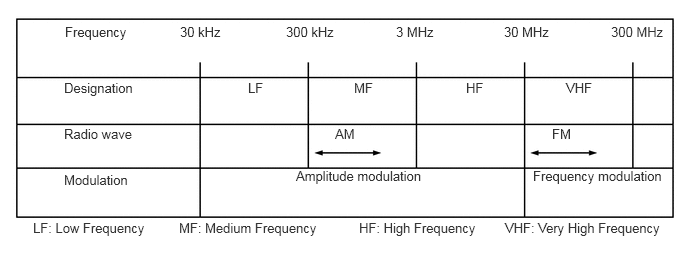
Radio frequency band
Radio broadcasts use the radio frequency bands shown in the table below.
Service area
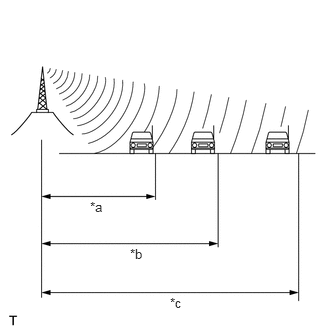
| *a | FM (Stereo) |
| *b | FM (Monaural) |
| *c | AM |
The service areas of AM and FM broadcasts are vastly different. Sometimes an AM broadcast can be received very clearly but an FM stereo broadcast cannot. FM stereo has the smallest service area, and is prone to pick up static and other types of interference such as noise.
Radio reception problems
- HINT:
-
In addition to static, other problems such as "phasing", "multipath" and "fade out" exist. These problems are not caused by electrical noise, but by the radio signal propagation method itself.
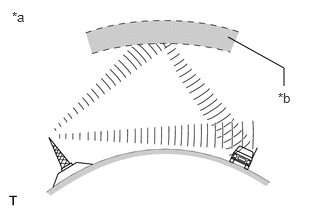
| *a | Phasing |
| *b | Ionosphere |
Phasing
AM broadcasts are susceptible to electrical interference and another kind of interference called phasing. Occurring only at night, phasing is the interference created when a vehicle receives 2 radio wave signals from the same transmitter. One signal is reflected off the ionosphere and the other signal is received directly from the transmitter.
| *a | Multipath |
Multipath
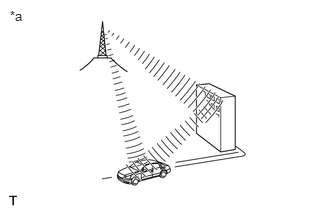
Multipath is a type of interference created when a vehicle receives 2 radio wave signals from the same transmitter. One signal is reflected off buildings or mountains and the other signal is received directly from the transmitter.
| *a | Fade Out |
Fade out
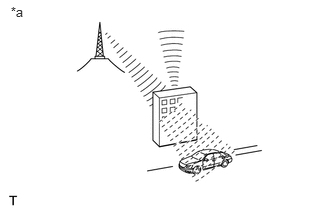
Fade out is caused by objects (buildings, mountains and other large obstructions) that deflect part of a signal, resulting in a weaker signal when the object is between the transmitter and vehicle. High frequency radio waves, such as FM broadcasts, are easily deflected by obstructions. Low frequency radio waves, such as AM broadcasts, are less likely to be deflected.
Noise problem
Technicians must have a clear understanding about each customer's noise complaint. Use the following table to diagnose noise problems.
| Radio Frequency | Noise Occurrence Condition | Presumable Cause |
|---|---|---|
| AM | Noise occurs in a specific area | Foreign noise |
| Noise occurs when listening to an intermittent broadcast | An identical program transmitted from multiple towers can cause noise where the signals overlap | |
| Noise occurs only at night | Signal phasing | |
| FM | Noise occurs while driving in a specific area | Multipath resulting from a change in FM frequency |
VEHICLE CUSTOMIZATION OUTLINE
Customization of functions can also be performed on the multi-display screen. Refer to Owner's Manual for further information on customizable items for the navigation system.
- HINT:
- ·
Items available for customization via the navigation system can also be customized by using the GTS.
·Some customize parameters displayed on the GTS will be displayed on the vehicle customization screen for the navigation system. Users can customize these items.
EXPORT / IMPORT MEMORY POINT FUNCTION OUTLINE
This function allows memory points stored in the radio and display receiver assembly to be registered to another radio and display receiver assembly. Memory points stored in the radio and display receiver assembly can be exported to a USB device. Data exported to a USB device can be imported to another radio and display receiver assembly using a USB device.
AUTOMATIC SOUND LEVELIZER (ASL) FUNCTION OUTLINE
The Automatic Sound Levelizer (ASL) function automatically adjusts the audio system volume in order to compensate for increased vehicle noise (vehicle noise tends to increase as vehicle speed increases). The ASL adjusts the volume based upon vehicle speed signals sent from the combination meter assembly.
MOBILE ASSISTANT FUNCTION OUTLINE
With a compatible portable device connected via "Bluetooth", this function allows the system to interface directly for voice recognition functions. The steering pad switch assembly is operated to start the Mobile Assistant function and the function is operated by using voice commands.
- HINT:
-
Mobile assistant may not operate or the device may become unresponsive depending on the type of device connected, OS (iOS/Android) version or Google app version.
DIGITAL AUDIO BROADCAST (DAB) FUNCTION OUTLINE (w/ DAB Function)
Digital Audio Broadcast (DAB) is the standard for digital radio. Compared to conventional AM/FM broadcasting, DAB enables higher sound quality radio broadcasting with lower noise when reception conditions change. DAB has an FM-Link function that automatically and temporarily changes the radio to the simultaneously broadcasted FM station if the DAB broadcasting reception level falls.
TOYOTA LINK FUNCTION OUTLINE (w/ Toyota Link Function)
Toyota Link is a service that enables Toyota Link applications and content of a cellular phone to be displayed on and operated from the radio and display receiver assembly.
Communication between the cellular phone and radio and display receiver assembly is performed using a "Bluetooth" connection. Depending on the functions used, a USB connection may also be required.
Before using the Toyota Link service on the navigation system, the cellular phone needs to be registered to the radio and display receiver assembly as a "Bluetooth" device.
For details regarding Toyota Link operations, each of the applications and compatible phones, refer to https://www.toyota.com.au/toyotalink.
"Miracast" FUNCTION OUTLINE (w/ "Miracast" Function)
About "Miracast"
"Miracast" is a trademark owned by Wi-Fi Alliance, a non-profit industry association.
"Miracast" uses the "Wi-Fi" connection (P2P function) to display cellular phone and tablet screens on the multi-display and allows for audio on the cellular phone, etc., to be streamed through vehicle speakers.
- HINT:
- ·
While driving only sound playback is supported. Videos are not displayed.
·When Bluetooth audio and "Miracast" are connected simultaneously, audio output priority varies depending on the specifications of the device.
·Bluetooth and "Miracast" and other "Wi-Fi" use the same 2.4 GHz band radio waves. As a result, if Bluetooth audio and "Miracast" are connected at the same time some sound skipping and image distortion, etc., may occur.
Supported devices
| Supported mobile devices | ·
Android cellular phones or tablets certified as "Miracast" compatible devices from the Wi-Fi alliance. ·
For details about "Miracast" compatibility, contact the cellular phone manufacturer. |
- HINT:
- ·
Depending on differences between models or software versions etc., some models might be incompatible with this system.
·This function is not available if the smartphone is not certified by Wi-Fi Alliance as Miracast device.
"Wi-Fi" OUTLINE (w/ "Wi-Fi" Function)
"Wi-Fi" is divided into two functions described in the following table.
| Function | Description |
|---|---|
| Station Function* | Function that connects the radio and display receiver assembly to an access point |
| P2P Function | Function that connects the radio and display receiver assembly to another device directly |
*: w/ "Wi-Fi" (Station) Function
"Wi-Fi" is a worldwide wireless communication standard widely used as a short range communication tool.
"Wi-Fi" is a trademark owned by Wi-Fi Alliance, a non-profit industry association.
The radio and display receiver assembly uses the 2.4 GHz frequency band for "Wi-Fi" communication.
- HINT:
-
The communication performance of "Wi-Fi" may vary depending on obstructions or radio wave conditions between communication devices, electromagnetic radiation, communication device sensitivity or antenna capacity.
"MirrorLink" FUNCTION OUTLINE (w/ "MirrorLink" Function)
"MirrorLink" is a function that enables the radio and display receiver assembly to operate applications on a cellular phone which meets Car Connectivity Consortium standards by connecting the cellular phone to the radio and display receiver assembly with a USB cable or USB cable and "Wi-Fi".
Only cellular phones which have passed the Car Connectivity Consortium MirrorLink 1.1 or later (including MirrorLink 1.2) Certification Program are compatible.
For details, refer to http://carconnectivity.org/ and http://www.mirrorlink.com/
For details about MirrorLink compatibility, contact the cellular phone manufacturer.
- HINT:
- ·
The "MirrorLink" version may vary depending on the radio and display receiver assembly. If the radio and display receiver assembly supports "MirrorLink" Ver. 1.0, only cellular phones listed in the above compatibility chart are supported.
·Some applications require payment.
·The names of applications are subject to change.
·Some applications have a display restriction in consideration of safe driving.
TOYOTA ONLINE OUTLINE (w/ Toyota Online)
The following services are available by connecting the navigation system to the Toyota portal site via the internet using a cellular phone or "Wi-Fi" network.
Online search: New establishments, such as restaurants, bars, etc., that are not registered in the navigation system can be set as a destination.
Importing memory points: Establishments that were searched for using a personal computer can be set as a destination and can be registered as memory points.
- HINT:
- ·
For known compatible phones, refer to www.my.toyota.eu.
·Before using Toyota online, access Toyota portal site www.my.toyota.eu via a personal computer etc. and create an account. If the account details are not entered into the radio and display receiver assembly, this service cannot be used.
·It is necessary to agree to the terms of service for the search engine on www.my.toyota.eu. Failure to do so may cause problems such as not being able to select the search engine or the screen not transferring to the next screen when "Online search" is selected.
·Search results may not be displayed if the target establishment is not in the data supplied by the provider or in the map data of the navigation system.
·As the information for a destination set using the Toyota online is supplied by the provider, the navigation system may guide to a location that deviates from the actual destination.
TRAFFIC AND PARKING INFORMATION FUNCTION OUTLINE (w/ Toyota Online)
Traffic information and parking lot information can be viewed. There are 2 methods to receive this information.
| Priority | Method | Information |
|---|---|---|
| 1st | Internet by using a cellular phone or "Wi-Fi" network | ·
Traffic event ·
Traffic flow prediction |
| 2nd | FM | RDS-TMC (Radio Data System-Traffic Message Channel) |
- HINT:
- ·
Traffic information is displayed only on a map with a scale of 20 km (12 miles) or less.
·The traffic information display range is 200 km (124 miles) from the current position.
·The maximum distance is set to 50 km (31 miles). The server will return up to 60 results (maximum distance depends on density of POIs).
·Detoured route search activates only when traffic information within 200 km (124 miles) exists.
·If there is traffic information only for traffic congestion, the route may not be changed depending on the distance of the congestion.
·If there is no available avoidance route, the route may not be changed.
·Depending on provided data, the "From" and "To" information of the traffic event information may not be displayed.
·Provided data may differ from the actual situation.
SEARCHING GAS STATION IN LOW FUEL FUNCTION OUTLINE (w/ Searching Gas Station in Low Fuel Function)
This function alerts the user of gas stations in the nearby vicinity on the multi-display when the remaining fuel level is low.
- HINT:
-
It is possible to select the estimated distance this function operates for in the multi-display settings. The function can also be turned off in the settings.
SEARCH LEARNING ROUTE FUNCTION OUTLINE (w/ Search Learning Route Function)
When this function uses the navigation function, if the user travels outside of the recommended route indicated on the navigation system a certain number of times under the same condition, the navigation system learns the user's travel pattern. After the navigation system learns the route, the learned route is used as the recommended route.
- HINT:
-
When the map information is updated, the learned content by the function above may be reset.
APP SUITE SERVICE OUTLINE (w/ APP SUITE SERVICE)
For details (service available countries list, operation, setup, etc.), refer to http://www.toyota-connect.com/tsl.
DIAGNOSTIC FUNCTION OUTLINE
The navigation system has a diagnostic function (the result is indicated on the master unit).
COMMUNICATION SYSTEM
Local Bus Communication Outline
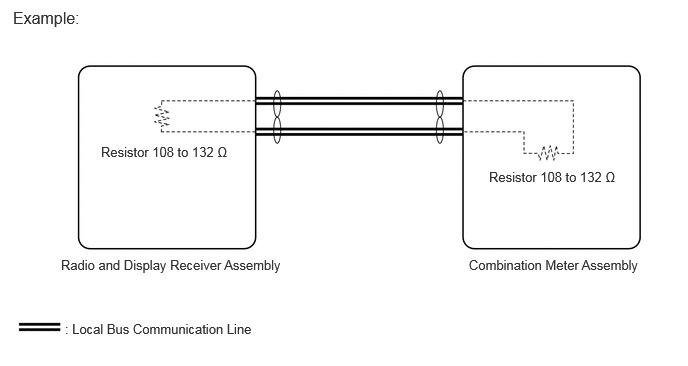
Components of the navigation system communicate with each other via the local bus.
The local bus uses a twisted pair of wires for its communication lines.
The master unit of the local bus is the radio and display receiver assembly.
- HINT:
- ·
The radio and display receiver assembly has the resistance (108 to 132 Ω) necessary for communication.
·The combination meter assembly has the resistance (108 to 132 Ω) necessary for communication.
·If a short or open occurs in the local bus circuit, communication is interrupted and the system will not operate normally.
AVC-LAN Outline (for 9 Speakers)
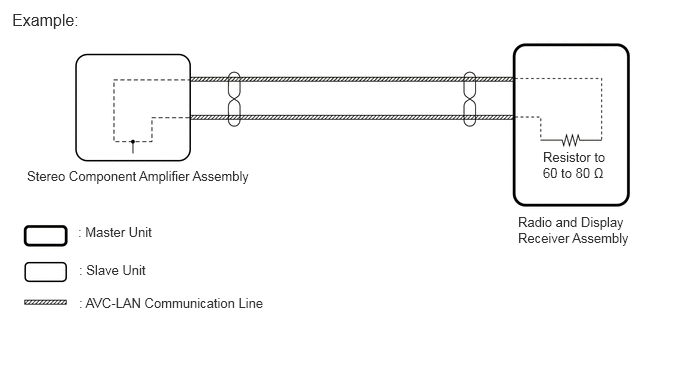
Components of the navigation system communicate with each other via AVC-LAN communication.
The AVC-LAN uses a twisted pair of wires for its communication lines.
The master unit of the AVC-LAN is the radio and display receiver assembly.
- HINT:
- ·
The radio and display receiver assembly has the resistance (60 to 80 Ω) necessary for communication.
·If a short or open occurs in the AVC-LAN circuit, communication is interrupted and the system will not operate normally.
CAN Communication Outline
The navigation system uses CAN communication between the radio and display receiver assembly and ECUs.