HEATING / AIR CONDITIONING HUMIDITY SENSOR REMOVAL
CAUTION / NOTICE / HINT
- HINT:
- ·
Use the same procedure as for the LHD and RHD vehicles.
·The procedure listed below is for the LHD vehicles.
PROCEDURE

 89437D
1.REMOVE SENSOR COVER (w/ Humidity Sensor)
- HINT:
-
Use the same procedure described as for the rain sensor cover.
-
Click hereVehicle Exterior>WIPER / WASHER>RAIN SENSOR>REMOVAL
88620E
2.REMOVE AIR CONDITIONING THERMISTOR ASSEMBLY (w/ Humidity Sensor)
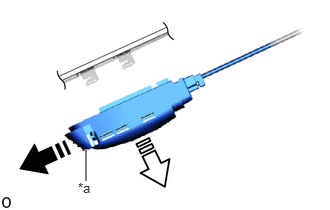
| *a | Stopper |

|
Remove in this Direction (1) |

|
Remove in this Direction (2) |
Pull the stopper in the direction (1) indicated by the arrow shown in the illustration to release the lock.
Pull the air conditioning thermistor assembly in the direction (2) indicated by the arrow shown in the illustration and remove it.
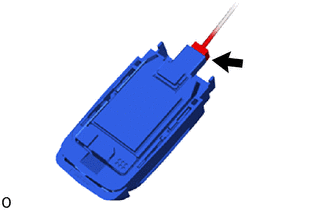
Disconnect the connector.
- NOTICE:
-
If the air conditioning thermistor assembly has been dropped, replace it with a new one.
89943
3.REMOVE RAIN SENSOR COVER (w/ Rain Sensor)
89941
4.REMOVE RAIN SENSOR (w/ Rain Sensor)