 |
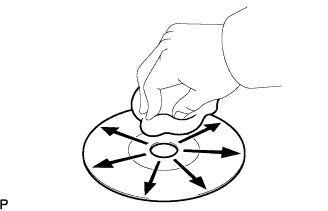
If the disc is dirty, clean the disc by wiping the CD's underside radially with a soft cloth.
- OK:
- Malfunction disappears.
- NOTICE:
- Do not use a conventional record cleaner or antistatic preservative.
NAVIGATION SYSTEM > CD Sound Skips |
| 1.CLEAN CD |
|
If the disc is dirty, clean the disc by wiping the CD's underside radially with a soft cloth.
|
| ||||
| OK | ||
 | ||
| ||
| 2.REPLACE CD WITH ANOTHER AND RECHECK |
Replace the CD with a normal one and check if the same problem occurs again.
|
| ||||
| OK | ||
| ||
| ||
| 3.CHECK WHEN PROBLEM OCCURS |
Check the location in which CD skipping occurs.
| Result | Proceed to |
| Driving surface is bumpy or rough | A |
| Driving surface is normal | B |
|
| ||||
| A | |
 |
| 4.CHECK NAVIGATION RECEIVER ASSEMBLY INSTALLATION |
Check the installation condition of the navigation receiver assembly.
|
| ||||
| OK | |
|
| 5.INSTALL NAVIGATION RECEIVER ASSEMBLY IN ANOTHER VEHICLE OF SAME MODEL AND COMPARE |
Remove the navigation receiver assembly and install it in another vehicle of the same model. Check if the CD sound skips.
|
| ||||
| OK | ||
| ||
| ||
| 6.DID TEMPERATURE IN CABIN CHANGE RAPIDLY? |
Check whether or not a rapid temperature change occurred in the cabin.
|
| ||||
| OK | ||
| ||
| ||

