Home › Brake › BRAKE (REAR) › REAR BRAKE

REAR BRAKE > INSPECTION

for Preparation Click here


1. CHECK PAD LINING THICKNESS


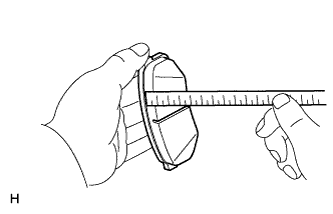
C155445
  1. Using a ruler, measure the pad lining thickness.

    Standard thickness:
    12.0 mm (0.472 in.)

    Minimum thickness:
    1.0 mm (0.0394 in.)

    If the pad lining thickness is less than the minimum, replace the pad.

    HINT:
    Be sure to check the wear on the rear disc after replacing the brake pad with a new one.


2. CHECK DISC THICKNESS
  1. Temporarily install the disc with 3 hub nuts.
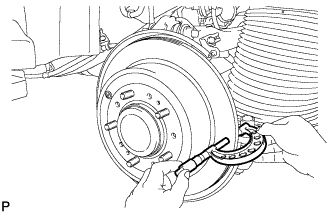


    C178156
  1. Using a micrometer, measure the disc thickness.

    Standard thickness:
    18.0 mm (0.709 in.)

    Minimum thickness:
    16.0 mm (0.630 in.)

    If the disc thickness is less than the minimum, replace the disc.

  1. Remove the disc and 3 hub nuts.


3. CHECK DISC RUNOUT


    C180570E01
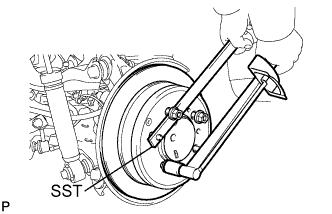
  1. Using SST to hold the disc, fix the disc in place with the 5 hub nuts.
    SST
    09330-00021  
    1. for Aluminum Wheel

    Torque:
    131 N*m{ 1336 kgf*cm , 97 ft.*lbf }

    1. for Steel Wheel

    Torque:
    209 N*m{ 2131 kgf*cm , 154 ft.*lbf }


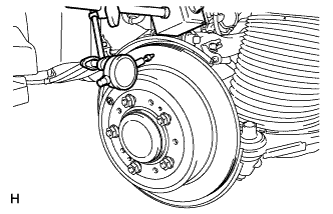
    C191836
  1. Using a dial indicator, measure the disc runout at a position 10 mm (0.394 in.) from the outer edge.

    Maximum disc runout:
    0.15 mm (0.0059 in.)

    If the disc's runout is more than the maximum value, check the rear axle hub bearing looseness and the axle hub runout . If the rear axle hub bearing looseness and axle hub runout are normal, adjust the disc runout or grind the disc on an on-vehicle brake lathe.

  1. Remove the 5 hub nuts and rear brake disc.


4. ADJUST DISC RUNOUT
  1. Remove the 2 bolts and rear disc brake cylinder mounting from the backing plate.

  1. Remove the hub nuts and disc. Rotate the disc 1/5 of a turn from its original position on the hub, and install the disc with the hub nuts.

    1. for Aluminum Wheel

    Torque:
    131 N*m{ 1336 kgf*cm , 97 ft.*lbf }

    1. for Steel Wheel

    Torque:
    209 N*m{ 2131 kgf*cm , 154 ft.*lbf }

  1. Remeasure the disc runout. Make a note of the runout and the disc's position on the hub.

  1. Repeat the 2 previous steps until the disc has been installed on the 3 remaining hub positions.
    If the minimum runout recorded above is less than 0.15 mm (0.0059 in.), install the disc in that position. If the minimum runout recorded above is more than 0.15 mm (0.0059 in.), replace the disc and repeat the "CHECK DISC RUNOUT" procedure.