 |
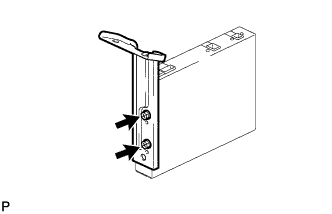
Install the multi-display controller bracket A with the 2 screws.
- Torque:
- 2.3 N*m{ 23 kgf*cm , 20 in.*lbf }
SATELLITE RADIO TUNER > INSTALLATION |
| 1. INSTALL MULTI-DISPLAY CONTROLLER BRACKET A |
|
Install the multi-display controller bracket A with the 2 screws.
| 2. INSTALL MULTI-DISPLAY CONTROLLER BRACKET A |
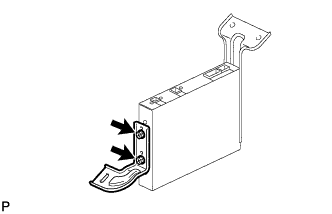 |
Install the multi-display controller bracket A with the 2 screws.
| 3. INSTALL STEREO COMPONENT TUNER ASSEMBLY |
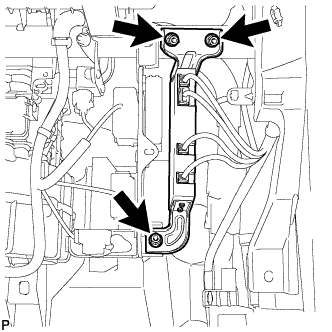 |
Install the stereo component tuner with the 3 nuts.
Connect the connectors.
| 4. INSTALL LOWER INSTRUMENT PANEL FINISH PANEL SUB-ASSEMBLY RH |
Connect the connector.
Attach the 3 claws to install the finish panel.
Install the 3 <D> screws and bolt <A>.
| 5. INSTALL LOWER INSTRUMENT PANEL |
Attach the 2 claws.
Install the panel with the bolt <A> and screw <D>.
| 6. INSTALL NO. 2 INSTRUMENT PANEL UNDER COVER SUB-ASSEMBLY |
Attach the 2 guides and 4 claws.
Attach the clip to install the under cover.