Home › RESTRAINTS › SUPPLEMENTAL RESTRAINT SYSTEM › REAR AIRBAG SENSOR

REAR AIRBAG SENSOR > INSTALLATION

for Preparation Click here


HINT:
  1. Use the same procedures for the RH side and LH side.
  2. The procedures listed below are for the LH side.


1. INSTALL REAR AIRBAG SENSOR LH
  1. Check that the ignition switch is off.

  1. Check that the battery negative (-) terminal is disconnected.

    CAUTION:
    After disconnecting the negative battery terminal, wait for at least 90 seconds before starting the operation.


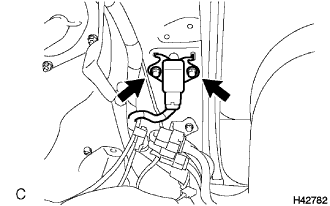
    H042782
  1. Install the rear airbag sensor LH with the 2 bolts.

    Torque:
    17.5 N*m{ 179 kgf*cm , 13 ft.*lbf }

    CAUTION:
    1. If the rear airbag sensor LH has been dropped, or there are any cracks, dents or other defects in the case, bracket or connector, replace it with a new one.
    2. When installing the rear airbag sensor LH, be careful that the SRS wiring does not interfere with other parts and that it is not pinched between other parts.
  1. Check that there is no looseness in the installation parts of the rear airbag sensor LH.

  1. Connect the connector to the rear airbag sensor LH.


2. INSTALL AIR DUCT ASSEMBLY


3. INSTALL FRONT QUARTER TRIM PANEL ASSEMBLY RH


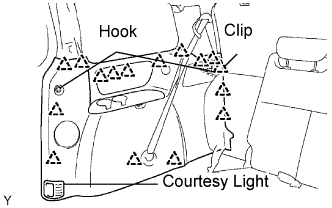
    B066503E01
  1. Engage the 16 clips to install the front quarter trim panel assembly.

  1. Connect the courtesy light connectors.

  1. Install the courtesy light.

  1. Install the 2 package holder net hooks.

  1. Install the No. 2 rear seat outer belt assembly on the floor anchor side with the bolt.

    Torque:
    42 N*m{ 430 kgf*cm , 31 ft.*lbf }

    NOTICE:
    Do not make the anchor part run onto the protrusion part of the floor panel.

  1. Install the floor anchor cover.

  1. Check the ELR lock.

    NOTICE:
    The check should be performed with the assembly installed.


4. INSTALL LAP BELT OUTER ANCHOR COVER


5. INSTALL BACK DOOR SCUFF PLATE

HINT:


6. INSTALL BACK DOOR WEATHERSTRIP

HINT:


7. INSTALL REAR DOOR WEATHERSTRIP RH

HINT:


8. INSTALL REAR DOOR SCUFF PLATE RH

HINT:


9. CONNECT CABLE TO NEGATIVE BATTERY TERMINAL


10. PERFORM INITIALIZATION
  1. Perform initialization.

    HINT:
    Some systems need initialization when disconnecting the cable from the negative battery terminal.


11. INSPECT SRS WARNING LIGHT
  1. Inspect the SRS warning light (Click here).