TELEMATICS TELEMATICS SYSTEM CONTROL SAFETY & SECURITY
FUNCTION
Emergency Call
When a vehicle collision or rollover is detected, or a serious accident causing airbag deployment occurs, the call center is contacted automatically to assist in calling emergency vehicles to the scene as soon as possible. The connection can also be initiated manually in the case of a sudden illness, etc.
When the system is first used, the following preconditions apply:
There is a valid Toyota Supra Connect contract.
Operational standby is ON.
The Emergency Call system is functioning properly.
The SIM card built into the vehicle is valid.
Calling is performed via the following methods: Calling Methods and Descriptions
| Method | Description |
|---|---|
| Automatic Call | Occurs when the airbag ECU assembly has output a collision detection signal, regardless of whether the occupants are conscious. |
| Manual Call | When a sudden illness or an accident not causing airbag deployment has occurred, pressing the emergency call switch located in the roof console box sub-assembly initiates a manual call. To press the emergency call switch, first open the switch cover of the emergency call switch panel, and then press the switch. |
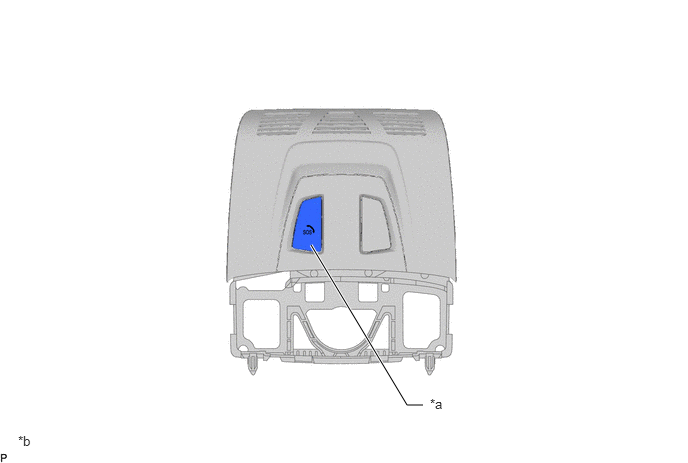
| *a | Roof Console Box Sub-assembly
·
Manual (SOS) Switch |
*b | The illustrations shown are examples only. |
The procedure to perform the call is as follows:
| Sequence | Procedure |
|---|---|
| 1 | Lightly press the cover cap to open it. |
| 2 | Press and hold the SOS button until the LED on the button illuminates in green. |
- HINT:
- ·
When Emergency Call has activated, the LED illuminates in green.
·When CANCEL is displayed in the multi-display assembly, it is possible to cancel the Emergency Call.
·If the situation allows, remain in the vehicle until the voice connection is established.
·When the Emergency Call telephone call connects, the LED blinks in green.
·Data useful in determining the type of emergency response necessary is forwarded to the emergency call center. For example, the current location of the vehicle is sent if it can be determined.
·If the SOS call center operator asks questions but there continues to be no response from the vehicle occupants, the emergency response is initiated automatically.
·Even when the voice from the emergency call center cannot be heard over the vehicle speakers, the emergency call center staff may still be able to hear the customer's voice.
·Only the emergency call center can end the Emergency Call voice connection.
| Sequence | Procedure |
|---|---|
| 1 | The system operates immediately after an accident of sufficient severity occurs, with judgment based on certain preconditions such as airbag activation. |
- HINT:
- ·
Pressing the SOS button will not interrupt the Automatic Emergency Call.
Remote Maintenance
Roadside Assistance
When a breakdown occurs, contacting the dedicated call center enables the vehicle information to be acquired and conveyed to the support vehicle, enabling information sharing. Also, the following preconditions apply for use:
There is a valid Toyota Supra Connect contract.
The vehicle is within the mobile network service area and has reception.
Operational standby is ON.
Remote Services
Remote operation of the vehicle is possible through a dedicated smartphone app. For example, the headlights can be turned on, the vehicle can be located in a dark parking lot at night, and in hot weather the air inside the vehicle can be ventilated before riding.
- HINT:
- ·
The vehicle is controlled via the Toyota Supra Connect app or user site, which can be installed from the Apple App Store for iOS.
·To make the Remote Services usable, they must first be set to enabled via the user site or the Toyota Supra Connect app.
·Some functions can also be used via the user site.
·A Toyota Supra Connect contract is necessary.
·Some functions can be requested via the concierge services.
Remote Services has the following functions:
Lock
All doors and the trunk lid are locked at once.
Unlock
The driver side door is unlocked.
Headlight Illumination
The headlights can be illuminated twice.
Parking Ventilation Control
The parking ventilation can be activated. Also, the ventilation can be started immediately, or set to activate at a specified departure time.
Vehicle Location Check
The current location of the vehicle can be checked using the smartphone app (for iPhone).
Send Destination to Vehicle
Information searched using a computer or smartphone app can be sent to the vehicle. Navigation destinations can be set from the information that was sent.