NAVIGATION / MULTI INFO DISPLAY NAVIGATION RECEIVER INSTALLATION
CAUTION / NOTICE / HINT
- HINT:
- ·
Use the same procedure for LHD and RHD vehicles.
·The procedure listed below is for the LHD vehicles.
PROCEDURE

 1.INSTALL RADIO RECEIVER ASSEMBLY
- NOTICE:
- ·
Damage to the head unit.
The hard disk of the head unit can be damaged by vibration.
-Carry out mechanical work on the head unit and adjacent components with care.
- ·
Sensitive optical fibers.
Damaged optical fibers can result in operating failure of the LED.
-Do not bend optical fibers too much and do not kink, as well. The minimum permissible bending radius is 25 mm.
-Avoid pressure and tensile loads and heat influences on the optical fiber.
Install the plug.
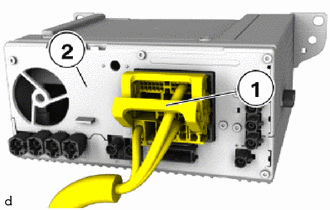
Position the radio receiver assembly (2).
Connect connector and lock (1).
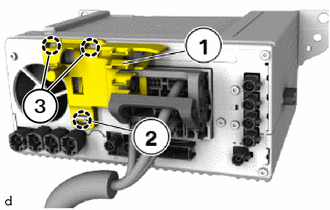
Attach the guides (3) and clip (2) to install the cable clip (1).
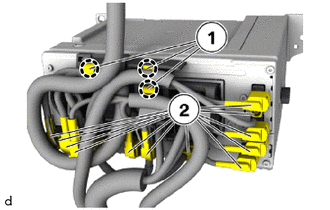
Connect connectors (2) and lock.
Attach the wiring harnesses in the holders (1).
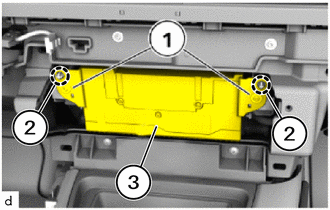
Attach the guides (2) to install the radio receiver assembly (3).
Tighten the T20 screws (1).
- Torque:
- 2.3 N*m (23 kgf*cm, 20 in.*lbf)
55011A
2.INSTALL NO. 1 INSTRUMENT PANEL GARNISH SUB-ASSEMBLY