INTRODUCTION REPAIR INSTRUCTION CONDITION BASED SERVICE (CBS)
Condition Based Service (CBS)
Condition Based Service (CBS) informs the customer about necessary inspections and maintenance in order to support safe driving and safe operation of the vehicle.
The sensors and special programs built into the vehicle analyze the vehicle usage conditions, and based on this the CBS calculates appropriate maintenance timing. This enables the system to display information about maintenance timing appropriate for the vehicle usage conditions on the combination meter and multi-display.
After CBS-related maintenance has been performed, it is necessary to perform CBS reset. Depending on the type of maintenance, this is performed via the combination meter, multi-display or diagnostic system.
The CBS-related maintenance items are as follows:
Engine oil
Front brake pad
Rear brake pad
Brake fluid
Vehicle check
Emission inspection
Vehicle inspection
Maintenance Timing Display
When the engine is started, the information area of the combination meter briefly displays the next inspection timing and remaining driving distance.
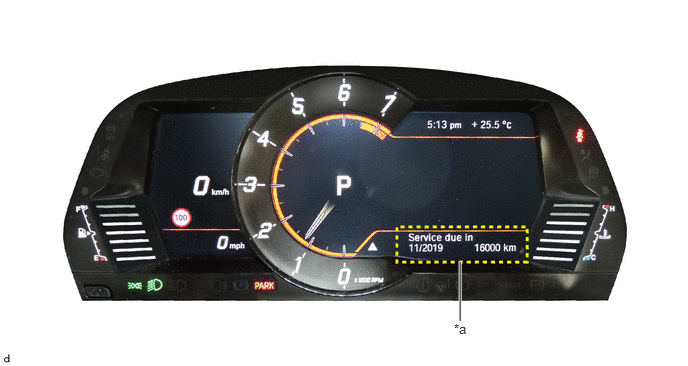
| *a | Information Area | - | - |
Detailed information about maintenance can be displayed in the multi-display.
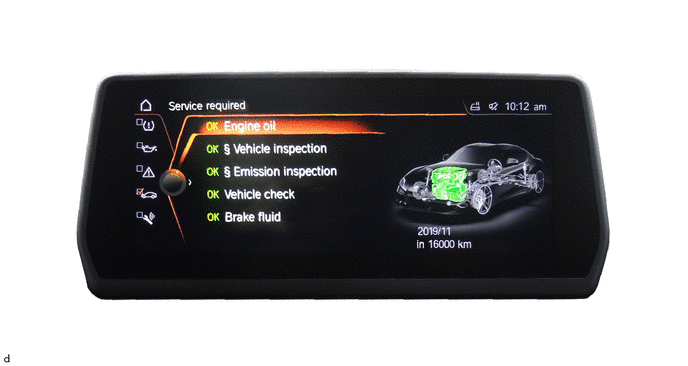
To display the information, enter the following menus in Toyota Supra Command:
"My vehicle"
"Vehicle status"
"Service required"
Select the maintenance item:
"Engine oil"
"Front brake pad"*1
"Rear brake pad"*1
"Brake fluid"
"Vehicle check"
"Emission inspection"*2
"Vehicle inspection"*2
*1: The maintenance item will be displayed once the brake pad wear sensor begins to experience wear.
*2: This item may not be displayed by country or region.
Confirm the selected item to display the detailed information.
CBS Reset
Reset and Date Setting Tool Support Table
| Item | Combination Meter | Multi-display | Diagnosis System |
|---|---|---|---|
|
*1: The maintenance item will be displayed once the brake pad wear sensor begins to experience wear. |
|||
| Engine oil (Diagnosis system display: Motor oil) | Reset | - | Reset |
| Front brake pad (Diagnosis system display: Front brake) | Reset*1 | - | Reset |
| Rear brake pad (Diagnosis system display: Rear brake) | Reset*1 | - | Reset |
| Brake fluid | Reset | - | Reset |
| Vehicle check | Reset | - | Reset |
| Emission inspection | - | Date setting | Date setting |
| Vehicle inspection | - | Date setting | Date setting |
- HINT:
-
If procedures have been performed before the maintenance timing and reset cannot be performed via the combination meter, it can still be performed using diagnosis system.
Reset Using the Combination Meter
Press the START-STOP button (engine switch) 3 times within 0.8 seconds to enter Diagnostic (PAD) Mode.
Press and hold the trip distance recorder reset button on the combination meter for 5 to 10 seconds.
- HINT:
-
Continue pressing until maintenance item display appears on the combination meter.
Briefly press the trip distance recorder reset button to change the maintenance item.
- HINT:
-
Reset can only be performed when the combination meter displays "Reset possible".
Press and hold the trip distance recorder reset button to confirm the maintenance item.
- HINT:
-
When the maintenance item is confirmed, the display changes to "Perform reset?".
Press and hold the trip distance recorder reset button to reset the maintenance item.
- HINT:
-
When the reset is completed, the display changes to "Reset successful".
Date Setting Using the Multi-display
In Toyota Supra Command, enter the following menus:
"My vehicle"
"Vehicle status"
"Service required"
"Emission inspection" or "Vehicle inspection"
Set the date.
Reset and Date Setting Using the Diagnosis System
Connect the diagnosis system to the vehicle and enter the following menus:
"Vehicle management"
"Service functions"
"Maintenance and pre-delivery check"
"Reset CBS Condition Based Service"
"ABL / CBS reset UDS"
Select the maintenance item:
"Motor oil" (Vehicle display: Engine oil)
"Front brake" (Vehicle display: Front brake pad)
"Rear brake" (Vehicle display: Rear brake pad)
"Brake fluid"
"Vehicle check"
"Emission inspection"
"Vehicle inspection"
Follow the instructions on the screen to complete the rest of the procedure.
- HINT:
-
For "Emission inspection" and "Vehicle inspection," selecting "Activate" will move to the date setting.
When engine oil change and vehicle check were performed at the same time
When engine oil change and vehicle check were performed at the same time, reset must be performed according to the following procedure:
Change the engine oil.
Perform engine oil change reset.
Perform the vehicle check.
Perform the vehicle check reset.
Correcting CBS Vehicle Data
If CBS reset has been performed in error, it is possible to correct the CBS vehicle data using the diagnosis system.
The procedure to correct CBS vehicle data is as follows:
Connect the diagnosis system to the vehicle and enter the following menus:
"Vehicle management"
"Service functions"
"Maintenance and pre-delivery check"
"CBS correction, vehicle data "
"ABL / CBS vehicle data correction"
Select the maintenance item:
"Motor oil" (Vehicle display: Engine oil)
"Front brake" (Vehicle display: Front brake pad)
"Rear brake" (Vehicle display: Rear brake pad)
"Brake fluid"
"Vehicle check"
"Emission inspection"
"Vehicle inspection"
Follow the instructions on the screen to complete the rest of the procedure.
Changing Maintenance Items
Using the diagnosis system, the vehicle's "Emission inspection" and "Vehicle inspection" can be changed between displayed or not displayed.
The procedure to change maintenance items is as follows:
Connect the diagnosis system to the vehicle and enter the following menus:
"Vehicle management"
"Service functions"
"Maintenance and pre-delivery check"
"CBS correction, vehicle data "
"ABL / CBS vehicle data correction"
"Emission inspection" or "Vehicle inspection"
Follow the instructions on the screen to complete the rest of the procedure.
Resetting Annual Mileage
- HINT:
-
In the case of a vehicle which has not been driven for a long time, the learning value for annual driving distance will be set too low and must be reset.
Using the diagnosis system, the annual driving distance applied for CBS can be reset.
After reset, the mileage accumulated over a period of 6 to 8 weeks is used to estimate a new value for annual mileage, which is then applied to CBS calculations.
The initial default value is 30000 km (20000 mile) per year, and the varying mileage values are then learned over the period of time described above.
The procedure to reset the annual mileage is as follows:
Connect the diagnosis system to the vehicle and enter the following menus:
"Vehicle management"
"Service functions"
"Maintenance and pre-delivery check"
"CBS correction, vehicle data "
"ABL / CBS vehicle data correction"
"Resetting the annual mileage"
Follow the instructions on the screen to complete the rest of the procedure.