AUDIO AND VISUAL SYSTEM > CD Sound Skips |
| 1.CLEAN CD |
|
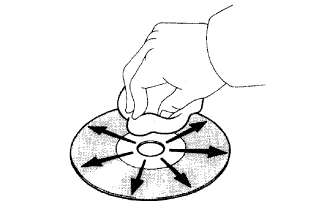
Clean the disc.
If the disc gets dirty, clean the disc by wiping the surface from the center to the outside, in a radial direction, with a soft cloth as shown in the illustration.
|
| ||||
| OK | |
 |
| 2.OPERATION USING ANOTHER CD |
Replace the CD with another and recheck.
Replace the CD with another normal one to see whether the same trouble occurs again.
|
| ||||
| OK | |
|
| 3.CHECK RADIO RECEIVER INSTALLATION |
Check the radio receiver assembly installation condition.
Check that the radio receiver assembly is installed properly.
|
| ||||
| OK | |
|
| 4.CHECK WHETHER RAPID TEMPERATURE CHANGE OCCURRED IN CABIN |
Check whether or not a rapid temperature change occurred in the cabin.
|
| ||||
| OK | ||
 | ||
| ||
