SFI SYSTEM > DTC CHECK / CLEAR |
| CHECK DTC (Using a intelligent tester) |
|
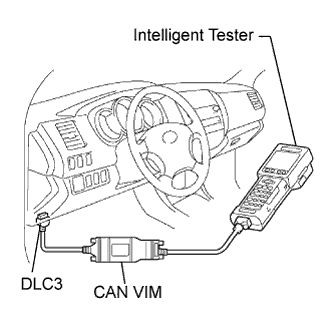
Connect a intelligent tester to the DLC3.
Turn the ignition switch to ON.
Turn the tester ON.
Select the following menu items: DIAGNOSIS / ENHANCED OBD II / DTC INFO / CURRENT CODES or PENDING CODES.
Check DTCs and freeze frame data, and then write them down.
Proceed to Diagnosis Trouble Code Chart to check the details of the DTCs (Click here).
| CLEAR DTC (Using the intelligent tester) |
Connect the intelligent tester to the DLC3.
Turn the ignition switch to ON.
Turn the tester ON.
Select the following menu items: DIAGNOSIS / ENHANCED OBD II / DTC INFO / CLEAR CODES.
Press the YES button.
| CLEAR DTC (Without using the intelligent tester) |
Perform either one of the following operations.
Disconnect the negative battery cable for more than 1 minute.
Remove the EFI and ETCS fuses from the Relay Block (R/B) located inside the engine compartment for more than 1 minute.