SFI SYSTEM > DTC CHECK / CLEAR |
| CHECK DTC (Using an intelligent tester) |
|
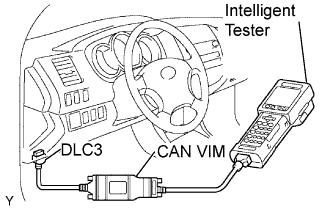
Connect an intelligent tester to the DLC3.
Turn the ignition switch ON.
Turn the tester ON.
Select the following menu items: DIAGNOSIS / ENHANCED OBD II / DTC INFO / CURRENT CODES.
Check the DTC(s) and freeze frame data, and then write them down.
Check the details of the DTC(s) (Click here).
| CLEAR DTC (Using an intelligent tester) |
Connect an intelligent tester to the DLC3.
Turn the ignition switch ON.
Turn the tester ON.
Select the following menu items: DIAGNOSIS / ENHANCED OBD II / DTC INFO / CLEAR CODES.
Press the YES button.
| CLEAR DTC (Without using an intelligent tester) |
Perform either one of the following operations.
Disconnect the negative battery cable for more than 1 minute.
Remove the EFI and ETCS fuses from the Relay Block (R/B) located inside the engine compartment for more than 1 minute.