AUTOMATIC TRANSMISSION SYSTEM > DTC CHECK / CLEAR |
| CHECK DTC |
|
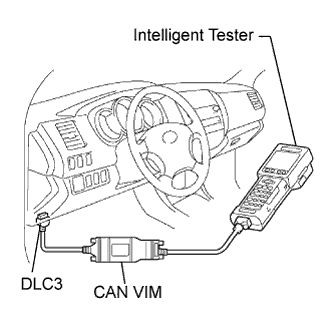
Connect the intelligent tester to the Controller Area Network Vehicle Interface Module (CAN VIM). Then connect the CAN VIM to the Data Link Connector 3 (DLC3).
Turn the ignition switch to the ON position.
Enter the following menus: DIAGNOSIS/ ENHANCED OBD II/ DTC INFO/ CURRENT CODES (or PENDING CODE).
Confirm the DTCs and freeze frame data and then write them down.
Click here to confirm the details of the DTCs.
| CLEAR DTC |
Connect the intelligent tester to the CAN VIM. Then connect the CAN VIM to the DLC3.
Turn the ignition switch to the ON position.
Enter the following menus: DIAGNOSIS/ ENHANCED OBD II/ DTC INFO/ CLEAR CODES and press YES.