Set the tire pressures of all the wheels, including the spare tire, to the appropriate specified values.
| Tire Size | Front Wheel kPa (kgf/cm2, psi) | Rear Wheel kPa (kgf/cm2, psi) | Spare Wheel kPa (kgf/cm2, psi) |
| P215/70 R15 | 200 (2.0, 29) | 220 (2.2, 32) | 220 (2.2, 32) |
| P255/45 R18 | 240 (2.4, 34) | 240 (2.4, 34) | 240 (2.4, 34) |
| P245/75 R16 | 200 (2.0, 29) | 200 (2.0, 29) | 200 (2.0, 29) |
| P265/70 R16 (ORP)* | 200 (2.0, 29) | 220 (2.2, 32) | 220 (2.2, 32) |
| P265/65 R17 | 200 (2.0, 29) | 200 (2.0, 29) | 200 (2.0, 29) |
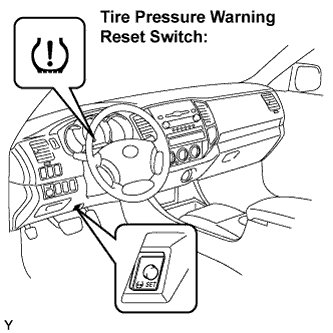 |
Press the tire pressure warning reset switch for 3 seconds or more with the ignition switch in the ON position.
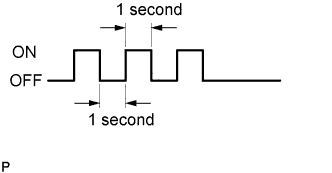 |
Check that the tire pressure warning light blinks 3 times at 1 second intervals.
- HINT:
- The initialization is complete when the tire pressure warning ECU has received signals from all of the wheels.
 |
Wait for 2 or 3 minutes with the ignition switch ON.
- NOTICE:
- The initialization is normally completed within 2 to 3 minutes.
- If the initialization has not been completed successfully, DTC C2177/77 is set approximately 20 minutes after driving starts.
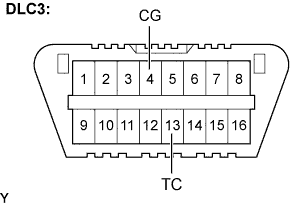
- The initialization can be terminated by making a short circuit between terminals TC and CG of the DLC3 connector.
Confirm that the initialization has been completed using the intelligent tester.
Change the mode to test mode using intelligent tester and check that test DTCs have been stored.
- The test DTCs will not be indicated until the system initialization is complete.
- After the initialization has been completed successfully, the test DTCs (C2181/81 to C2191/91) are indicated.
- NOTICE:
- The following operations can be used instead of above procedure:
- Turn the ignition switch from OFF to ON.
- Monitor the tire pressure values of all the wheels using intelligent tester.
- If the tire pressure values cannot be displayed on the intelligent tester screen, the initialization has failed.
- It takes 2 to 3 minutes to display the tire pressure data.
- HINT:
- In winter, as the tire pressure may decrease depending on the ambient temperature, increase the tire pressure by 20 kPa (0.2 kgf/cm2, 2.9 psi) to 30 kPa (0.3 kgf/cm2, 4.3 psi) above the specified value after confirmation that the initialization has been completed.
- The test DTCs will not be indicated until the system initialization is complete.