AUDIO AND VISUAL SYSTEM > SYSTEM DESCRIPTION |
| DISC PLAYER OUTLINE |
A CD player uses a laser pickup to read digital signals recorded on CDs. By converting the digital signals to analog, it can play music and audio.
Usable discs
The CD player can only play audio CDs, CD-Rs (CD-Recordable) and CD-RWs (CD-ReWritable) that have any of the following marks:
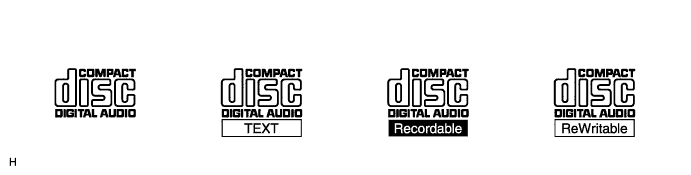
Precautions for use of discs
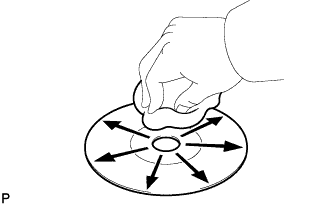
Cleaning
![]() |
If dirt is on the disc surface, wipe it clean with a soft dry cloth such as an eyeglass cleaner for plastic lenses from the inside to the outside in a radial direction.
| MP3/WMA OUTLINE |
Playable MP3 file standards
| Compatible standard | MP3 (MPEG1 LAYER3, MPEG2 LSF LAYER3) |
| Compatible sampling frequency |
|
| Compatible bit rate |
|
| Compatible channel mode | Stereo, joint stereo, dual channel, monaural |
Playable WMA file standards
| Compatible standard | WMA Ver. 7, 8, 9 |
| Compatible sampling frequency | 32, 44.1, 48 (kHz) |
| Compatible bit rate (Only compatible with 2-channel playback) |
|
ID3 tag and WMA tag
Additional text information called an ID3 tag can be input to MP3 files. Information such as song titles and artist names can be stored.
Additional text information called a WMA tag can be input to WMA files. Information such as song titles and artist names can be stored.
Usable media
Only CD-ROMs, CD-Rs (CD-Recordable) and CD-RWs (CD-ReWritable) can be used to play MP3/WMA files.
Usable media format
Usable media format
| Disc format | CD-ROM Mode 1, CD-ROM XA Mode 2 Form1 |
| File format | ISO9660 Level 1 and Level 2 (Joliet, Romeo) |
Standards and restrictions
| Maximum directory levels | 8 levels |
| Maximum number of characters for a folder name/file name | 32 characters |
| Maximum number of folders | 192 (Including empty folders, the root folder, and folders that do not contain MP3/WMA files) |
| Maximum number of files in a disc | 255 (Including non-MP3/WMA files) |
File names
Only files with an extension of ".mp3" or ".wma" can be recognized and played as MP3 or WMA files.
Save MP3 or WMA files with an extension of ".mp3" or ".wma".
| AVC-LAN DESCRIPTION |
What is AVC-LAN?

Purpose
Recently, car audio systems have rapidly developed and the functions have vastly changed. The conventional car audio system is being integrated with multi-media interfaces similar to those in navigation systems. At the same time, customers are demanding higher quality from their audio systems. This is merely an overview of the standardization background. The specific purposes are as follows:
To solve sound or compatibility issues caused by using components of different manufacturers through signal standardization.
To allow each manufacturer to concentrate on developing the products they do best. From this, reasonably priced products can be produced.
| COMMUNICATION SYSTEM OUTLINE |
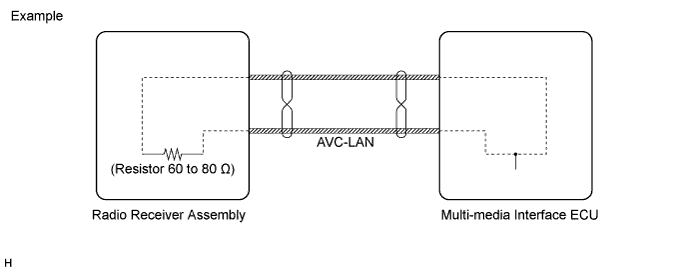
Components of the audio system communicate with each other via the AVC-LAN.
The master component of the AVC-LAN is a radio receiver assembly with a 60 to 80 Ω resistor. This is essential for communication.
If a short circuit or open circuit occurs in the AVC-LAN circuit, communication is interrupted and the audio system will stop functioning.
| DIAGNOSTIC FUNCTION OUTLINE |
The audio system has a diagnostic function (the result is indicated on the master unit).
A 3-digit hexadecimal component code (physical address) is allocated to each component on the AVC-LAN. Using this code, the component in the diagnostic function can be displayed.
| "Bluetooth" OUTLINE |
"Bluetooth" is a trademark owned by Bluetooth SIG. Inc.
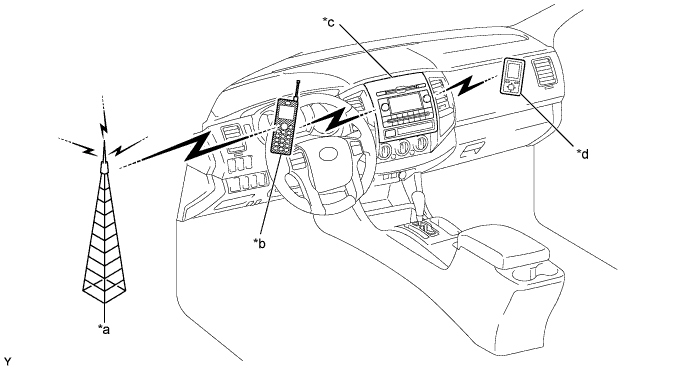
"Bluetooth" is a wireless connection technology that uses the 2.4 GHz frequency band.

| *a | Cellular Tower | *b | Cellular Phone ("Bluetooth" compatible type) |
| *c | Radio Receiver Assembly (Built-in "Bluetooth" receiver antenna) | *d | Portable Audio Player ("Bluetooth" compatible type) |
Hands-free function
The "Bluetooth" built-in radio receiver assembly and a "Bluetooth" compatible cellular phone*1 can be connected using a "Bluetooth" wireless connection. This enables the use of the hands-free function on the cellular phone even if the phone is in a pocket or bag. For this reason, it is not necessary to use a connector or cable to connect the cellular phone.
*1: Some versions of "Bluetooth" compatible cellular phones may not function.
"Bluetooth" audio function
The "Bluetooth" built-in radio receiver assembly and a "Bluetooth" compatible portable audio player*2 can be connected using a "Bluetooth" wireless connection. This enables files stored in the portable audio player to be heard from the vehicle speakers. In addition, operations such as play/stop can be performed directly from the radio receiver assembly.
*2: Some versions of "Bluetooth" compatible audio players may not be able to operate the "Bluetooth" function, or music may play, but functions available using the radio receiver assembly may be limited.
Compatible "Bluetooth" audio devices
| "Bluetooth" specifications | Ver. 1.1 or higher (Ver. 2.0+EDR or higher recommended) |
| Following profiles |
|
| Maximum number of audio devices that can be registered | 2 |
| RADIO DESCRIPTION |
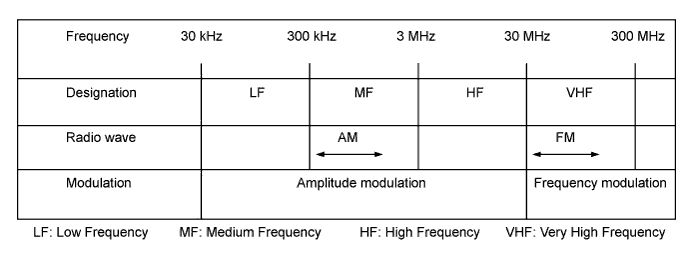
Radio frequency band
Radio broadcasts use the radio frequency bands shown in the table below.

Service area
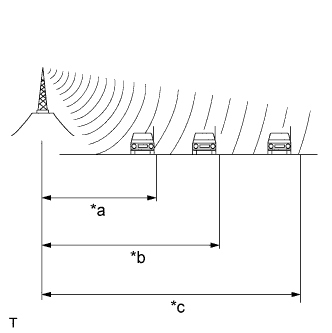
![]() |
The service areas of AM and FM broadcasts are vastly different. Sometimes an AM broadcast can be received very clearly but an FM stereo broadcast cannot. FM stereo has the smallest service area, and is prone to pick up static and other types of interference such as noise.
| *a | FM (Stereo) |
| *b | FM (Monaural) |
| *c | AM |
Radio reception problems
![]() |
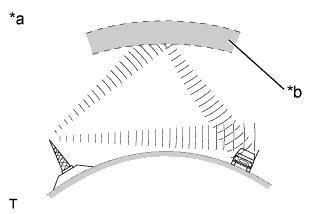
Phasing
AM broadcasts are susceptible to electrical interference and another kind of interference called phasing. Occurring only at night, phasing is the interference created when a vehicle receives 2 radio wave signals from the same transmitter. One signal is reflected off the ionosphere and the other signal is received directly from the transmitter.
| *a | Phasing |
| *b | Ionosphere |
![]() |
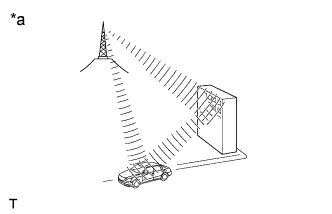
Multipath
Multipath is a type of interference created when a vehicle receives 2 radio wave signals from the same transmitter. One signal is reflected off buildings or mountains and the other signal is received directly from the transmitter.
| *a | Multipath |
![]() |
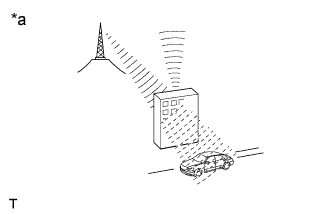
Fade out
Fade out is caused by objects (buildings, mountains and other such large obstacles) that deflect away part of a signal, resulting in a weaker signal when the object is between the transmitter and vehicle. High frequency radio waves, such as FM broadcasts, are easily deflected by obstructions. Low frequency radio waves, such as AM broadcasts, are less likely to deflect.
| *a | Fade Out |
Noise problem
Technicians must have a clear understanding about each customer's noise complaint. Use the following table to diagnose noise problems.
| Radio Frequency | Noise Occurrence Condition | Presumable Cause |
| AM | Noise occurs in a specific area | Foreign noise |
| AM | Noise occurs when listening to an intermittent broadcast | An identical program transmitted from multiple towers can cause noise where the signals overlap |
| AM | Noise occurs only at night | Signal phasing |
| FM | Noise occurs while driving in a specified area | Multipath resulting from a change in FM frequency |
| USB AUDIO SYSTEM FUNCTION OUTLINE |
The No. 1 stereo jack adapter assembly is equipped with a USB terminal. Connecting a USB device or "iPod" to the No. 1 stereo jack adapter assembly allows music files to be played. Not only is it possible to play music from a USB device with audio functions, is also possible to play MP3 or WMA music files that are stored on a USB device. In addition, "iPod" control software is installed, allowing file selection from playlists and operation using shuffle mode.
USB audio system compatible model
USB Device
The following device formats can be used:
| Compatible USB device formats |
|
"iPod"
"iPod" is a trademark of Apple Inc., registered in the U.S. and other countries.
| Supported "iPod" Model | Supported Firmware Version |
| "iPod" 5th generation | Ver. 1.2.0 or higher |
| "iPod nano" 1st generation | Ver. 1.3.0 or higher |
| "iPod nano" 2nd generation | Ver. 1.1.2 or higher |
| "iPod nano" 3rd generation | Ver. 1.0.0 or higher |
| "iPod classic" 1st generation | Ver. 1.0.0 or higher |
| "iPod touch" 1st generation | Ver. 1.1.0 or higher |
| Unsupported Models | "iPod shuffle" |
| "iPhone" | |
| "iPod" 4th generation and earlier models | |
| "iPod mini" | |
| "iPod photo" |
| ASL (Automatic Sound Levelizer) FUNCTION OUTLINE |
The Automatic Sound Levelizer (ASL) function automatically adjusts the audio system volume level in order to compensate for increased vehicle noise (vehicle noise tends to increase as vehicle speed increases). The ASL adjusts the volume level based upon vehicle speed signals that it receives from the combination meter assembly.
| SDARS SYSTEM FUNCTION OUTLINE (BROADCAST IN NORTH AMERICA ONLY) |
Satellite Digital Audio Radio Service (SDARS) is a satellite digital radio broadcast provided by Sirius XM Radio Inc. The broadcast (pay-type) is performed through satellites and terrestrial repeater networks. Several unique channels are available, and even if a vehicle changes locations, the same information can be received without breaks. Information such as song names, broadcast station names, etc. can be received.