ENGINE IMMOBILISER SYSTEM > REGISTRATION |
| 1. DESCRIPTION OF CODE REGISTRATION |
When adding master keys and sub-keys (additional registration).
Register the key code (immobiliser code) in the transponder key ECU assembly.
| Target ECU | See step |
| Transponder key ECU assembly | Procedure "A" |
When replacing the transponder key ECU assembly (new registration):
Register the key code (immobiliser code) in the transponder key ECU assembly.
| Target ECU | See step |
| Transponder key ECU assembly | Procedure "B" |
Register the ECU COMMUNICATION ID between the ECM and the transponder key ECU assembly.
| Target ECU | See step |
| ECM | Procedure "C" |
When replacing the ECM:
Register the ECU COMMUNICATION ID between the ECM and the transponder key ECU assembly.
| Target ECU | See step |
| Transponder key ECU assembly | Procedure "C" |
Erasure of key code:
Erasure the key code.
| Target ECU | See step |
| Transponder key ECU assembly | Procedure "D" |
| 2. KEY REGISTRATION IN AUTOMATIC REGISTRATION (PROCEDURE "B") |
When an ignition key is inserted into the ignition cylinder, the key code (immobiliser code) registration is automatic. In this mode, a maximum of 2 key codes for 2 master keys can be registered. Any order of registration for the master keys and sub-keys is fine because the transponder key ECU assembly can distinguish the types of keys.
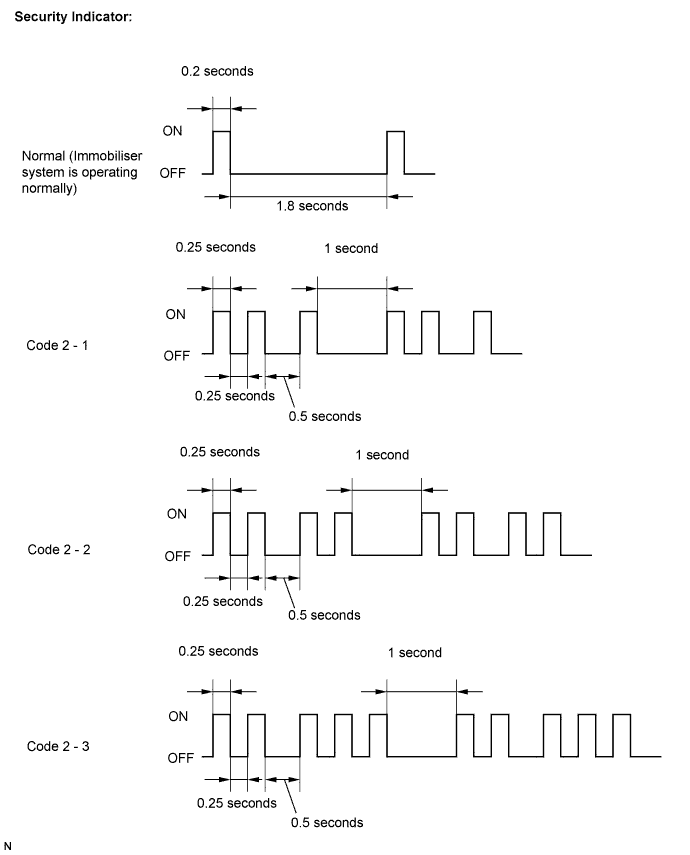
| Procedure | Security Indicator Condition |
| 1. Start (Procedure "E") | Blinking occurs until the first key is inserted. |
| 2. Insert the key into the ignition key cylinder. | ON |
3. Registration begins.
| OFF
|
| 4. Remove the key. | ON
|
| 5. Register another key? Yes: Go to procedure "E". No: Go to procedure "F". | |
| 6. End (Procedure "F") | |

Finish the automatic key code registration mode. The automatic key code registration mode can be forced to end when at least 1 key code for the master key has been registered.

Turn the ignition switch ON and OFF 5 times within 10 seconds using the already registered master key.
| 3. PERFORM REGISTRATION OF ADDITIONAL KEY (PROCEDURE "A") |
Register an additional key by using the Techstream.
| Procedure | Time (Completion of operation) | Security indicator Condition |
| 1. Start | - | The indicator will blink until the first key is inserted. |
| 2. Insert the already registered master key in the ignition key cylinder and turn the ignition switch on. | ||
| 3. Techstream operation: (1) Select Body Electrical. (2) Select Immobiliser. (3) Select ID Utility. (4) Select Transponder Code Registration.
| Within 120 seconds | OFF |
| 4. Remove the master key. | Within 20 seconds of the instruction on the tester. | ON |
| 5. Insert the key to be registered in the ignition key cylinder. | Within 10 seconds | |
6. After 60 sec. the key is registered.
| - | Blinking |
| 7. Next | OFF | |
| 8. End | ||
| 4. ERASURE OF KEY CODE (PROCEDURE "D") |
Erase key codes using the Techstream.
| Procedure | Time (Completion of operation) | Security Indicator Condition |
| 1. Start | - | The indicator will blink until the first key is inserted. |
| 2. Insert the already registered master key in the ignition key cylinder and turn the ignition switch on. | ||
| 3. Techstream operation: (1) Select Body Electrical. (2) Select Immobiliser. (3) Select ID Utility. (4) Select Transponder Code Erasure.
| Within 120 seconds | OFF |
| 4. Remove the master key. | Within 10 seconds of the instruction on the tester. | ON for 1 sec. then OFF |
| 5. Next | - | Blinking |
| 6. End | ||
| 5. REGISTRATION OF ECU COMMUNICATION ID (PROCEDURE "C") |
Register the ECU communication ID

Before operation, make sure that no key is in the ignition key cylinder.
Using SST, connect terminals TC and CG of the DLC3. SST 09843-18040
Insert a key, of which the key code has already been registered, into the ignition key cylinder.
Turn the ignition switch ON (do not start the engine) and leave it as is for 30 minutes.
Turn the ignition switch OFF and disconnect terminals TC and CG.
Check that the engine starts.