Home › RESTRAINTS › SUPPLEMENTAL RESTRAINT SYSTEM › OCCUPANT CLASSIFICATION SYSTEM (for Bench Seat Type)

OCCUPANT CLASSIFICATION SYSTEM (for Bench Seat Type) > INITIALIZATION

for Preparation Click here


NOTICE:
Make sure that the front passenger seat is not occupied before performing the operation.

HINT:
Perform the zero point calibration if any of the following conditions apply.
  1. The occupant classification ECU is replaced.
  2. Accessories (seatback tray and seat cover, etc.) are installed.
  3. The front passenger seat is removed from the vehicle.
  4. The passenger airbag ON/OFF indicator indicates OFF when the front passenger seat is not occupied.
  5. The vehicle is brought to the workshop for repair due to an accident or a collision.


ZERO POINT CALIBRATION
  1. Zero point calibration procedures

    1. Check that all of the following conditions are met:

      1. The vehicle is parked on a flat surface.
      2. No objects are placed on the front passenger seat.
      3. The front passenger seat belt buckle switch is OFF.

    2. Adjust the seat position according to the table below.
      Adjustment Item
      Position
      Slide Direction
      Rearmost position
      Reclining Angle
      Upright position
      Headrest Height
      Lowest position
      Lifter Height
      Lowest position

    3. Connect the Techstream to the DLC3.

    4. Turn the ignition switch to the ON position.

    5. Perform the zero point calibration by following the prompts on the Techstream screen.

      HINT:
      1. Refer to the Techstream operator's manual for further details.
      2. If the zero point calibration is performed when the calibration conditions are not satisfied, DTC B1797 is output.
      3. If the zero point calibration has failed, DTC B1797 is output.


      HINT:
      *1: If After Exchange is selected before the previous ECU data are stored in the Techstream, the display screen returns to "Zero Point Calibration is complete.": Occupant Detect.

      Item
      Procedure
      DTC
      Perform DTC check and repair
      Write error
      Replace front seat cushion assembly (with occupant classification ECU and occupant classification sensor)
      Temperature
      Check value of THERMISTOR TEMP in ECU DATA LIST
      Pressure
      Check value of FILTERED PRESS in ECU DATA LIST
      Crash counter
      -


SENSITIVITY CHECK


  1. Sensitivity check procedures

    1. Turn the ignition switch to the LOCK position.


    2. H101938
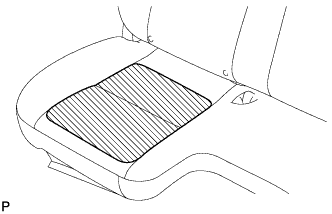
    3. Place a weight of 20 kg (44.0 lb) on the front passenger seat.

      NOTICE:
      1. Do not let the weight come into contact with the seat back when placing it on the seat cushion.
      2. Place the weight in the area shown in the illustration.

    4. Turn the ignition switch to the ON position, and wait for at least 6 seconds.

    5. Check that the passenger airbag ON/OFF indicator indicates OFF.

      OK:
      The passenger airbag ON/OFF indicator indicates OFF.

    6. Add a weight of 30 kg (66.1 lb) to the front passenger seat (total 50 kg (110.2 lb)).

      NOTICE:
      1. Do not let the weight come into contact with the seat back when placing it on the seat cushion.
      2. Place the weight in the area shown in the illustration.

    7. Check that the passenger airbag ON/OFF indicator indicates ON.
      OK:
      The passenger airbag ON/OFF indicator indicates ON.