Turn the ignition switch to ON.
Press and hold the tire pressure warning reset switch for 3 seconds or more so that the tire pressure warning light blinks 3 times.
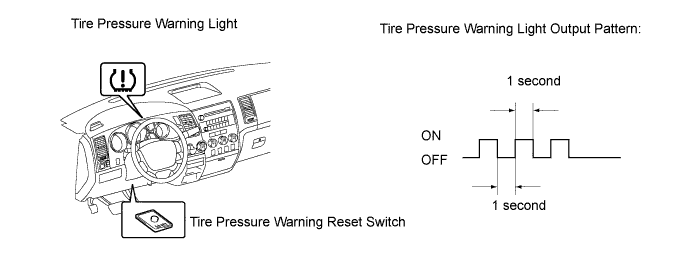
Turn the ignition switch off.
Connect the Techstream to the DLC3.
Turn the ignition switch to ON and the Techstream on.
Enter the following menus: Chassis / Tire Pressure Monitor / Data List.
 |
Confirm that the tire pressure data of all tires are displayed on the Techstream screen in order to check the completion.
- NOTICE:
- The initialization is normally completed within 5 to 6 minutes.
- If the initialization has not been completed successfully, DTC C2177/77 is set after the vehicle is driven for 20 minutes or more.
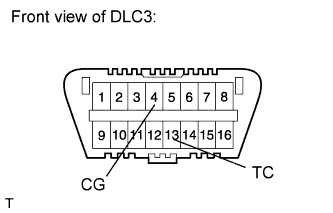
- The initialization can be terminated by connecting terminals 13 (TC) and 4 (CG) of the DLC3.
| Tester Display | Measurement Item/Range | Normal Condition | Diagnostic Note |
| ID1 Tire Inflation Pressure | ID1 tire inflation pressure / min.: Absolute pressure / 100 kPa (1 kgf/cm2, 14 psi), Relative pressure / 0 kPa (0 kgf/cm2, 0 psi) max.: Absolute pressure / 449.35 kPa (4.5 kgf/cm2, 63 psi), Relative pressure / 349.35 kPa (3.6 kgf/cm2, 51 psi) | Actual tire inflation pressure | If 100 kPa (1 kgf/cm2, 14 psi) for the absolute pressure or 0 kPa (0 kgf/cm2, 0 psi) is displayed for the relative pressure, the data has not been received.* |
| ID2 Tire Inflation Pressure | ID2 tire inflation pressure / min.: Absolute pressure / 100 kPa (1 kgf/cm2, 14 psi), Relative pressure / 0 kPa (0 kgf/cm2, 0 psi) max.: Absolute pressure / 449.35 kPa (4.5 kgf/cm2, 63 psi), Relative pressure / 349.35 kPa (3.6 kgf/cm2, 51 psi) | Actual tire inflation pressure | If 100 kPa (1 kgf/cm2, 14 psi) for the absolute pressure or 0 kPa (0 kgf/cm2, 0 psi) is displayed for the relative pressure, the data has not been received.* |
| ID3 Tire Inflation Pressure | ID3 tire inflation pressure / min.: Absolute pressure / 100 kPa (1 kgf/cm2, 14 psi), Relative pressure / 0 kPa (0 kgf/cm2, 0 psi) max.: Absolute pressure / 449.35 kPa (4.5 kgf/cm2, 63 psi), Relative pressure / 349.35 kPa (3.6 kgf/cm2, 51 psi) | Actual tire inflation pressure | If 100 kPa (1 kgf/cm2, 14 psi) for the absolute pressure or 0 kPa (0 kgf/cm2, 0 psi) is displayed for the relative pressure, the data has not been received.* |
| ID4 Tire Inflation Pressure | ID4 tire inflation pressure / min.: Absolute pressure / 100 kPa (1 kgf/cm2, 14 psi), Relative pressure / 0 kPa (0 kgf/cm2, 0 psi) max.: Absolute pressure / 449.35 kPa (4.5 kgf/cm2, 63 psi), Relative pressure / 349.35 kPa (3.6 kgf/cm2, 51 psi) | Actual tire inflation pressure | If 100 kPa (1 kgf/cm2, 14 psi) for the absolute pressure or 0 kPa (0 kgf/cm2, 0 psi) is displayed for the relative pressure, the data has not been received.* |
- HINT:
- The initialization is complete when the Data List "ID Tire Inflation Pressure" display shows the correct pressures.
- *: It may take up to about 5 to 6 minutes to update the tire pressure data. If the values are not displayed after about 5 to 6 minutes, perform troubleshooting according to the inspection procedure for DTCs C2121/21 to C2124/24 (Click here).