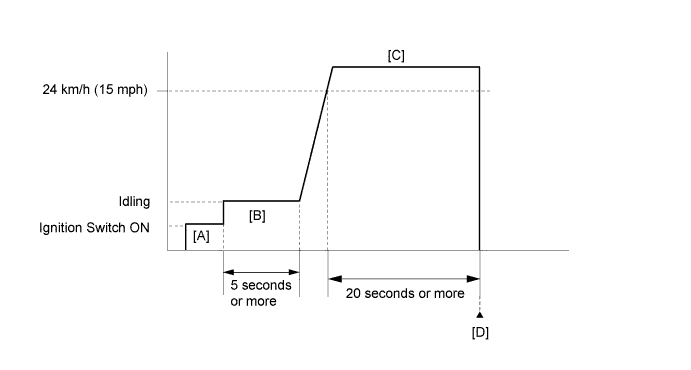
DTC P0617 Starter Relay Circuit High |
| DTC No. | DTC Detection Condition | Trouble Area |
| P0617 | When conditions (a), (b) and (c) are met, a positive (+B) battery voltage of 10.5 V or higher is applied to the ECM for 20 seconds (1 trip detection logic):
|
|
| Related DTCs | P0617: Starter signal |
| Required Sensors/Components (Main) | ST relay, PNP switch, Ignition switch |
| Required Sensors/Components (Related) | Vehicle Speed Sensor (VSS), Crankshaft Position (CKP) sensor |
| Frequency of Operation | Continuous |
| Duration | 20 seconds |
| MIL Operation | Immediate |
| Sequence of Operation | None |
| Monitor runs whenever following DTCs not stored | None |
| Battery voltage | 10.5 V or higher |
| Vehicle speed | 20 km/h (12.4 mph) or more |
| Engine speed | 1000 rpm or more |
| Starter signal | ON |
| Techstream Display | Description |
| NORMAL |
|
| ABNORMAL |
|
| INCOMPLETE |
|
| N/A |
|
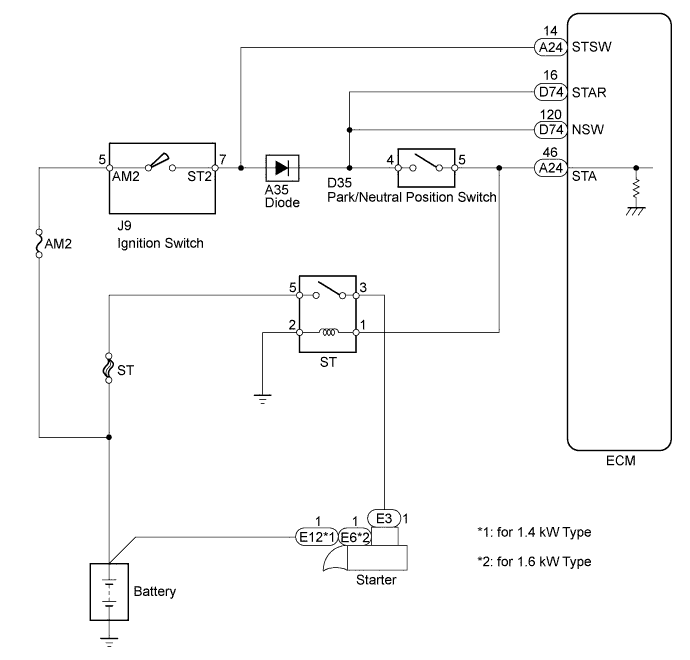
| 1.READ VALUE USING TECHSTREAM (STARTER SIGNAL) |
Connect the Techstream to the DLC3.
Turn the ignition switch to ON and turn the Techstream on.
Enter the following menus: Powertrain / Engine and ECT / Data List / Starter Signal.
Check the value displayed on the Techstream when the ignition switch is turned to the ON and START positions.
| Ignition Switch Position | Starter Signal |
| ON | OFF |
| START | ON |
| Result | Proceed to |
| NG | A |
| OK | B |
|
| ||||
| A | |
 |
| 2.INSPECT PARK/NEUTRAL POSITION SWITCH ASSEMBLY |
Inspect the park/neutral position switch assembly (Click here).
| Result | Proceed to |
| NG | A |
| OK | B |
|
| ||||
| A | |
|
| 3.REPLACE PARK/NEUTRAL POSITION SWITCH ASSEMBLY |
Replace the park/neutral position switch assembly (Click here).
| NEXT | |
|
| 4.READ VALUE USING TECHSTREAM (STARTER SIGNAL) |
Connect the Techstream to the DLC3.
Turn the ignition switch to ON and turn the Techstream on.
Enter the following menus: Powertrain / Engine and ECT / Data List / Starter Signal.
Check the value displayed on the Techstream when the ignition switch is turned to the ON and START positions.
| Ignition Switch Position | Starter Signal |
| ON | OFF |
| START | ON |
| Result | Proceed to |
| NG | A |
| OK | B |
|
| ||||
| A | |
|
| 5.INSPECT IGNITION SWITCH ASSEMBLY |
Inspect the ignition switch assembly (Click here).
| Result | Proceed to |
| NG | A |
| OK | B |
|
| ||||
| A | |
|
| 6.REPLACE IGNITION SWITCH ASSEMBLY |
Replace the ignition switch assembly (Click here).
| NEXT | |
|
| 7.READ VALUE USING TECHSTREAM (STARTER SIGNAL) |
Connect the Techstream to the DLC3.
Turn the ignition switch to ON and turn the Techstream on.
Enter the following menus: Powertrain / Engine and ECT / Data List / Starter Signal.
Check the value displayed on the Techstream when the ignition switch is turned to the ON and START positions.
| Ignition Switch Position | Starter Signal |
| ON | OFF |
| START | ON |
| Result | Proceed to |
| NG | A |
| OK | B |
|
| ||||
| A | |
|
| 8.REPAIR OR REPLACE HARNESS OR CONNECTOR (PARK/NEUTRAL POSITION SWITCH ASSEMBLY - STA TERMINAL OF ECM) |
| NEXT | |
|
| 9.CHECK WHETHER DTC OUTPUT RECURS |
Connect the Techstream to the DLC3.
Turn the ignition switch to ON.
Turn the Techstream on.
Clear the DTCs (Click here).
Drive the vehicle in accordance with the driving pattern described in the Confirmation Driving Pattern.
Enter the following menus: Powertrain / Engine and ECT / Trouble Codes.
Read the DTCs.
| Result | Proceed to |
| P0617 is output | A |
| No DTC is output | B |
|
| ||||
| A | ||
 | ||
| ||

