 |
Remove the 2 clips.
NAVIGATION RECEIVER (for Column Shift Type) > REMOVAL |
| 1. PRECAUTION |
| 2. DISCONNECT CABLE FROM NEGATIVE BATTERY TERMINAL |
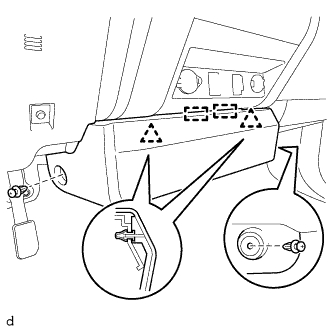
| 3. REMOVE CENTER LOWER INSTRUMENT COVER |
|
Remove the 2 clips.
Detach the 2 clips, 2 guides and remove the lower center instrument cover.
| 4. REMOVE AIR CONDITIONING CONTROL ASSEMBLY |
Put protective tape around the air conditioning control assembly.
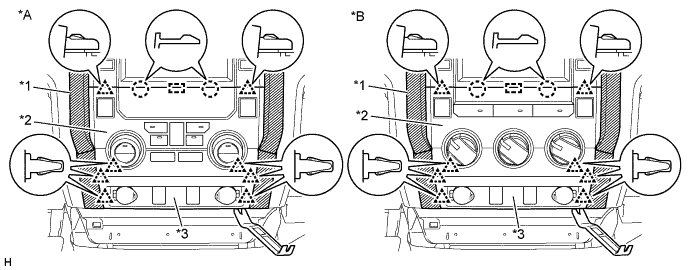
| *A | for Automatic Air Conditioning System | *B | for Manual Air Conditioning System |
| *1 | Protective Tape | *2 | Air Conditioning Control Assembly |
| *3 | Center Lower Instrument Panel Finish Panel | - | - |
Using moulding remover B, detach the 8 clips, 2 claws and guide.
Disconnect each connector and remove the air conditioning control assembly together with the center lower instrument panel finish panel.
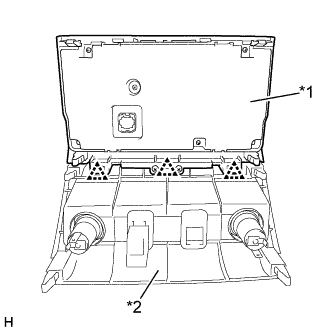 |
Detach the 3 clips and remove the air conditioning control assembly from the center lower instrument panel finish panel.
| *1 | Air Conditioning Control Assembly |
| *2 | Center Lower Instrument Panel Finish Panel |
| 5. REMOVE NAVIGATION RECEIVER ASSEMBLY |
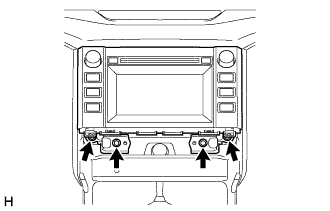 |
Remove the 4 bolts.
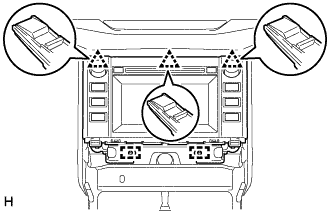 |
Pull the navigation receiver assembly with bracket to detach the 3 clips and 2 guides on the backside of the navigation receiver assembly with bracket.
Disconnect each connector and remove the navigation receiver assembly with bracket.
| 6. REMOVE NO. 1 NAVIGATION WIRE (w/ Satellite Radio) |
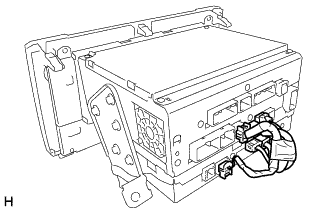 |
Disconnect each connector and remove the No. 1 navigation wire.
| 7. REMOVE NO. 1 RADIO RECEIVER BRACKET |
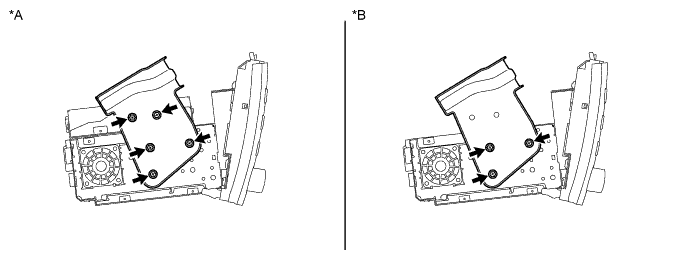
| *A | w/ Satellite Radio | *B | w/o Satellite Radio |
w/ Satellite Radio:
Remove the 5 bolts and No. 1 radio receiver bracket.
w/o Satellite Radio:
Remove the 3 bolts and No. 1 radio receiver bracket.
| 8. REMOVE NO. 2 RADIO RECEIVER BRACKET |
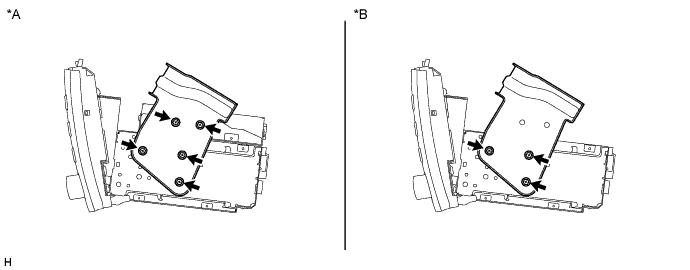
| *A | w/ Satellite Radio | *B | w/o Satellite Radio |
w/ Satellite Radio:
Remove the 5 bolts and No. 2 radio receiver bracket.
w/o Satellite Radio:
Remove the 3 bolts and No. 2 radio receiver bracket.
| 9. REMOVE STEREO COMPONENT TUNER ASSEMBLY (w/ Satellite Radio) |
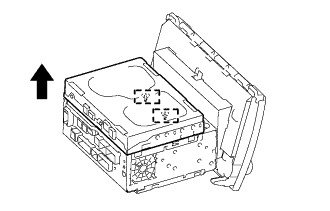 |
Detach the 2 guides and remove the stereo component tuner assembly as shown in the illustration.