METER / GAUGE / DISPLAY METER / GAUGE SYSTEM GENERAL GENERAL
OUTLINE
The combination meter assembly has a built-in meter ECU and buzzer.
A multi-information display that shows various kinds of information is integrated.
A 4.2-inch color Thin Film Transistor (TFT) Liquid Crystal Display (LCD) monitor is provided.
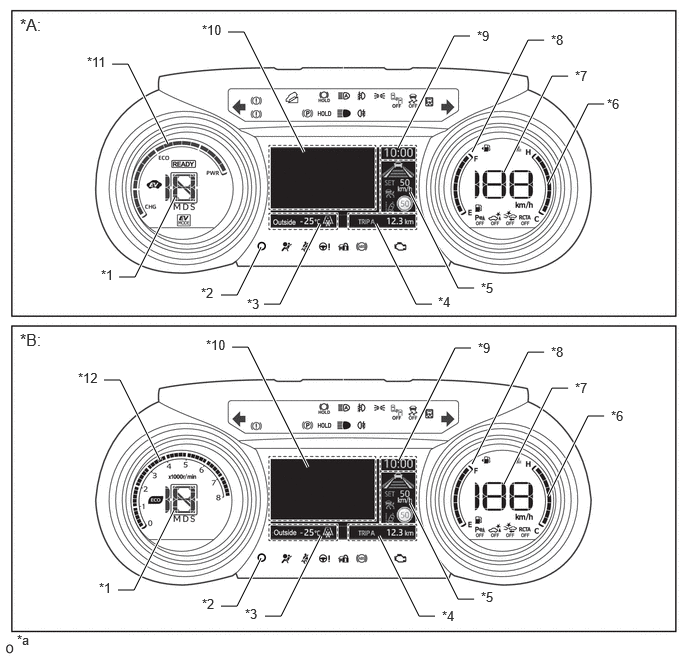
| *A | HV Models | *B | Gasoline Models |
| *1 | Shift Position Indicator | *2 | ODO/TRIP Switch |
| *3 | Outside Temperature Gauge | *4 | ODO/TRIP Meter |
| *5 | Driving Support System Information Display | *6 | Water Temperature Gauge |
| *7 | Speedometer | *8 | Fuel Gauge |
| *9 | Clock | *10 | Multi-information Display |
| *11 | Hybrid System Indicator | *12 | Tachometer |
| *a | The illustrations shown are examples only. The illustration may differ from the actual screen. | - | - |
MAIN FEATURES
Opening/Ending Ceremony
When the ignition switch is turned ON, the LCD monitor illuminates.
The needles, gauges and panels of the hybrid system indicator*1 or tachometer*2, engine coolant temperature gauge and fuel gauge illuminate.
When the ignition switch is turned off, a farewell message is displayed on the multi-information display.
The needles, gauges and panels of the hybrid system indicator*1 or tachometer*2, engine coolant temperature gauge and fuel gauge fade out.
The farewell message is turned off. The odometer and clock are displayed on the LCD monitor.
The odometer and clock is turned off.
*1: HV models
*2: Gasoline models
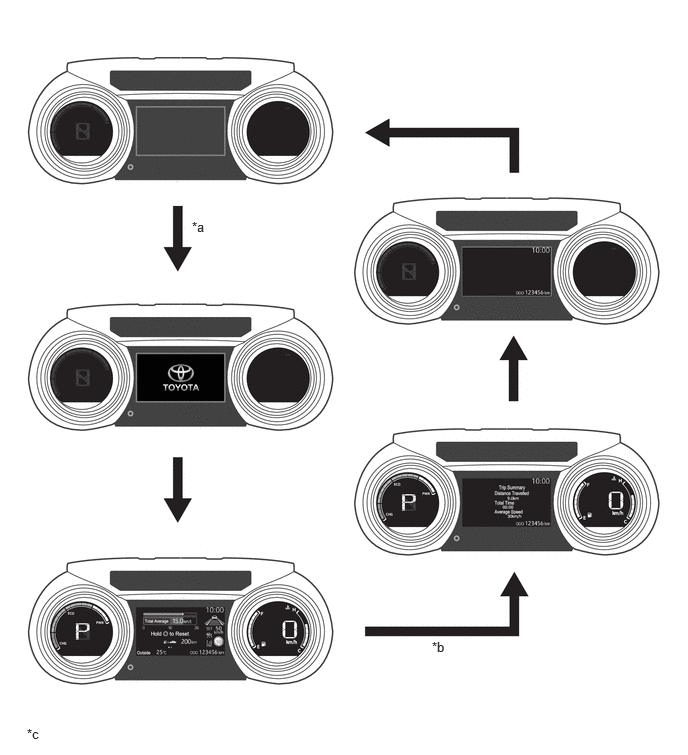
| *a | IG ON | *b | IG OFF |
| *c | The illustration shown is an example only. The illustration may differ from the actual vehicle screen. | - | - |
Hybrid System Indicator (HV Models)
A hybrid system indicator, which displays the total of the engine output and Motor Generator (MG) output as the hybrid system output, the regeneration status and Ready Off condition, is provided.
The scale for the hybrid system indicator is divided into 3 areas (Charge, Eco, Power). The role of each area is as follows.
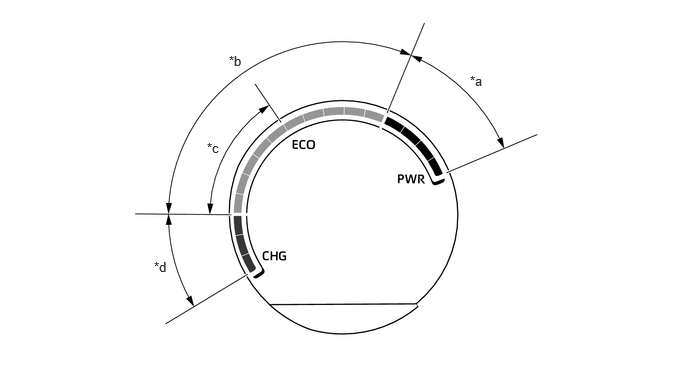
| *a | Power Area | *b | Eco Area |
| *c | Hybrid Eco Area | *d | Charge Area |
| Area | Function |
|---|---|
| Ready OFF Position | The Ready OFF position indicates that the power switch is turned off or power switch is turned on (IG) and Ready OFF. |
| Charge | The charge area indicates when energy is being regenerated. |
| Eco | ·
The eco area indicates when the vehicle is being driven in an eco-friendly manner. ·
The hybrid eco area indicates that the vehicle is driven in a manner that promotes frequent motor only operation. (Based on various conditions, the hybrid vehicle control ECU controls if the engine should be stopped to enhance fuel efficiency.) |
| Hybrid Eco | |
| Power | The power area indicates that the eco-friendly driving range is being exceeded (during full power driving, etc.). |
Multi-information Display
The following information can be displayed on the LCD monitor.
| Item | Outline |
|---|---|
|
*1: HV models *2: Gasoline models *3: AWD models *4: Models with road sign assist system *5: Models with navigation system *6: Models with smart entry and start system |
|
| Indicator | ·
When the display conditions are met, the following indicators illuminate. -
Rear Passengers' Seat Belt Reminder Indicator -
Low Outside Temperature Indicator -
EV Drive Mode Indicator*1 -
Power Mode Indicator -
Eco Drive Mode Indicator -
EV Driving indicator*1 -
Eco Driving Indicator*2 -
Cruise Control SET Indicator -
Cruise Control Indicator -
Cruise Control Indicator (Constant Speed Control Mode) -
Cruise Control Indicator (Vehicle-to-Vehicle Distance Control Mode) -
LTA Indicator -
Rock and Dirt Mode Indicator*3 -
Trail Mode Indicator*3 -
Snow Mode Indicator*3 |
| Driving Support System Information | The operation condition of the following items is displayed:
·
Dynamic Radar Cruise Control System ·
Lane Tracing Assist System ·
Road Sign Assist System*4 |
| Drive Mode | The currently selected drive mode is displayed:
·
Eco Mode ·
Normal Mode (Not Displayed) ·
Power Mode |
| Multi-information Display | ·
The following information can be displayed on the multi-information display by switching the tabs. -
Fuel Economy Tab -
Driving Assist System Information Tab -
Audio Information Tab -
Vehicle Information Tab -
Settings Tab -
Warning Message Tab
|
| Interrupt Display | ·
When the display conditions are met, the following screen is interrupt display. -
Turn-by-turn Navigation*5 -
Telephone -
Audio Operation -
Volume Operation -
Warning Display -
Brightness |
| Clock | The current time is displayed. |
| Outside Temperature | ·
The outside temperature is displayed. ·
When the outside temperature drops below 3°C, an ice warning is displayed to warn the driver to drive with caution due to possibly icy road conditions. After the ice warning flashes 10 times, the ice warning stay on. When the temperature reaches 5°C, the ice warning goes off. |
| Vehicle Power Source State*6 | The vehicle power source state is displayed. |
| ODO/TRIP Meter | ·
The odometer, trip meter A or trip meter B is displayed. ·
The item shown can be switched by pressing the ODO/TRIP switch. |
| Light Control Rheostat | Meter panel luminance can be changed by using the multi-information display. |
Multi-information Display
The following information can be displayed on the multi-information display.
| Item | Outline |
|---|---|
|
*1: HV models *2: Gasoline models *3: AWD models *4: Models with road sign assist system *5: Models with navigation system *6: Models with blind spot monitor system *7: Models with parking support brake system *8: Models with head-up display (mirror meter sub-assembly) |
|
| Economy Information | The following items can be displayed:
·
Current Fuel Consumption ·
Fuel Consumption (After Reset) (Mark Display) ·
Fuel Consumption (After Start) ·
Fuel Consumption (After Reset) ·
Fuel Consumption (After Refuel) ·
Average Vehicle Speed (After Start) ·
Average Vehicle Speed (After Reset) ·
Distance Travelled (After Start) ·
Distance Travelled (After Reset) ·
Elapsed Time (After Start) ·
Elapsed Time (After Reset) ·
Cruising Range ·
Eco Accelerator Guidance/Eco Judge*1 ·
Eco Driving Indicator Zone Display*2
|
| Driving Assist Information | The operation condition of the following items is displayed:
·
Dynamic Radar Cruise Control System ·
Lane Tracing Assist System ·
Road Sign Assist System*4 ·
Navigation System*5
|
| Audio Information | Audio information (status information) is displayed and the audio source and songs can be switched. |
| Vehicle Information | The following items can be displayed:
·
Drive Information ·
Energy Monitor*1 ·
AWD Monitor*3
|
| Settings | The following settings can be changed:
·
Rheostat ·
Lane Tracing Assist System ·
Pre-Collision System ·
Blind Spot Monitor System*6 ·
Toyota Parking Assist-sensor System*7 ·
Rear Cross Traffic Alert System*6 ·
Parking Support Brake System*7 ·
HUD (Head-up Display) System*8 ·
Road Sign Assist System*4 ·
Dynamic Radar Cruise Control System ·
Vehicle Settings ·
Meter Settings |
| Warning Message | Warning messages about vehicle malfunctions are displayed. |
Eco Accelerator Guidance (HV Models)
The eco accelerator guidance displays a bar graph to indicate the ideal acceleration for driving in an eco-friendly manner.
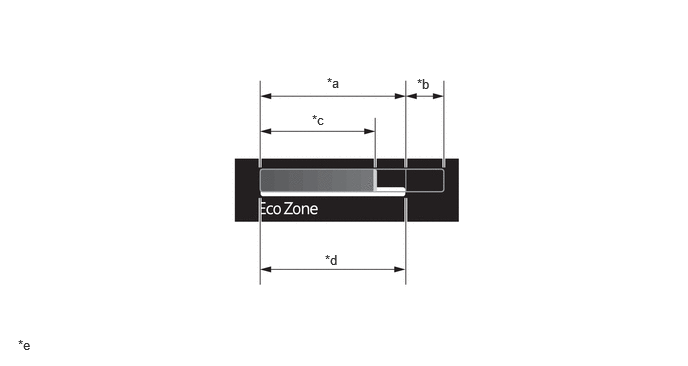
| *a | Eco Area | *b | Power Area |
| *c | Current Accelerator Pedal Depression Amount | *d | Recommended Accelerator Pedal Depression Amount |
| *e | The illustration shown is an example only. The illustration may differ from the actual vehicle screen. | - | - |
| Eco Area | The eco area indicates that the vehicle is being driven in an eco-friendly manner. |
| Power Area | The power area indicates that the eco-friendly driving range is being exceeded (during full power driving, etc.). |
| Current Accelerator Pedal Depression Amount | The current accelerator pedal depression amount is displayed. |
| Recommended Accelerator Pedal Depression Amount | The recommended accelerator pedal depression amount for eco-friendly driving.
|
Eco Score (HV Models)
The total Eco driving score is rated out of 100 points.
- HINT:
- ·
When the power switch is turned on (IG), an Eco driving score is provided for each individual cycle which spans from start to stop.
·When the power switch is turned off, the total Eco driving score from power switch on (IG) to off is displayed.
The Eco score displays the score of driving conditions (start, cruise and stop) rated out of 5.
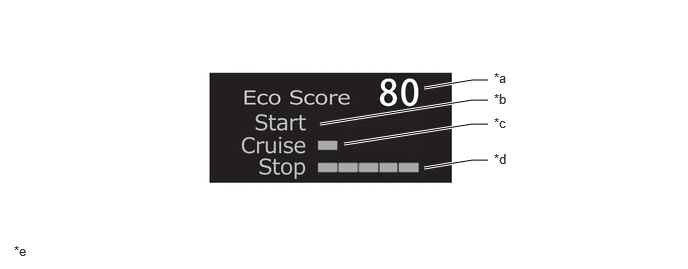
| *a | Score | *b | Start |
| *c | Cruise | *d | Stop |
| *e | The illustrations shown are examples only. | - | - |
| Start | Bar graph to display Eco driving score when accelerating from stopped. |
| Cruise | Bar graph to display Eco driving score when cruising. |
| Stop | Bar graph to display Eco driving score when decelerating to stopped. |
| Score | Total Eco driving score based on Eco accelerator guidance. |
Eco Driving Indicator and Eco Driving Indicator Zone Display (Gasoline Models)
The following table shows the operation of eco driving indicator and eco driving indicator zone display in different driving conditions:
| Driving Condition | Eco Driving Indicator | Eco Driving Indicator Zone Display |
|---|---|---|
| While Stopped | Turns off | 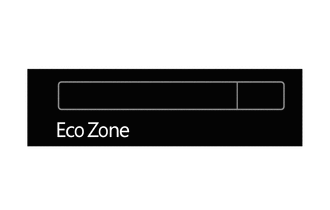
|
| While Eco Driving | Turns on | 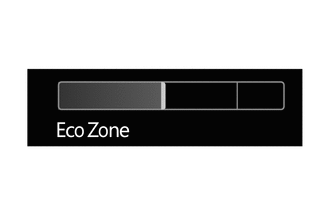
|
| While Non-eco Driving | Turns off | 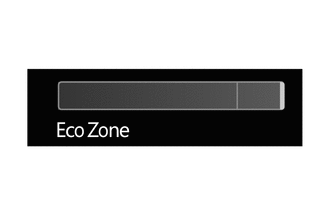
|
| When any of the following conditions is met, operation is stopped.
·
Ignition switch off ·
Engine stopped ·
Shift position is not D. ·
Power mode is selected. ·
The vehicle is being driven at a speed of approximately 130 km/h (81 mph) or higher. |
Turns off | 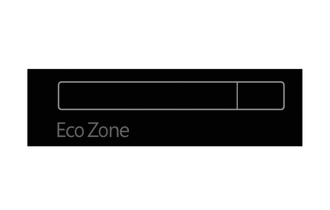
|