ADVANCED PARK ADVANCED PARK GENERAL GENERAL
OUTLINE
Advanced park is provided to assist with parking operations by providing steering operation, accelerator operation and brake operation during reverse parking and parallel departure.
Advanced park uses ultrasonic sensors installed on the front, rear and sides of the vehicle to detect parking spaces, and television camera assemblies installed on the front grille, back door, and outer rear view mirror assembly to detect parking lines and parking spaces. This information is combined and used to assist with parking operations by providing display on the multi-display and operation guidance using the buzzer and speech.
Advanced park uses a reverse perpendicular parking function and parallel parking function that help the vehicle stopped next to the target parking spot move to the target parking spot, a parallel parking spot departure function that helps the parallel parked vehicle move to the target departure completed position, and a memory function that helps the vehicle move to a previously registered parking spot.
The memory function allows a parking spot to be registered in advance, to assist with parking even when there are no parking lines or neighboring vehicles.
MAIN FEATURES
When the advanced park operation conditions are met, the advanced park provides assistance using the reverse perpendicular parking function, parallel parking function, parallel parking spot departure function or memory function by operating the advanced park main switch.
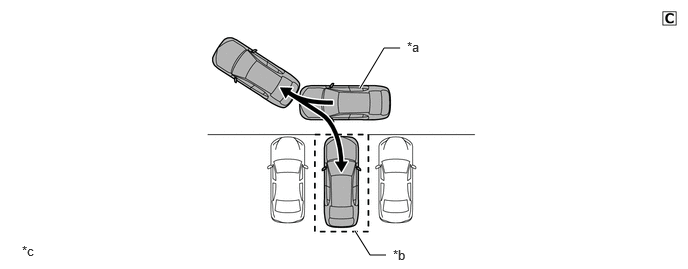
| *a | Own Vehicle | *b | Target Parking Spot with Parking Lines or Neighboring Vehicles |
| *c | This illustration is only for explanatory purposes. | - | - |
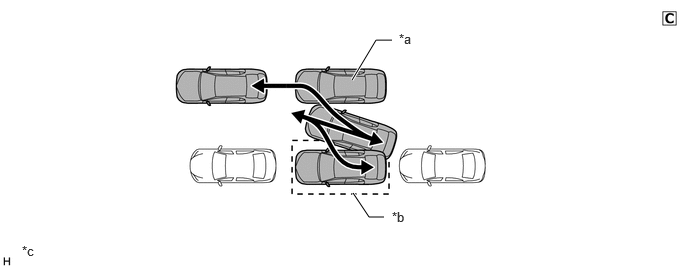
| *a | Own Vehicle | *b | Target Parking Spot with Parking Lines or Neighboring Vehicles |
| *c | This illustration is only for explanatory purposes. | - | - |
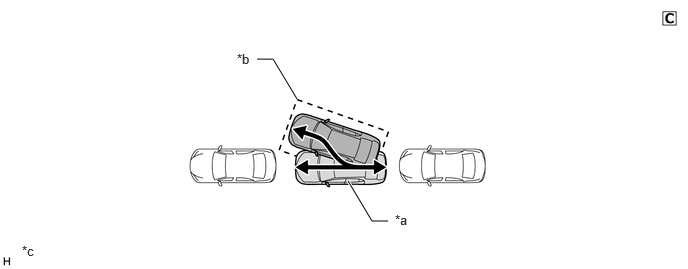
| *a | Own Vehicle | *b | Target Departure Completed Position |
| *c | This illustration is only for explanatory purposes. | - | - |
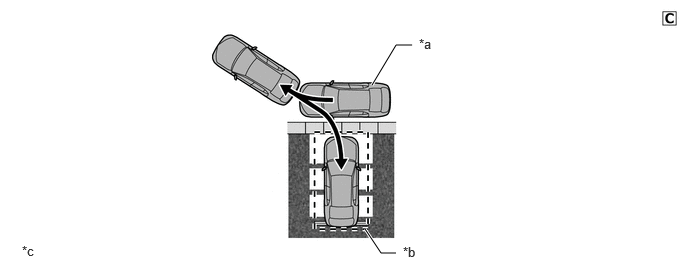
| *a | Own Vehicle | *b | Parking Spot Registered in Memory |
| *c | This illustration is only for explanatory purposes. | - | - |
Parking space is detected by signals from the ultrasonic sensor, and the parking lines and parking spaces are detected by signals from each television camera assembly. This information is combined to detect the parking spot.
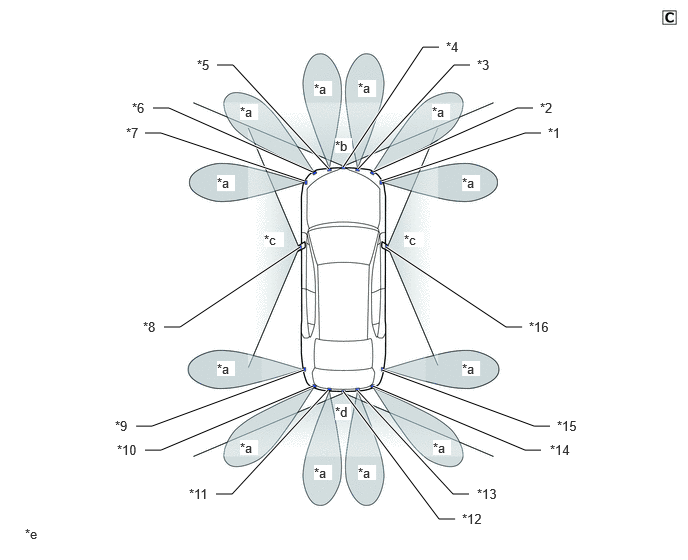
| *1 | Front Side Ultrasonic Sensor RH | *2 | Front Corner Ultrasonic Sensor RH |
| *3 | Front Center Ultrasonic Sensor RH | *4 | Front Television Camera Assembly |
| *5 | Front Center Ultrasonic Sensor LH | *6 | Front Corner Ultrasonic Sensor LH |
| *7 | Front Side Ultrasonic Sensor LH | *8 | Side Television Camera Assembly LH |
| *9 | Rear Side Ultrasonic Sensor LH | *10 | Rear Corner Ultrasonic Sensor LH |
| *11 | Rear Center Ultrasonic Sensor LH | *12 | Rear Television Camera Assembly |
| *13 | Rear Center Ultrasonic Sensor RH | *14 | Rear Corner Ultrasonic Sensor RH |
| *15 | Rear Side Ultrasonic Sensor RH | *16 | Side Television Camera Assembly RH |
| *a | Ultrasonic Range | *b | Front Image Range |
| *c | Side Image Range | *d | Rear Image Range |
| *e | This illustration is only for explanatory purposes. | - | - |
A target spot selection method is used which allows the user to directly touch the multi-display to select their desired parking spot when multiple target parking spot candidates are displayed on the multi-display.
Parking support brake system cooperative control is used to perform brake control when the parking support brake system operation conditions are met during advanced park operation, regardless of whether the parking support brake system is operating or not. For details on the parking support brake system, see the Parking Support Brake System section.
TOYOTA parking assist-sensor system cooperative control is used to display an intuitive parking assist stationary object detection and sound a buzzer when the TOYOTA parking assist-sensor system operation conditions are met during advanced park operation, regardless of whether intuitive parking assist system is operating or not. For details on the TOYOTA parking assist-sensor system, see the TOYOTA Parking Assist-sensor System section.
RCTA function cooperative control is used to display a rear approaching vehicle detection and sound a buzzer when the RCTA function operation conditions are met during advanced park operation, regardless of whether the RCTA function is operating or not. For details on the RCTA function, see the Blind Spot Monitor System section.
PRECAUTION
Advanced Park
Advanced park is a system that assists with reverse parking near the target parking spot which the driver has confirmed on the multi-display, or departure from a parallel parking space, by automatically providing display on the multi-display, operation guidance using the buzzer and speech, steering operation, accelerator operation and brake operation. Also, the panoramic view monitor system helps the driver confirm the vehicle's surroundings by displaying views to the front, the rear and from above the vehicle. It may not be possible to reach the set target parking spot, depending on road surface conditions, the vehicle condition, or the distance to the target parking spot.
Safety Precautions
Do not rely solely upon on the advanced park system. As with unequipped vehicles, use the advanced park carefully while directly confirming the safety of the surroundings.
Advanced park is a system that assists with parking in and departing from parking spaces. Confirm the safety of the vehicle surroundings, depress the brake pedal to reduce speed or stop the vehicle if necessary.
Be sure to directly confirm the safety of the vehicle surroundings when using the system.
As following objects may not be detected, make sure to check the safety of the area around your vehicle and depress the brake pedal to stop the vehicle if it may collide with an object.
Thin objects such as wire, fences, rope, etc.
Cotton, snow and other materials that absorb sound waves.
Sharply-angled objects.
Low objects (curb stones, parking blocks, etc.).
Tall objects with upper sections that protrude outward.
Parking lot with a device which raises to contact the bottom of the vehicle.
If it appears that the vehicle may come into contact with a surrounding vehicle, obstacle, wheel chock, pedestrian or other object, depress the brake pedal to stop the vehicle and press the advanced park main switch to cancel the system operation.
Do not drive in reverse while only viewing the monitor screen. The image on the screen may differ from the actual conditions, therefore driving in reverse while only viewing the screen can lead to unforeseen accidents, such as collisions. While driving in reverse, always directly confirm the safety of the surroundings (particularly to the rear) by sight, mirrors, etc.
Since the steering wheel turns automatically while the advanced park is in use, make sure to observe the following precautions.
Neckties, scarves, arms, etc. may get entangled in the steering wheel. Do not move your upper body close to the steering wheel. Also, be careful not to let young children get close to the steering wheel.
Drivers with long fingernails could be injured when the steering wheel turns.
In case of emergency, depress the brake pedal to stop the vehicle and press the advanced park main switch to cancel the operation.
Always confirm that the vehicle can be parked in the target parking spot before attempting to park the vehicle.
Do not use the advanced park in the following situations.
When in areas other than common parking spaces.
When the surface of the parking space is sand or gravel and is not clearly defined with parking space lines.
When the parking space is not level, such as when on a slope or has differences in height.
Mechanical parking system.
When the road surface is frozen, slick, or covered with snow.
When it is extremely hot and the asphalt is melting.
When there is an object in front of the vehicle.
When there is an object between your vehicle and the target parking spot or within the target parking spot (within the displayed blue box).
When there is a gutter between your vehicle and the target parking space or within the target parking spot (within the displayed blue box).
When there is a hole or gutter in the departure direction.
When in high pedestrian or vehicle traffic areas.
When the parking space is in a location that is difficult to park in (too narrow for your vehicle, etc.).
When images are unclear due to dirt or snow attached to the camera lens, light being shined into the camera or shadows.
When the doors are not completely closed.
When the back door is not completely closed.
When using tire chains or a spare tire.
When the driver or passengers' hand is sticking out of the window.
Do not use any type of tire other than that installed by the manufacturer. The system may not operate normally. Also, when tires are replaced, the position of the lines or frame displayed on the multi-display may differ slightly. Contact your dealer when replacing tires.
Because this system is intended to assist with parking in a set target parking spot, the parking location may not be able to be recognized or parking assist may not be able to function until the parking operation is complete, depending on road surface conditions, the vehicle condition, or the distance to the target parking position.
Parking in the set target parking spot using parking assist may not be possible in the following situations.
When the tires are extremely worn or tire pressure is low.
When the vehicle is loaded with extremely heavy cargo.
When the vehicle is tilted due to luggage loaded only on one side.
When a road heater (a heater used to prevent the road surface from freezing) is installed in the parking lot.
When the wheels are out of alignment after the tires have hit against a curb or other obstacle.
Parking lots on a steep slope.
Parking lots with a large change in slope.
When there is a large difference in grade.
When the parking path adjustment customization settings are incorrect.
When something is incorrectly detected as a parking line (light, reflections from a building, difference in height on the parking surface, a gutter, painted road lines, redrawn lines, etc.).
- HINT:
-
Have the vehicle inspected by your dealer in cases other than those above in which vehicle position deviates significantly from the set position.
The system will provide guidance on where to turn the steering wheel on the appropriate path, but if the driver feels uneasy, such as when other vehicles are approaching, depress the brake pedal at any time to change the shift position. However, this may increase the number of times the steering wheel must be turned, or reduce parking accuracy.
Even when there is an obstacle in the target parking spot, it may not be detected and parking assist may be performed.
Make sure to observe the following precautions, otherwise the system may stop operating normally, which could lead to an unforeseen accident.
Do not subject a sensor, camera, or its surrounding area to a strong impact. If such an impact has occurred, have this vehicle inspected by your dealer.
Do not modify, disassemble, or paint any sensors or cameras.
When washing the vehicle with a pressure washer, do not spray water directly at any sensors or cameras. The impact force of the high pressure water stream could cause the sensor or camera to stop working correctly.
When washing a camera lens, first use a large amount of water to wash the dirt off the camera, then wipe the camera lens with a soft, damp cloth.
The following situations are dangerous in that the sensor may not operate normally, which could lead to an unforeseen accident. Be sure to drive carefully.
The sensor is frozen (returns to normal after it is thawed). In very cold weather when a malfunction display appears due to the sensor freezing, etc., the sensor may not be able to detect parked vehicles.
The sensor is covered.
The vehicle is significantly tilted.
In blazing heat or freezing cold.
When driving on a bumpy road, slope, gravel road or grass, etc.
The vehicle is approached by a source of ultrasonic waves, such as another vehicle's horn, motorcycle engine, large vehicle air brakes or a sensor on another vehicle.
Rain or water is sprayed on the sensor.
When the area around the vehicle is dark or backlit.
A commercially available fender pole or wireless antenna is installed on the vehicle body.
When another parked vehicle gets too close to the sensor.
When accessories, etc. are installed in the sensor detection range.
If the parking space is displayed in a significantly misaligned position from the target parking spot, even though the vehicle is next to the target parking spot, the sensor angle may be misaligned. Have the vehicle inspected by your dealer.
It may not be possible to detect a parking space on the road surface in the following situations.
Parking lots without white lines (parking spaces are demarcated with rope, blocks, etc.).
When white lines cannot be seen clearly because they are faded, dirty or otherwise obscured.
When the road surface is so whitish in color that contrast difference from the white lines is small (such as with white lines on a concrete road surface).
When the parking space lines on the road surface are any color other than yellow or white.
When the surroundings are dark, such as at night, in underground parking lots, or multi-story parking lots.
When the road surface is wet and reflecting light or covered in puddles during or after rain, etc.
When sunlight is shining into the camera around sunrise or sunset.
When snow cover or snow-melting agent is present.
When there are repaired areas, road markings, or obstacles such as pedestrians, poles, etc.
When the color and brightness of the road surface is uneven.
When the lens is fogged up such as after the camera is sprayed with hot or cold water.
When affected by shadows from this vehicle, trees, etc.
When the camera lens is dirty or there are water droplets on it.
The target parking spot may be incorrectly recognized in the following situations.
When there marks from repairs or other marks on the road surface, or there is a parking block, traffic bollard, or other object on the road surface.
When it is raining or has rained and the road surface is wet and reflective or there are puddles.
When the area around the vehicle is dark or backlit.
When the color or brightness of the road surface is uneven.
When the parking space is on a slope.
When there are diagonal lines (access aisle) near the parking space.
When the appearance of the parking space is affected by the shadow of a parked vehicle (such as shadows from the grille, side step, etc.).
When accessories which obstruct the view of the camera are installed.
When the parking space lines are faded or dirty, making them unclear.
When the appearance of the parking space is affected by the shadow of the vehicle or trees.
The system may cancel vehicle stop holding in the following situations, allowing the vehicle to start moving.
During parking assist operation, the driver door is opened.
During parking assist operation, instructions from the system are not followed for specified period of time.
During parking assist operation, the brake pedal is depressed to stop the vehicle for a specified period of time.
During parking assist operation, a malfunction occurs.
The memory function is a function to assist with parking in a previously registered parking spot. If road surface conditions, the vehicle condition or the surrounding environment differs from when the spot was registered, the parking position may not be recognized or parking assist may not be able to function until the parking operation is complete.
Do not perform parking spot registration in the following situations. It may not be possible to register the set position or the use of parking assist may not be possible at the set position from the next time.
The camera is dirty.
It is raining or snowing.
At night (a sufficient level of brightness cannot be secured).
Registration of parking spots may not be possible in the following environments.
Parking lots where space is insufficient.
Parking lots where sidewalks are located in front of parking spots.
Parking lots with insufficient passage widths and insufficient space for the parking spots.
Parking lots without parking lines around the parking spot that can be recognized by the system.
If a parking spot is registered in the following environments, parking assist may not start or the use of parking assist may not be possible at the set position from the next time.
When the parking spot is covered by shade (such as in a parking lot with simple roof and posts).
When leaves or trash (items that may be gone or moved the next time the vehicle is parked) is on the parking spot.
When the road surface around the parking spot is composed of the same pattern (brick, etc.).
Parking in the set position using parking assist may not be possible in the following situations.
When the parking spot is covered by shade (such as in a parking lot with simple roof and posts).
There is an obstacle in the set parking spot.
When pedestrians or passing vehicles are detected during parking assist.
The position at which the vehicle is stopped at the start of parking assist is different from that when registered.
The set parking spot cannot be reached due to wheel chocks, etc.
When the parking lines around the parking spot have changed (because of road surface deterioration due to age or renovations, etc.).
Sunlight conditions are different from those when registered (due to weather or time of day, etc.).
When the parking spot is subjected to strong light.
When the parking spot is subjected to temporary light (such as that from the headlights of other vehicles or security lights).
The camera lens is dirty, or has water droplets adhering to it.
Perform registration again if control is stopped during memory function registration.
If memory function registration is performed in a location where parking lines cannot be detected from the road surface, "No available parking space to register" may be displayed.
Stop the vehicle right next to the intended parking area before starting the memory function. Otherwise, the parking spot may not be recognized or parking assist may not be able to function until the parking operation is complete.
Do not use the memory function if the camera is subjected to any impact or the panoramic view image is significantly misaligned.
Because the camera installation angle will change when the camera malfunctions or is replaced, it is necessary to perform registration of the memory function again.