PARK ASSIST / MONITORING PANORAMIC VIEW MONITOR SYSTEM(w/ Advanced Park) CONTROL PANORAMIC VIEW MONITOR CONTROL
Function of Main Components
| Component | Function | |
|---|---|---|
| Front Television Camera Assembly | Outputs a video signal of the area in front of the vehicle to the parking assist ECU. | |
| Outer Rear View Mirror Assembly RH/LH | Side Television Camera Assembly RH/LH | Outputs video signals of the areas to the left and right sides of the vehicle to the parking assist ECU. |
| Parking Assist Light RH/LH | Emits invisible infrared light to enable cameras to capture images in the dark. | |
| Light Parking Assist ECU Circuit | Sends parking assist light operation signals to the outer rear view mirror assembly RH/LH. | |
| Rear Television Camera Assembly | Outputs a video signal of the area behind the vehicle to the parking assist ECU. | |
| Parking Assist ECU | ·
Combines video signals from the front, rear, left and right television camera assemblies to create a seamless overhead image. ·
Calculates each guide line based on vehicle status information such as steering angle signals and combines the lines with the panoramic view and images from each television camera assembly, and outputs a video signal to the radio and display receiver assembly. ·
Turns each television camera assembly on and off according to the vehicle speed signal, input shift position signal and panoramic view monitor switch signal. ·
Combines detection information with the currently displayed panoramic view monitor system screen according to signals from the clearance warning ECU assembly or blind spot monitor sensor RH/LH and outputs a video signal to the radio and display receiver assembly. |
|
| Radio and Display Receiver Assembly | ·
Displays image information received from the parking assist ECU. ·
Switches the multi-display screen display according to request signals from the parking assist ECU. |
|
| Panoramic View Monitor Switch | Sends the switch operation signals to the parking assist ECU, and switches the screen display. | |
| Steering Sensor | Sends the steering angle signal to the parking assist ECU. | |
| Hybrid Vehicle Control ECU | Sends shift position signals to the parking assist ECU. | |
| Brake Booster with Master Cylinde Assembly | Skid Control ECU | Sends vehicle speed signals to the parking assist ECU. |
| Main Body ECU (Multiplex Network Body ECU) | Sends the back door open/close signals, left and right front door open/close signals and the outer rear view mirror assembly folding signals to the parking assist ECU. | |
| Clearance Warning ECU Assembly | Sends stationary object detection information to the parking assist ECU. | |
| Blind Spot Monitor Sensor LH | Sends rear side approaching vehicle detection information (RCTA information) to the parking assist ECU. | |
| Instrument Panel Junction Block Assembly | BKUP LP Relay | Sends vehicle reverse signals to the parking assist ECU. |
OPERATING CONDITION
To display the panoramic view monitor system screen, in addition to the manual display mode using the panoramic view monitor switch (automatic display mode off), there is an automatic display mode which, in response to vehicle speed, automatically displays the panoramic view and front view mode or panoramic view and clearance view mode (automatic display mode on).
In manual mode, when the shift position is other than P or R, the screen display timer function operates, so that even when the vehicle speed exceeds 12 km/h, the panoramic view monitor system screen can be displayed for a set period of time after operating the panoramic view monitor switch.
Manual Display Mode
Manual display mode is a method of displaying the panoramic view monitor system screen according to the needs of the driver via operation of the panoramic view monitor switch.
The screen displayed when the panoramic view monitor switch is pressed differs according to the shift position.
Screen Display Timer Function
In manual display mode with the shift position in other than P or R, when the following conditions are met at the time the panoramic view monitor switch is pressed, the panoramic view and front view mode*1 or panoramic view and clearance view mode*2 screens are displayed for a set period of time even when the vehicle speed has exceeded 12 km/h.
- HINT:
-
*1: When the outer rear view mirrors are folded, the side view and front view mode screen is displayed.
-
*2: When the outer rear view mirrors are folded, the dual side view mode screen is displayed.
While the screen display timer function is operating, pressing the panoramic view monitor switch will change the displayed screen in accordance with the display conditions for manual display mode.
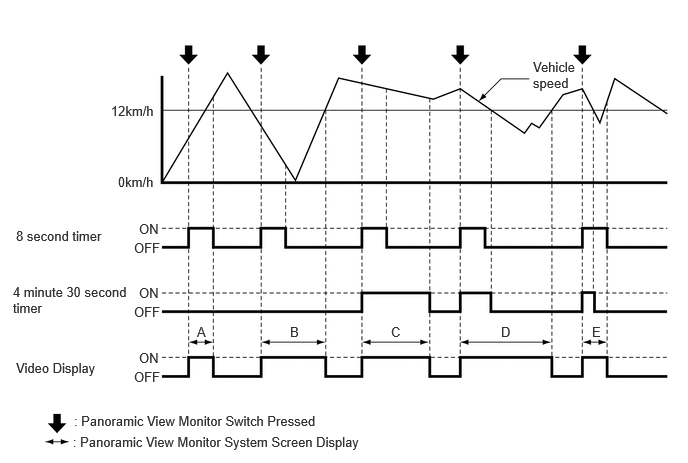
| Video Display | Vehicle Speed when Switch Operated | Vehicle Speed Transition | Panoramic View Monitor System Screen Display Time | Note |
|---|---|---|---|---|
|
*1: If the screen display timer function operation has stopped, the screen display switches to display the navigation screen or information screen. *2: Vehicle speed until 4 minutes and 30 seconds have elapsed since the panoramic view monitor switch was pressed. |
||||
| A | 12 km/h or less | 12 km/h or less → more than 12 km/h | 8 seconds | Even when the vehicle speed exceeds 12 km/h, the panoramic view and front view mode or panoramic view and clearance view mode will be displayed for 8 seconds from the point at which the panoramic view monitor switch was pressed. |
| B | 12 km/h or less | 12 km/h or less | - | When the vehicle speed remains at 12 km/h or less, the screen is displayed in accordance with the display conditions for manual display mode. |
| C | More than 12 km/h | More than 12 km/h*2 | 4 minutes 30 seconds | If the panoramic view monitor switch is pressed when the vehicle speed exceeds 12 km/h, the panoramic view and front view mode or panoramic view and clearance view mode will be displayed for 4 minutes and 30 seconds from the point at which the panoramic view monitor switch was pressed. (Only when vehicle speed continues to exceed 12 km/h)*1 |
| D | More than 12 km/h | More than 12 km/h → 12 km/h or less → more than 12 km/h | - | If the panoramic view monitor switch is pressed when the vehicle speed exceeds 12 km/h, the screen display timer (4 minutes and 30 seconds) operates, and the panoramic view and front view mode or panoramic view and clearance view mode screen is displayed. If the vehicle speed decreases to 12 km/h or less within 4 minutes and 30 seconds after the switch was pressed, the screen display timer (4 minutes and 30 seconds) is canceled, and the screen is displayed in accordance with the display conditions for manual display mode. If the vehicle speed exceeds 12 km/h while the panoramic view and front view mode or panoramic view and clearance view mode screen is being displayed, the panoramic view monitor system screen ends and switches to display the navigation screen or information screen. |
| E | More than 12 km/h | More than 12 km/h → 12 km/h or less → more than 12 km/h | 8 seconds | If the panoramic view monitor switch is pressed when the vehicle speed exceeds 12 km/h, the screen display timer (4 minutes and 30 seconds) operates the panoramic view and front view mode or panoramic view and clearance view mode screen is displayed. If the vehicle speed has decreased to 12 km/h or less while the screen display timer is operating, the screen display timer is canceled, but because the screen display timer (8 seconds) is operating, the screen display is retained. If the vehicle speed exceeds 12 km/h again, when the screen display timer (8 seconds) operation completes, the panoramic view monitor system screen ends and switches to display the navigation screen or information screen. |
Automatic Display Mode
When starting off and stopping the vehicle in automatic display mode, it is possible to display the panoramic view and front view or panoramic view and clearance view automatically instead of by pressing the panoramic view monitor switch. Refer to the following chart for the screen display conditions.
The automatic display mode can be set with the auto mode button displayed on the screen.
| Display | Screen Display Conditions | Objective | Assumed Situation |
|---|---|---|---|
| Display when starting off | Vehicle speed is 10 km/h (6 mph) or less and shift lever is not in P or R | Alert the driver to the vehicle surroundings | Check the vehicle surroundings |
| Display when stopping vehicle | Shift lever is not in P or R and vehicle speed becomes 10 km/h (6 mph) or less | Reduce switch operations | ·
Check forward blind spot ·
Check inside blind spot ·
Check vehicle width ·
Check vehicle-to-vehicle distance |
TOYOTA Parking Assist-sensor Linked Display Function
When the TOYOTA parking assist-sensor system detects a stationary obstacle while driving at low speed, the TOYOTA parking assist-sensor linked display function automatically displays the panoramic view and front view.
When all of the following conditions are met, the panoramic view and front view will be displayed automatically.
The shift lever is not in P or R.
The TOYOTA parking assist-sensor system has detected an obstacle.
The vehicle speed is approximately 10 km/h or more.
When either of the following conditions is met, the panoramic view and front view will be canceled and return to its original screen.
The TOYOTA parking assist-sensor system does not detect an obstacle.
The vehicle speed changes to less than approximately 12 km/h.
Function
Panoramic View Monitor Screen and Operation
Each screen of the panoramic view monitor system displays guide lines, estimated course lines calculated using steering angle information received from the steering sensor via CAN communication, etc., composited in accordance with the selected screen display mode to inform the driver of the tire positions and trajectories which cannot be directly seen from the driver seat.
When the TOYOTA parking assist-sensor system detects an obstacle, clearance sonar information is displayed superimposed on the screen according to each screen display mode.
Panoramic View and Front View
The composite overhead view (panoramic view) assembled from the front, rear, and side cameras is displayed simultaneously with the view from the front television camera assembly to assist the driver in checking the vehicle surroundings for safety and checking the left and right directions for safety at locations with poor visibility, such as intersections and T-junctions.
- HINT:
-
The positions of obstacles as displayed on the TOYOTA parking assist-sensor system and the positions as they appear in the camera view may not match.
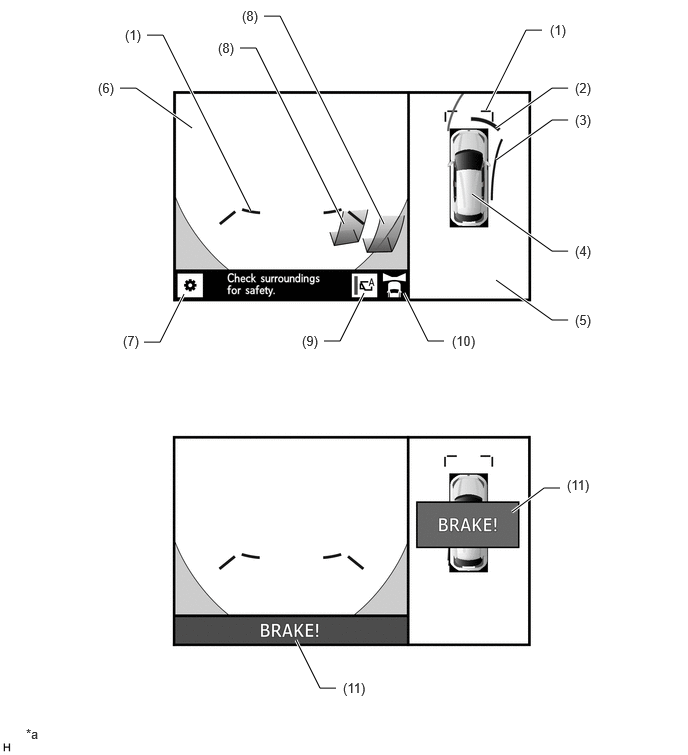
| *a | Illustration shows a representative example. The illustration may differ from the actual vehicle screen. | - | - |
| No. | Display | Description |
|---|---|---|
| (1) | Front Distance Guide Line | These lines are distance guide lines (blue) showing the distance forward from the edge of the front bumper. (Approximately 1.0 m (3.3 ft.)) |
| (2) | TOYOTA Parking Assist-sensor Detection Information | If a stationary object is detected when the TOYOTA parking assist-sensor is activated, the object position and the approximate distance between the vehicle and the stationary object is displayed. |
| (3) | Forward Estimated Course Line | Displays the estimated course (yellow) calculated from the steering angle. (Shown when the current steering operation will take the vehicle 90° or more from the straight-ahead direction) |
| (4) | Panoramic View Vehicle Icon | Displays the vehicle position in the panoramic view. |
| (5) | Panoramic View | An overhead image of the vehicle created by combining images from the front, rear, left and right side television camera assemblies. |
| (6) | Front View | An image captured by the front television camera assembly of the area in front of the vehicle. |
| (7) | Customization Setting Button | Configures the guide line display mode, vehicle body color, TOYOTA parking assist-sensor display, etc. |
| (8) | TOYOTA Parking Assist-sensor Detection Information (3D Display) | If a stationary object is detected the displayed when the TOYOTA parking assist-sensor is activated, the object position and the approximate distance between the vehicle and the stationary object is displayed in 3D if configured via the customization setting screen. |
| (9) | Automatic Display Mode Switch Button | Switches the automatic display mode on and off. |
| (10) | Display Area Icon | Indicates that the front view is being displayed. |
| (11) | Parking Support Brake System Detection Display | Displayed when the parking support brake system detects that there is a possibility of a collision. |
Estimated Course Line Display Mode (obstacle avoidance)
The forward estimated course lines use the cornering outer estimated course line and cornering inner estimated course line to provide steering guidance for avoiding obstacles during a turn. By turning the steering wheel so that no objects are within the estimated course lines, the driver can easily maneuver the vehicle around objects.
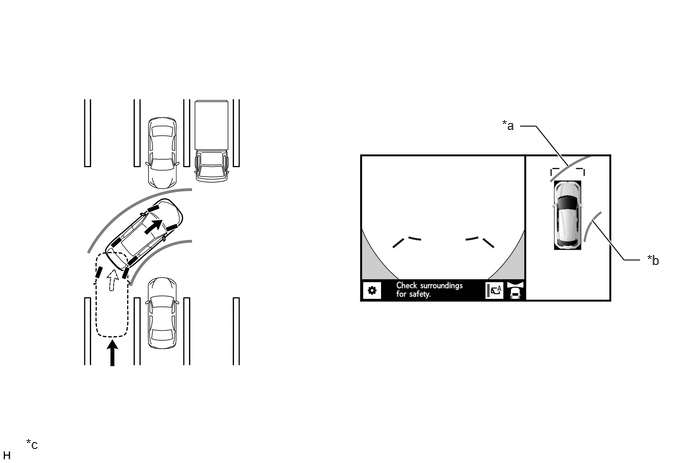
| *a | Forward Estimated Course Line (Cornering Outer Estimated Course Line) | *b | Forward Estimated Course Line (Cornering Inner Estimated Course Line) |
| *c | Illustration shows a representative example. The illustration may differ from the actual vehicle screen | - | - |
Distance Guide Line Display Mode (forward parking)
The front distance guide lines inform the driver of the vehicle's relative location when driving into a parking space. By aligning the front distance guide lines to avoid overlap with the end of the parking space and the parking space lines, the driver can easily position the vehicle within the parking space.
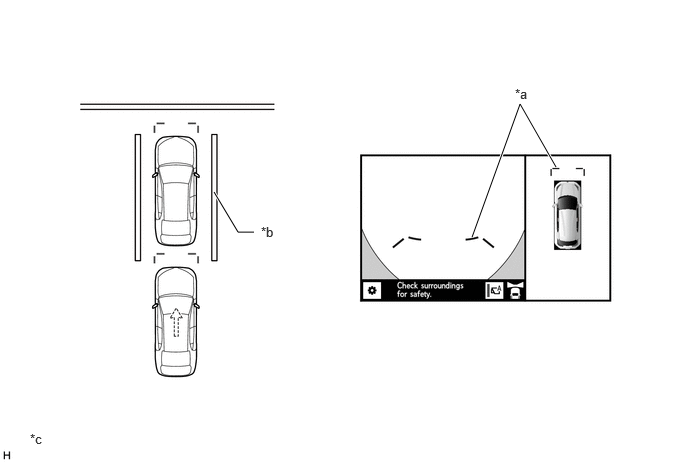
| *a | Front Distance Guide Line | *b | Parking Space Line |
| *c | Illustration shows a representative example. The illustration may differ from the actual vehicle screen | - | - |
Panoramic View and Clearance View
The composite overhead view (panoramic view) assembled from the front, rear, and side cameras is displayed simultaneously with the composite front side view of the vehicle as seen looking down from the rear (clearance view) assembled from the front, rear, and side cameras to assist the driver in checking the sides of the vehicle for safety and avoiding contact with obstacles when driving on narrow roads, etc.
- HINT:
- ·
Panoramic view and clearance view can only be displayed when the TOYOTA parking assist-sensor system is ON.
·Panoramic view and clearance view can only be displayed when the outer rear view mirrors are unfolded (not retracted).
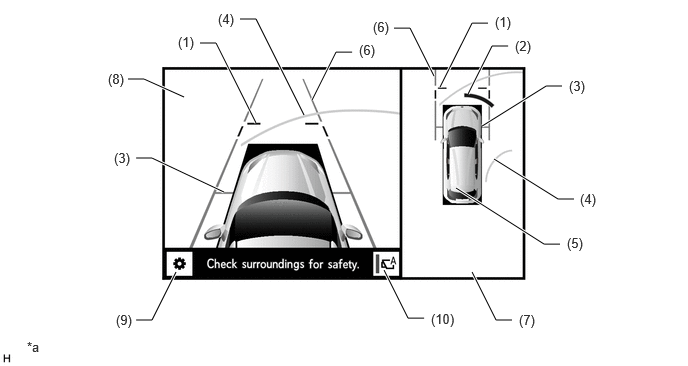
| *a | Illustration shows a representative example. The illustration may differ from the actual vehicle screen. | - | - |
| No. | Display | Description |
|---|---|---|
| (1) | Front Distance Guide Line | These lines are distance guide lines (blue) showing the distance forward from the edge of the front bumper. (Approximately 1.0 m (3.3 ft.)) |
| (2) | TOYOTA Parking Assist-sensor Detection Information | If a stationary object is detected when the TOYOTA parking assist-sensor is activated, the object position and the approximate distance between the vehicle and the stationary object is displayed. |
| (3) | Front Tire Contact Line | Displays the estimated location (gray) at which the front tires contact the ground. |
| (4) | Forward Estimated Course Line | Displays the estimated course (yellow) calculated from the steering angle.(Shown when the current steering operation will take the vehicle 90° or more from the straight-ahead direction) |
| (5) | Panoramic View Vehicle Icon | Displays the vehicle position in the panoramic view. |
| (6) | Vehicle Width Parallel Line | Parallel lines that indicate the estimated vehicle width (gray) including the outer mirrors. |
| (7) | Panoramic View | An overhead image of the vehicle created by combining images from the front, rear, left and right side television camera assemblies. |
| (8) | Clearance View | An image of the vehicle created by combining images from the front, left and right television camera assemblies. |
| (9) | Customization Setting Button | Configures the guide line display mode, vehicle body color, TOYOTA parking assist-sensor display, etc. |
| (10) | Auto Mode Button | Can be used to turn the automatic display mode on and off. |
Vehicle Width Parallel Line (Obstacle Evasion and Driving Close to Objects on Narrow Roads)
The vehicle width parallel lines inform the driver of the approximate width of the vehicle including the outer rear view mirror assemblies. By driving the vehicle so that the vehicle width parallel lines do not overlap actual obstacles, white lines, curbs, etc., the driver can avoid obstacles and drive the vehicle close to objects on narrow roads.
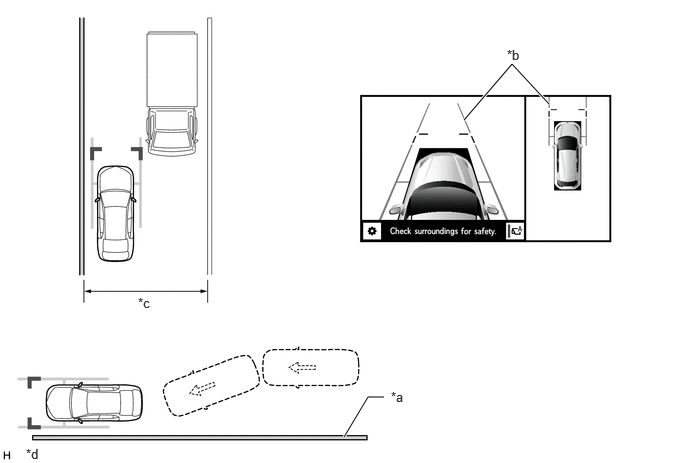
| *a | Wall, Fence, etc. | *b | Vehicle Width Parallel Line |
| *c | Narrow Road, etc. | *d | The illustration shown is an example only. The illustration may differ from the actual vehicle screen. |
Panoramic View and Rear View Mode
The composite overhead view (panoramic view) assembled from the front, rear, and side cameras is displayed simultaneously with the view from the rear television camera assembly located on the back door to assist the driver in checking the vehicle surroundings for safety when driving in reverse.
- HINT:
-
When the shift lever is in R and the panoramic view and rear view is displayed, pressing the door mirror open/close switch will change the display mode to panoramic view and front view.
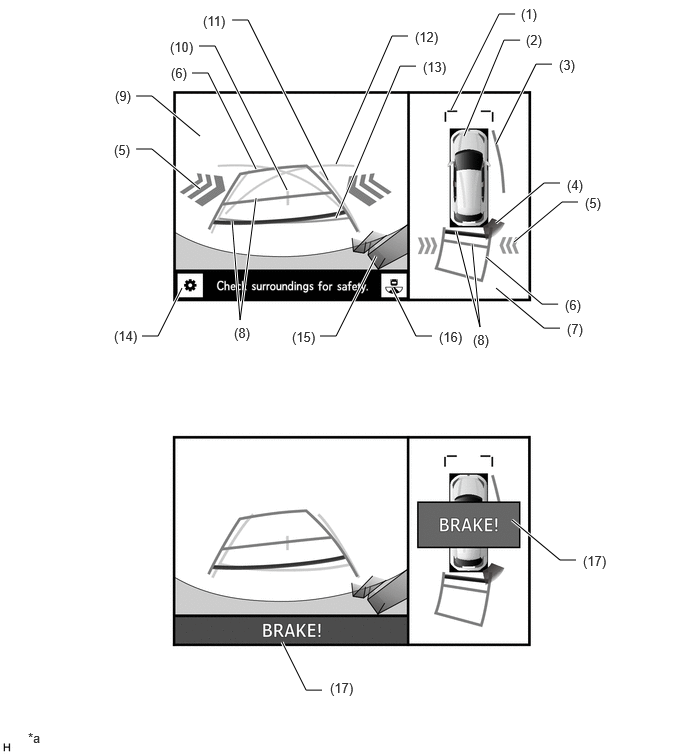
| *a | The illustration shown is an example only. The illustration may differ from the actual vehicle screen. | - | - |
| Item | Display | Description |
|---|---|---|
| (1) | Front Distance Guide Line | These lines are distance guide lines (blue) showing the distance forward from the edge of the front bumper. (Approximately 1.0 m (3.3 ft.)) |
| (2) | Panoramic View Vehicle Icon | Displays the vehicle position in the panoramic view. |
| (3) | Side Estimated Course Line | Displays the estimated course (yellow) calculated from the steering angle. |
| (4) | TOYOTA Parking Assist-sensor Detection Information | If a stationary object is detected when the TOYOTA parking assist-sensor is activated, the object position and the approximate distance between the vehicle and the stationary object is displayed. |
| (5) | RCTA Icon | If a vehicle in the rear side direction is detected when the blind spot monitor system (RCTA function) is activated, the RCTA icon is displayed. |
| (6) | Rear Estimated Course Line | Moves in sync with the steering wheel to indicate the estimated reverse course (yellow) of the vehicle. |
| (7) | Panoramic View | An overhead image of the vehicle created by combining images from the front, rear, left and right side television camera assemblies. |
| (8) | Rear Distance Guide Line | Shows the estimated distance rearward from the edge of the rear bumper. (Red at approximately 0.5 m, yellow at approximately 1.0 m) |
| (9) | Rear View | An image captured by the rear television camera of the area behind the vehicle. |
| (10) | Vehicle Center Guide Line | Indicates the center point (blue) between the vehicle width extension lines. |
| (11) | Rear Vehicle Width Extension Line | Shows the estimated course (blue) if the vehicle were driven straight backward.
(Not shown in estimated course line display mode when the steering angle is straight ahead) |
| (12) | Parking Assist Guide Line | Indicates the path (blue) the vehicle will follow if the driver turns the steering wheel fully and drives in reverse. |
| (13) | Rear Distance Guide Line | Shows the estimated distance (blue) rearward from the edge of the rear bumper. (Approximately 0.5 m (1.6 ft.))
(Not shown in estimated course line display mode when the steering angle is straight ahead) |
| (14) | Customization Setting Button | Configures the guide line display mode, vehicle body color, TOYOTA parking assist-sensor display, etc. |
| (15) | TOYOTA Parking Assist-sensor Detection Information (3D Display) | If a stationary object is detected the displayed when the TOYOTA parking assist-sensor is activated, the object position and the approximate distance between the vehicle and the stationary object is displayed in 3D if configured via the customization setting screen. |
| (16) | Display Mode Switch Button | Changes the display mode (panoramic view and rear view/rear view/wide rear view). |
| (17) | Parking Support Brake System Detection Display | Displayed when the parking support brake system detects that there is a possibility of a collision. |
Estimated Course Line Display Mode (Perpendicular Parking)
The estimated course lines inform the driver of the estimated course of the vehicle based on the current steering angle. When reversing, by turning the steering wheel so that the estimated course lines are correctly positioned with respect to the parking space lines, the driver can easily position the vehicle within the parking space.
The rear vehicle width extension lines can be used to determine whether the vehicle is parked straight in the parking space by confirming whether the parking space lines and rear vehicle width extension lines are crossed or parallel.
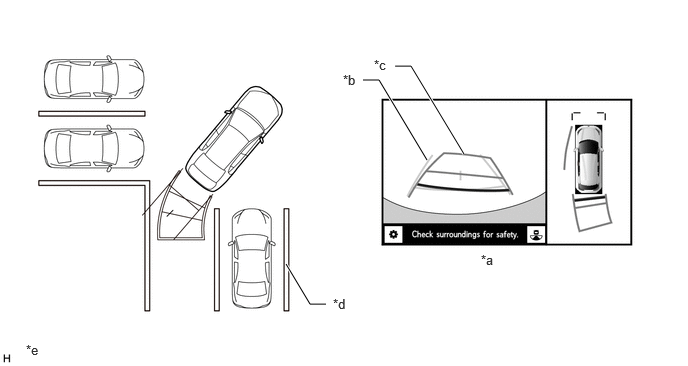
| *a | Panoramic View and Rear View | *b | Rear Vehicle Width Extension Line |
| *c | Rear Estimated Course Line | *d | Parking Space Line |
| *e | The illustration shown is an example only. The illustration may differ from the actual vehicle screen. | - | - |
Estimated Course Line Display Mode (Parallel Parking)
The estimated course lines inform the driver of the estimated course of the vehicle based on the current steering angle. When parallel parking, by turning the steering wheel so that the estimated course lines are correctly positioned with respect to the side of the road or parking space line, the driver can easily position the vehicle within the parking space.
The rear vehicle width extension lines can be used to determine whether the vehicle is parked straight in the desired parking position by confirming the status of the shoulder and parking space lines, etc., and rear vehicle width extension lines (whether crossed or parallel).
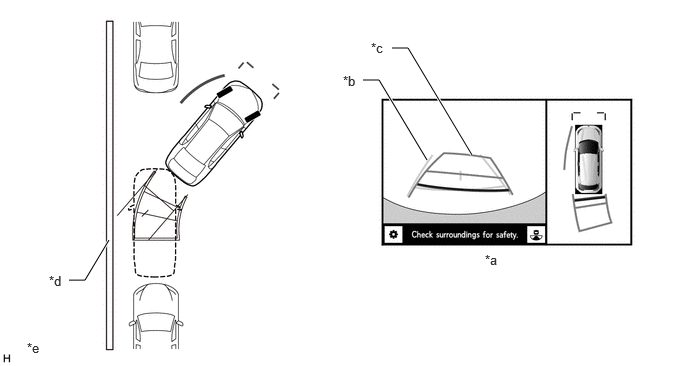
| *a | Panoramic View and Rear View | *b | Rear Vehicle Width Extension Line |
| *c | Rear Estimated Course Line | *d | Shoulder and Parking Space Lines, etc. |
| *e | The illustration shown is an example only. The illustration may differ from the actual vehicle screen. | - | - |
Parking Assist Guide Line Display Mode (Perpendicular Parking)
The parking assist guide lines inform the driver of the course of the vehicle when the steering wheel is turned to full lock while driving in reverse. By driving the vehicle in reverse until the parking assist guide lines align with the parking space line, the vehicle can be guided to the position at which the driver should start turning the steering wheel.
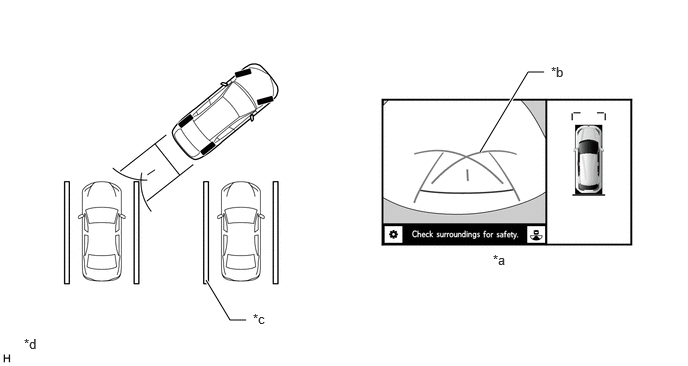
| *a | Panoramic View and Rear View | *b | Parking Assist Guide Line |
| *c | Shoulder and Parking Space Lines, etc. | *d | The illustration shown is an example only. The illustration may differ from the actual vehicle screen. |
Parking Assist Guide Line Display Mode (Parallel Parking)
The parking assist guide lines inform the driver of the course of the vehicle when the steering wheel is turned to full lock while driving in reverse. By driving the vehicle in reverse until the parking assist guide lines align with the side of the road or parking space line, the vehicle can be guided to the position at which the driver should start turning the steering wheel.
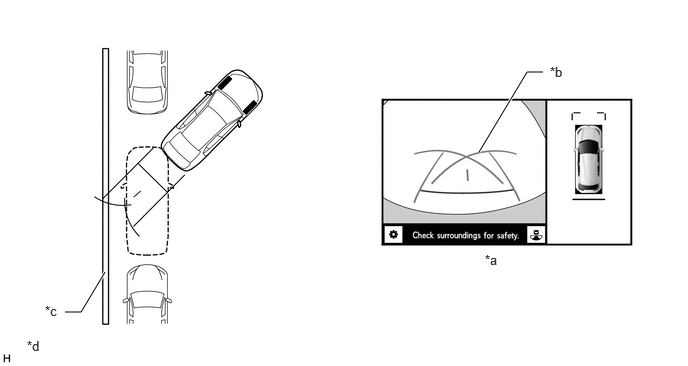
| *a | Panoramic View and Rear View | *b | Parking Assist Guide Line |
| *c | Shoulder and Parking Space Lines, etc. | *d | The illustration shown is an example only. The illustration may differ from the actual vehicle screen. |
Rear View/Wide Rear View
The image from the rear television camera assembly located on the back door is displayed to assist the driver in checking the vehicle surroundings for safety when driving in reverse. Rear View Display Contents (For illustrative purposes, all lines are shown)
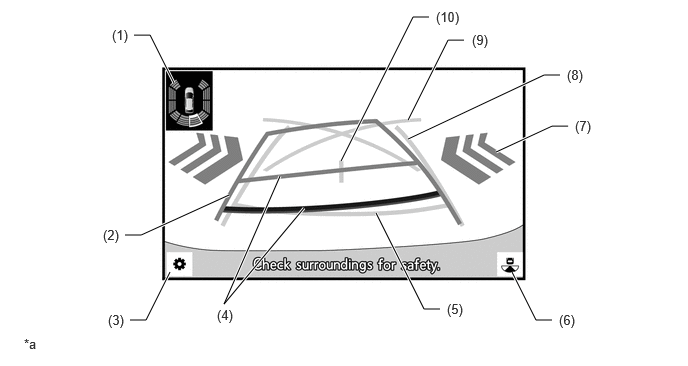
| *a | The illustration shown is an example only. The illustration may differ from the actual vehicle screen. | - | - |
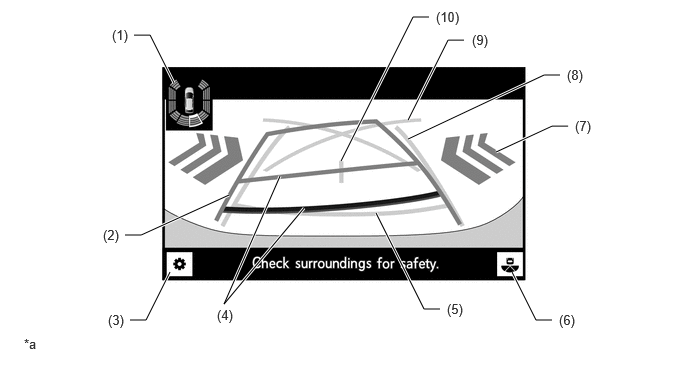
| *a | The illustration shown is an example only. The illustration may differ from the actual vehicle screen. | - | - |
| No. | Display | Description |
|---|---|---|
| (1) | TOYOTA Parking Assist-sensor Detection Information | If a stationary object is detected when the TOYOTA parking assist-sensor is activated, the object position and the approximate distance between the vehicle and the stationary object is displayed. |
| (2) | Rear Estimated Course Line | Displays the estimated course (yellow) calculated from the steering angle. |
| (3) | Customization Setting Button | Configures the guide line display mode, vehicle body color, TOYOTA parking assist-sensor display, etc. |
| (4) | Rear Distance Guide Line | Shows the estimated distance rearward from the edge of the rear bumper. (Red at approximately 0.5 m, yellow at approximately 1.0 m) |
| (5) | Rear Distance Guide Line | Shows the estimated distance (blue) rearward from the edge of the rear bumper. (Approximately 0.5 m (1.6 ft.))
(Not shown in estimated course line display mode when the steering angle is straight ahead) |
| (6) | Display Mode Switch Button | Changes the display mode (panoramic view and rear view/rear view/wide rear view). |
| (7) | RCTA Icon | If a vehicle in the rear side direction is detected when the blind spot monitor system (RCTA function) is activated, the RCTA icon is displayed. |
| (8) | Rear Vehicle Width Extension Line | Shows the estimated course (blue) if the vehicle were driven straight backward.
(Not shown in estimated course line display mode when the steering angle is straight ahead) |
| (9) | Parking Assist Guide Line | Indicates the path (blue) the vehicle will follow if the driver turns the steering wheel fully and drives in reverse. |
| (10) | Vehicle Center Guide Line | Indicates the center point (blue) between the vehicle width extension lines. |
Side View and Front View/Side View and Rear View
When the outer rear view mirrors are folded, instead of the panoramic view, the view from the side television camera assembly LH is displayed together with the front view or rear view to assist the driver in checking the vehicle surroundings for safety or parking the vehicle in a narrow space.
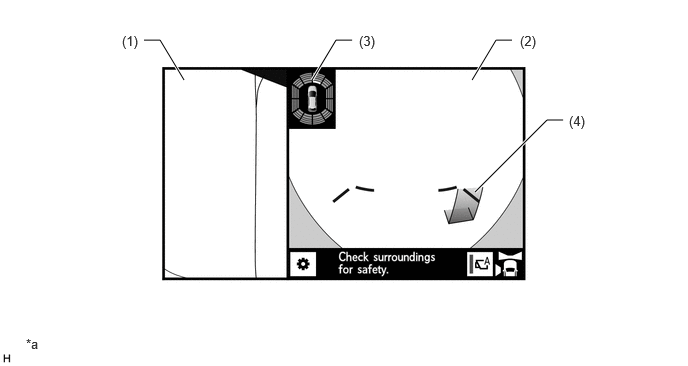
| *a | The illustration shown is an example only. The illustration may differ from the actual vehicle screen. | - | - |
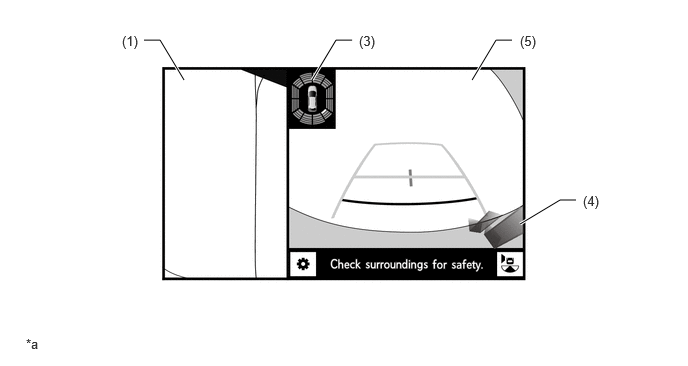
| *a | The illustration shown is an example only. The illustration may differ from the actual vehicle screen. | - | - |
| No. | Display | Description |
|---|---|---|
|
*1: Displayed contents are identical to the front view of the panoramic view and front view mode. *2: Displayed contents are identical to the rear view of the panoramic view and rear view mode. |
||
| (1) | Side View | An image captured by the side television camera assembly LH of the area to the side of the vehicle. |
| (2) | Front View*1 | An image captured by the front television camera assembly of the area in front of the vehicle. |
| (3) | TOYOTA Parking Assist-sensor Detection Information | If a stationary object is detected when the TOYOTA parking assist-sensor is activated, the object position and the approximate distance between the vehicle and the stationary object is displayed. |
| (4) | TOYOTA Parking Assist-sensor Detection Information (3D Display) | If a stationary object is detected the displayed when the TOYOTA parking assist-sensor is activated, the object position and the approximate distance between the vehicle and the stationary object is displayed in 3D if configured via the customization setting screen. |
| (5) | Rear View*2 | An image captured by the rear television camera assembly of the area behind the vehicle.
(Not shown in estimated course line display mode when the steering angle is straight ahead) |
Dual Side View
When the outer rear view mirrors are folded, this view displays images from the side television camera assemblies installed on either side of the vehicle to assist the driver in confirming the safety of the areas to the sides of the vehicle and avoiding contact with obstacles on narrow roads, etc.
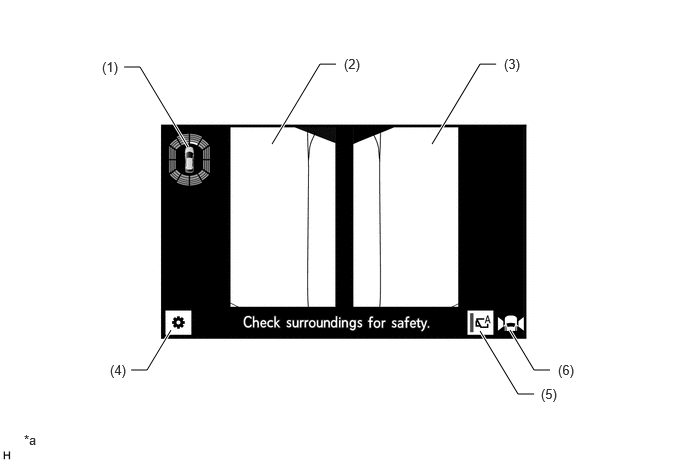
| *a | The illustration shown is an example only. The illustration may differ from the actual vehicle screen. | - | - |
| No. | Display | Description |
|---|---|---|
| (1) | TOYOTA Parking Assist-sensor Detection Information | If a stationary object is detected when the TOYOTA parking assist-sensor is activated, the object position and the approximate distance between the vehicle and the stationary object is displayed. |
| (2) | Side View (Front Left Side) | An image captured by the side television camera assembly LH of the area to the front left side of the vehicle. |
| (3) | Side View (Front Right Side) | An image captured by the side television camera assembly RH of the area to the front right side of the vehicle. |
| (4) | Customization Setting Button | Configures the guide line display mode, vehicle body color, TOYOTA parking assist-sensor display, etc. |
| (5) | Auto Mode Button | Can be used to turn the automatic display mode on and off. |
| (6) | Display Area Icon | Indicates that the dual side view is being displayed. |
Moving View
A simulated overhead image of the vehicle with an elevated diagonal perspective, created by combining images from the front, rear, left and right side television camera assemblies, which makes a simulated revolution around the vehicle to assist the driver in checking the vehicle surroundings for safety. After making one simulated revolution around the vehicle from an elevated diagonal perspective, the display changes to a simulated overhead perspective view.
By using the pause/continue rotation button, the driver can pause and resume the simulated revolution of the moving view whenever they want.
The moving view is displayed when all of the following conditions are met.
The shift lever is in P.
The TOYOTA parking assist-sensor is on.
The panoramic view monitor switch is pressed.
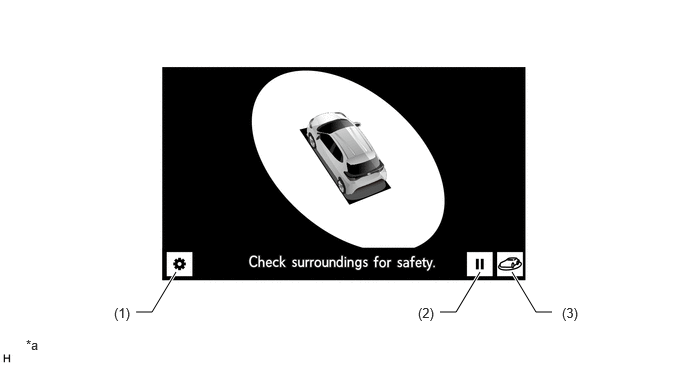
| *a | The illustration shown is an example only. The illustration may differ from the actual vehicle screen. | - | - |
| No. | Display | Description |
|---|---|---|
| (1) | Customization Setting Button | Configures the guide line display mode, vehicle body color, TOYOTA parking assist-sensor display, etc. |
| (2) | Pause/Continue Rotation Button | Enables the rotation of the display to be paused and resumed. |
| (3) | Perspective Select Switch | Allows changing between the moving view and see-through view. |
- HINT:
-
When the moving view is displayed, moving the shift lever away from P or R will change the display to the panoramic view and front view.
See-through View
A view made by combining images from the front, rear, left and right television camera assemblies to create a simulated view of the space surrounding the vehicle, reducing the blind spots from inside the vehicle to assist the driver in checking the vehicle surroundings for safety.
By using the pause/continue rotation button, the driver can pause and resume the simulated revolution of the see-through view whenever they want.
The see-through view is displayed when all of the following conditions are met.
The shift lever is in P.
The TOYOTA parking assist-sensor is on.
The panoramic view monitor switch is pressed.
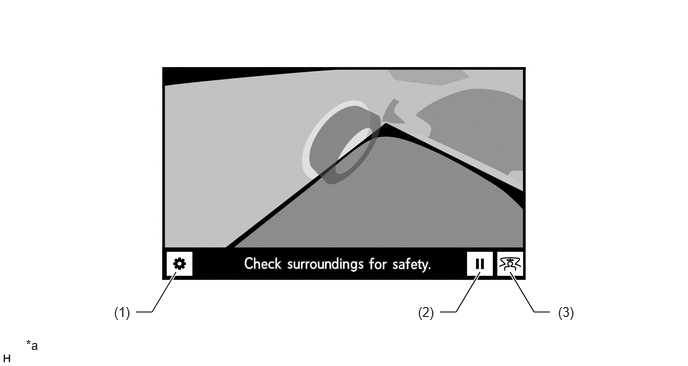
| *a | The illustration shown is an example only. The illustration may differ from the actual vehicle screen. | - | - |
| No. | Display | Description |
|---|---|---|
| (1) | Customization Setting Button | Configures the guide line display mode, vehicle body color, TOYOTA parking assist-sensor display, etc. |
| (2) | Pause/Continue Rotation Button | Enables the rotation of the display to be paused and resumed. |
| (3) | Perspective Select Switch | Allows changing between the see-through view and moving view. |
- HINT:
-
When the see-through view is displayed, moving the shift lever away from P or R will change the display to the panoramic view and front view.
Panoramic View Enlargement Function
When the panoramic view is displayed, if something appearing on the display is small and difficult to see, this function allows any of 4 areas near the vehicle corners to be enlarged on the display.
By selecting any of the 4 areas near the the vehicle corners on the panoramic view display, the selected area can be enlarged.
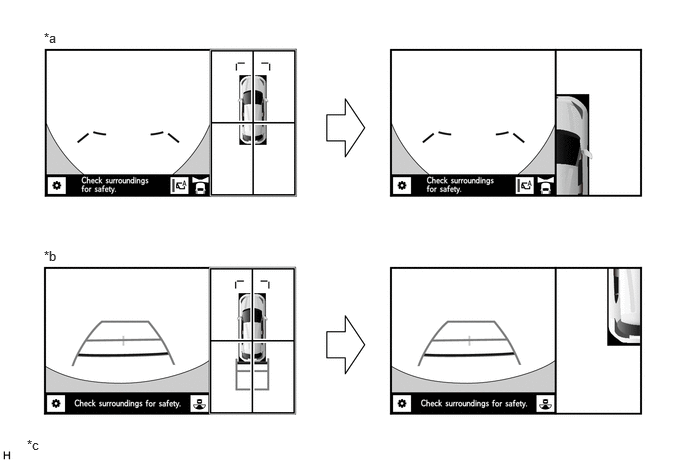
| *a | Panoramic View and Front View | *b | Panoramic View and Rear View |
| *c | The illustration shown is an example only. The illustration may differ from the actual vehicle screen. | - | - |
- HINT:
- ·
When the panoramic view and front view is being used with the shift lever in R, the panoramic view enlargement function cannot be used.
·The enlarged panoramic view display differs from the normal panoramic view in that guide lines are not shown.
When all of the following conditions are met, the panoramic view enlargement function can be used.
The vehicle speed is approximately 12 km/h or less.
The TOYOTA parking assist-sensor is on.
When any of the following conditions are met, the panoramic view enlargement function is automatically canceled.
The vehicle speed becomes approximately 12 km/h or more.
The TOYOTA parking assist-sensor is turned off.
Panoramic View Monitor System Screen Transition
The panoramic view monitor system uses the following screen transitions to assist the driver in confirming the conditions around the vehicle, and while driving at low speeds and when parking.
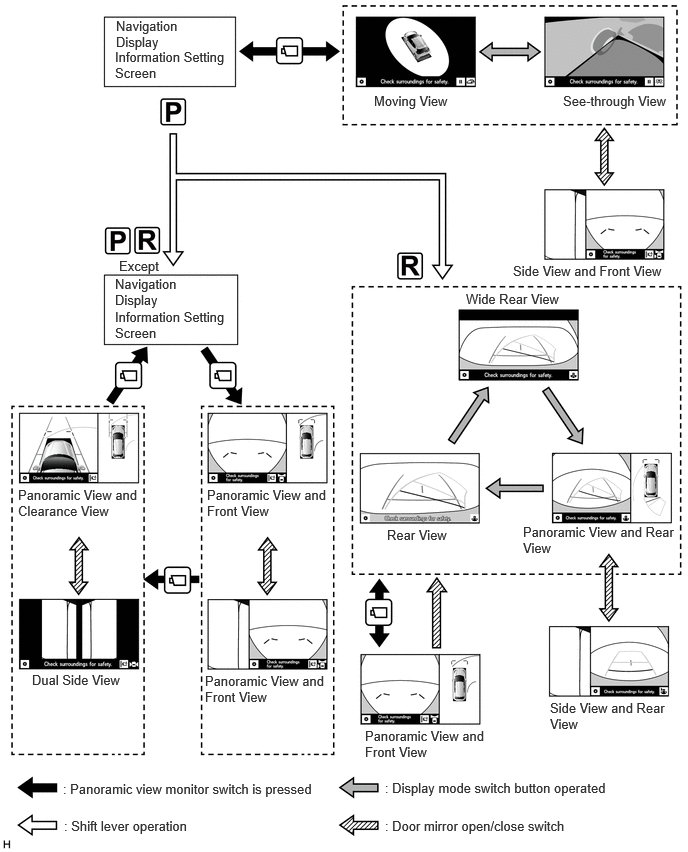
DIAGNOSIS
To make diagnosing the system easier, a diagnosis function is provided for enhanced serviceability. Connecting a diagnostic tool allows DTCs for malfunctioning areas to be read. For details, refer to the Repair Manual.