PARK ASSIST / MONITORING PANORAMIC VIEW MONITOR SWITCH INSPECTION
PROCEDURE

 84721B
1.INSPECT PANORAMIC VIEW MONITOR SWITCH
Check the resistance.
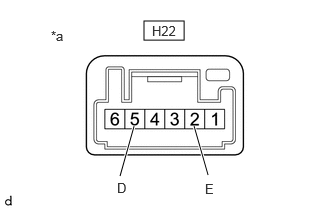
| *a | Component without harness connected
(Panoramic View Monitor Switch) |
Measure the resistance according to the value(s) in the table below.
- Standard Resistance:
Tester Connection Condition Specified Condition Click Location & Routing(H22)Location & Routingewd_type=routing;type=c;code=H22
Click Connector(H22)Instrument Panel>Instrument Panel Wire / Speaker Wire>Panoramic View Monitor Switchewd_type=component;type=c;code=H22;pinno=5,2
H22-5 (D) - H22-2 (E) Steering heater switch is pushed Below 1 Ω H22-5 (D) - H22-2 (E) Steering heater switch is not pushed 10 kΩ or higher
If the result is not as specified, replace the panoramic view monitor switch.
Check the illumination.
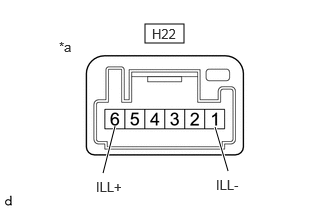
| *a | Component without harness connected
(Panoramic View Monitor Switch) |
Apply auxiliary battery voltage to the panoramic view monitor switch and check that the illumination.
- OK:
Tester Connection Condition Specified Condition Click Location & Routing(H22)Location & Routingewd_type=routing;type=c;code=H22
Click Connector(H22)Instrument Panel>Instrument Panel Wire / Speaker Wire>Panoramic View Monitor Switchewd_type=component;type=c;code=H22;pinno=6,1
H22-6 (ILL+) - H22-1 (ILL-) H22-6 (ILL+) → Auxiliary battery positive (+)
H22-1 (ILL-) → Auxiliary battery negative (-)Illumination illuminates
If the result is not as specified, replace the panoramic view monitor switch.