DOOR / HATCH POWER BACK DOOR SYSTEM Power Back Door cannot be Operated Using Kick Sensor
DESCRIPTION
When the kick door control sensor assembly detects a kick operation, it sends an operation signal to the multiplex network door ECU.
WIRING DIAGRAM
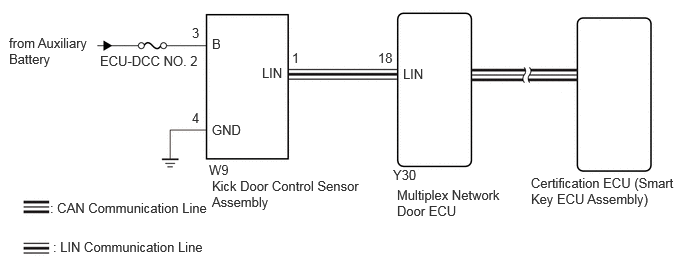
CAUTION / NOTICE / HINT
- NOTICE:
- ·
Before troubleshooting, make sure that the "Kick Sensor Function" customize setting is set to "ON" (The default is "ON").
Click hereVehicle Exterior>DOOR / HATCH>POWER BACK DOOR SYSTEM>CUSTOMIZE PARAMETERS
·Before troubleshooting, be sure to read Precautions for Hands Free Power Back Door.
Click hereVehicle Exterior>DOOR / HATCH>POWER BACK DOOR SYSTEM>PRECAUTION
·If the multiplex network door ECU has been removed and installed or replaced, or if any of the connectors has been disconnected, initialize the power back door system.
Click hereVehicle Exterior>DOOR / HATCH>POWER BACK DOOR SYSTEM>INITIALIZATION
·Inspect the fuses for circuits related to this system before performing the following inspection procedure.
·After the ignition switch is turned off, there may be a waiting time before disconnecting the negative (-) battery terminal.
Click hereGeneral>SETUP>WHEN DISCONNECTING OR RECONNECTING BATTERY TERMINAL>BEFORE DISCONNECTING BATTERY
·When disconnecting and reconnecting the battery.
Click hereGeneral>SETUP>WHEN DISCONNECTING OR RECONNECTING BATTERY TERMINAL>WORK PROCEDURE
- HINT:
-
When disconnecting and reconnecting the battery, there is an automatic learning function that completes learning when the respective system is used.
-
Click hereGeneral>SETUP>WHEN DISCONNECTING OR RECONNECTING BATTERY TERMINAL>AUTOMATIC LEARNING CHART
PROCEDURE
Check that the power back door function on the multi-information display in the combination meter assembly is set to ON.
Click hereVehicle Exterior>DOOR / HATCH>POWER BACK DOOR SYSTEM>CUSTOMIZE PARAMETERS
- Result:
Result Proceed to Power back door function on the multi-information display in the combination meter assembly is set to ON (power back door system operation is permitted) A Power back door function on the multi-information display in the combination meter assembly is set to OFF (power back door system operation is prohibited) B
A
B
Using the GTS, check that the customization setting "Kick Sensor Operation Function with ACC ON" is set to "Enable" (The default is "Enable").
Click hereVehicle Exterior>DOOR / HATCH>POWER BACK DOOR SYSTEM>CUSTOMIZE PARAMETERS
- Result:
Result Proceed to Using the GTS, the customization setting "Kick Sensor Operation Function with ACC ON" is set to "Enable" (Power back door system operation is permitted) A Using the GTS, the customization setting "Kick Sensor Operation with ACC ON" is set to "Disable" (Power back door system operation is prohibited) B
A
B
Check the operations of the power back door system other than the kick sensor function.
- Result:
Result Proceed to Power back door system operates normally A Power back door system does not operate normally B
A
B
Click hereVehicle Exterior>DOOR / HATCH>POWER BACK DOOR SYSTEM>Power Back Door cannot be Operated Frequently
Check for DTCs.
- Body Electrical > Back Door > Trouble Codes
- 50001 489
- OK:
DTC is not output.
- Result:
Proceed to OK NG
OK
NG
Read the Data List according to the display on the GTS.
- Body Electrical > Back Door > Data List
-
Tester Display Measurement Item Range Normal Condition Diagnostic Note Kick Sensor Status Kick Sensor condition signal Normal, Sensitivity Low (Noise), Stop (Foreign Objects), Sensitivity Low (Noise) & Stop (Foreign Objects), Stop (Battery Protection), Sensitivity Low (Noise) & Stop (Battery Protection), Stop (Foreign Objects) & Stop (Battery Protection) or Sensitivity Low (Noise) & Stop (Foreign Objects) & Stop (Battery Protection) Normal: Kick sensor detection status normal
Sensitivity Low (Noise): Kick sensor detection sensitivity decreased due to detection of noise in the past
Stop (Foreign Objects): Kick sensor detection stopped due to detection of foreign objects in the past
Stop (Battery Protection): Kick sensor detection stopped for battery protection after a high frequency of kick operations was detected in the past
Sensitivity Low (Noise) & Stop (Foreign Objects): More than one of the items above was displayed
Sensitivity Low (Noise) & Stop (Battery Protection): More than one of the items above was displayed
Stop (Foreign Objects) & Stop (Battery Protection): More than one of the items above was displayed
Sensitivity Low (Noise) & Stop (Foreign Objects) & Stop (Battery Protection): More than one of the items above was displayed
This item indicates past detection history.
- HINT:
- ·
Noise or foreign objects refer to changes in electrostatic capacitance that could not be judged to be kick operations.
·High frequency of kick operations refers to exceeding a certain number of kick operations per unit of time.
·If the cable is disconnected from the negative auxiliary battery terminal, or the connector of the kick door control sensor assembly is disconnected, the displayed contents will be reset.
- Body Electrical > Back Door > Data List
-
Tester Display Kick Sensor Status - 50003 489 1090
- Result:
Result Proceed to Normal A Other than the condition above B
A
B
Once the power back door system is again functioning normally in response to kick sensor operation, disconnect the cable from the negative (-) auxiliary battery terminal.
Reconnect the cable to the negative (-) battery terminal.
Read the Data List according to the display on the GTS.
- Body Electrical > Back Door > Data List
-
Tester Display Measurement Item Range Normal Condition Diagnostic Note Kick Sensor Status Kick Sensor condition signal Normal, Sensitivity Low (Noise), Stop (Foreign Objects), Sensitivity Low (Noise) & Stop (Foreign Objects), Stop (Battery Protection), Sensitivity Low (Noise) & Stop (Battery Protection), Stop (Foreign Objects) & Stop (Battery Protection) or Sensitivity Low (Noise) & Stop (Foreign Objects) & Stop (Battery Protection) Normal: Kick sensor detection status normal
Sensitivity Low (Noise): Kick sensor detection sensitivity decreased due to detection of noise in the past
Stop (Foreign Objects): Kick sensor detection stopped due to detection of foreign objects in the past
Stop (Battery Protection): Kick sensor detection stopped for battery protection after a high frequency of kick operations was detected in the past
Sensitivity Low (Noise) & Stop (Foreign Objects): More than one of the items above was displayed
Sensitivity Low (Noise) & Stop (Battery Protection): More than one of the items above was displayed
Stop (Foreign Objects) & Stop (Battery Protection): More than one of the items above was displayed
Sensitivity Low (Noise) & Stop (Foreign Objects) & Stop (Battery Protection): More than one of the items above was displayed
This item indicates past detection history.
- HINT:
- ·
Noise or foreign objects refer to changes in electrostatic capacitance that could not be judged to be kick operations.
·High frequency of kick operations refers to exceeding a certain number of kick operations per unit of time.
·If the cable is disconnected from the negative auxiliary battery terminal, or the connector of the kick door control sensor assembly is disconnected, the displayed contents will be reset.
- Body Electrical > Back Door > Data List
-
Tester Display Kick Sensor Status - 50003 489 1090
- Result:
Result Proceed to Normal A Other than the condition above B
A
B
Check that the power back door system functions normally in response to kick sensor operation.
- Result:
Result Proceed to Power back door system operates normally A Power back door system does not operate normally B
A
- HINT:
-
Kick sensor oscillation is suppressed to prevent incorrect kick sensor operation or to protect the battery, but this is not a malfunction.
B
Temporarily replace the kick door control sensor assembly with a new or normally functioning one.
- Result:
Proceed to NEXT
NEXT
Check that the power back door system functions normally in response to kick sensor operation.
- Result:
Result Proceed to Power back door system operates normally A Power back door system does not operate normally B
A
B