RM3700E
_59
Vehicle Exterior
_093706
DOOR / HATCH
_0444902
POWER BACK DOOR MAIN SWITCH
G
DOOR / HATCH POWER BACK DOOR MAIN SWITCH INSPECTION
PROCEDURE

 84966
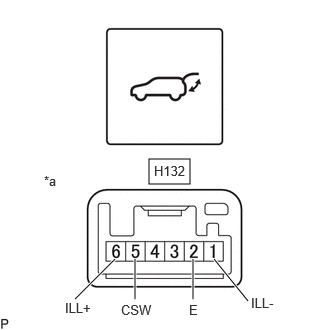
1.INSPECT POWER BACK DOOR CONTROL SWITCH
a.
1.552,1.656 1.979,1.917
0.427,0.26
0.781,3.115 1.198,2.698
true
2.01,3.115 2.01,2.698
true
1.406,3.115 1.406,2.698
true
2.583,3.135 2.229,2.698
true
2.615,3.073 2.969,3.302
0.354,0.229
10
false
ILL-
1.604,1.698 1.99,1.979
0.385,0.281
10
false
H132
1.26,3.146 1.76,3.396
0.5,0.25
10
false
CSW
0.677,3.125 1.031,3.406
0.354,0.281
10
false
ILL+
0.458,1.802 0.771,1.958
0.313,0.156
10
false
*a
1.969,3.146 2.469,3.396
0.5,0.25
10
false
E
| *a | Component without harness connected
(Power Back Door Control Switch) |
Check the switch.
i.
Measure the resistance according to the value(s) in the table below.
- Standard Resistance:
Tester Connection Condition Specified Condition Click Location & Routing(H132)Location & Routingewd_type=routing;type=c;code=H132
Click Connector(H132)Instrument Panel>Instrument Panel Wire / Speaker Wire>Power Back Door Control Switchewd_type=component;type=c;code=H132;pinno=5,2
H132-5 (CSW) - H132-2 (E) Pushed (ON) Below 1 Ω H132-5 (CSW) - H132-2 (E) Not Pushed (OFF) 10 kΩ or higher
If the result is not as specified, replace the power back door control switch.
b.
Check the switch illumination.
i.
Apply auxiliary battery voltage to the switch connector and check that the power back door control switch illuminates.
- OK:
Auxiliary Battery Condition Specified Condition Auxiliary battery positive (+) → Terminal H132-6 (ILL+)
Auxiliary battery negative (-) → Terminal H132-1 (ILL-)Illumination illuminates
If the result is not as specified, replace the power back door control switch.