 |
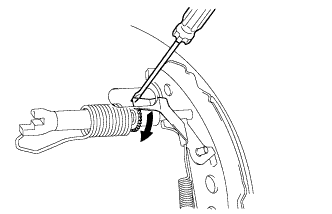
Remove the hole plug, and turn the adjuster to expand the shoe until the drum locks.
 | Expand |
PARKING BRAKE SYSTEM (for Hatchback) > ADJUSTMENT |
| 1. INSPECT PARKING BRAKE LEVER TRAVEL |
Slowly pull the parking brake lever to the fully applied position, counting the number of clicks.
| Rear Brake Type | Number of Clicks |
| Disc | 6 to 9 |
| Drum | 8 to 11 |
| 2. ADJUST PARKING BRAKE LEVER TRAVEL (for Rear Drum Brake) |
Remove the rear console box (Click here).
|
Remove the hole plug, and turn the adjuster to expand the shoe until the drum locks.
| Expand |
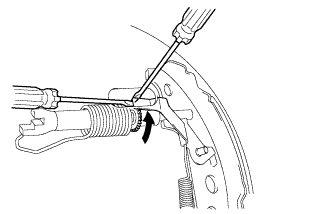 |
Hold the automatic adjust lever away from the adjuster, and contract the brake shoe by turning the adjust bolt using another screwdriver until the drum can rotate smoothly.
| Contract |
Check that there is no brake drag against the shoe.
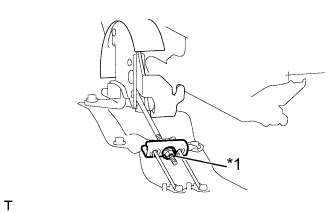 |
Turn the lock nut until the parking brake lever travel is corrected to within the specified range.
| *1 | Lock nut |
Operate the parking brake lever 3 to 4 times, and check the parking brake lever travel.
Install the rear console box (Click here).
| 3. ADJUST PARKING BRAKE LEVER TRAVEL (for Rear Disc Brake) |
Remove the rear console box (Click here).
|
Turn the lock nut until the parking brake lever travel is corrected to within the specified range.
| *1 | Lock nut |
Operate the parking brake lever 3 to 4 times, and check the parking brake lever travel.
Check whether the parking brake drags or not.
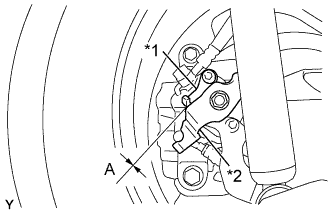 |
Release the parking brake lever and check that the clearance measurement between the rear disc brake cylinder operation lever and the stopper is within the specified range.
| *1 | Stopper |
| *2 | Operation Lever |
Install the rear console box (Click here).
| 4. INSPECT BRAKE WARNING LIGHT |
When operating the parking brake lever, check that the brake warning light illuminates.