TELEMATICS TELEMATICS SYSTEM DETAILS MANUAL (SOS) SWITCH INDICATOR
CONSTRUCTION
When the ignition switch is turned ON the manual (SOS) switch red indicator illuminates for 10 seconds and then turns off. Then, the manual (SOS) switch green indicator will illuminate for 2 seconds. Each indicator light illuminates, blinks or turns off depending on the mode type.
When the ignition switch is turned off, the manual (SOS) switch red indicator and manual (SOS) switch green indicator turn off. However, if the ignition switch is turned off when an automatic emergency call is in progress, the call continues and the indicator lights continue operating.
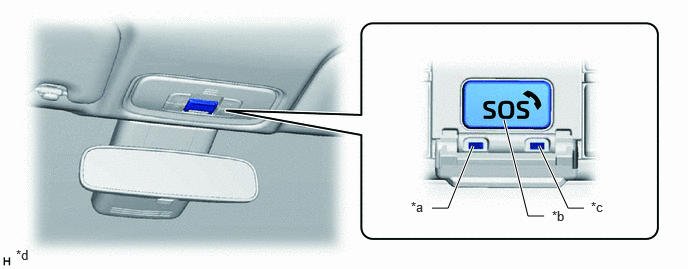
| *a | Manual (SOS) Switch Green Indicator | *b | Manual (SOS) Switch (Mayday Switch Assembly) |
| *c | Manual (SOS) Switch Red Indicator | *d | The illustrations shown are examples only. |
Indicators shown in each mode are as follows:
| Indicator Light | Operation Condition | |
|---|---|---|
| Green | Red | |
|
*: When live mode is valid, turns off after illuminating for 1 second. |
||
| ON | OFF* | The system is operating |
| OFF | ON | ·
A related device is malfunctioning. ·
The back-up battery (mobilephone battery) needs to be replaced. |
| Blinks | OFF | An emergency call is being performed. |
| OFF | Blinks | An emergency call has failed. |
| OFF | OFF | The ignition switch is off. |