PRE-COLLISION PRE-COLLISION SYSTEM DETAILS INDICATOR LIGHT/WARNING LIGHT/MULTI DISPLAY
OPERATION
Warning Indication
The combination meter assembly uses the multi-information display, PCS warning light and buzzer to provide the driver with pre-collision system malfunction and indications.
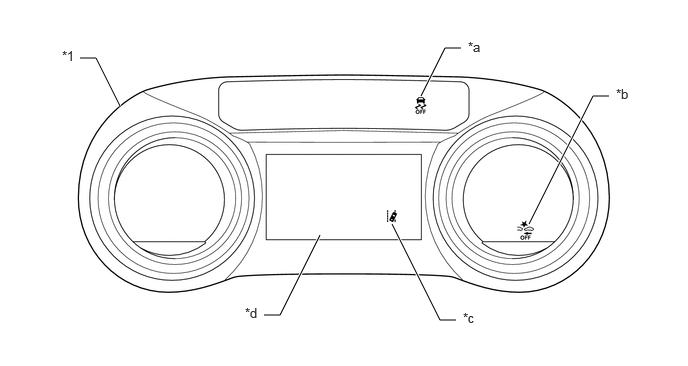
| *1 | Combination Meter Assembly
·
Buzzer |
- | - |
| *a | VSC OFF Indicator Light | *b | PCS Warning Light |
| *c | LTA Indicator (Models with Emergency Steering Assist) | *d | Multi-information Display |
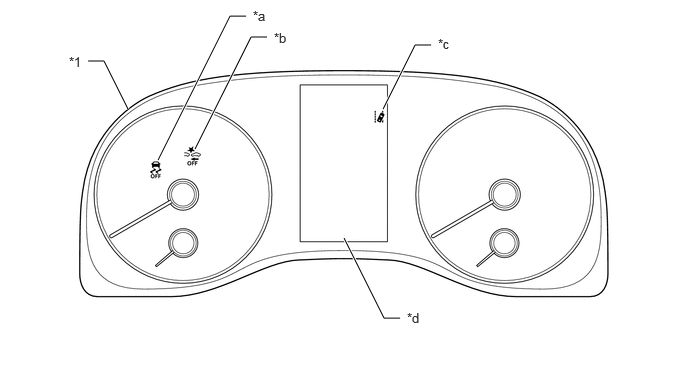
| *1 | Combination Meter Assembly
·
Buzzer |
- | - |
| *a | VSC OFF Indicator Light | *b | PCS Warning Light |
| *c | LTA Indicator (Models with Emergency Steering Assist) | *d | Multi-information Display |
Pre-collision System Operation Status Display
If the forward recognition camera determines that the possibility of a collision is high, it sends a signal to the combination meter assembly and headup display (meter mirror sub-assembly)*. Upon receiving this signal, the combination meter assembly and headup display (meter mirror sub-assembly)* indicates a warning using the multi-information display, headup display (meter mirror sub-assembly)* and buzzer.
*: Models with headup display
| Multi-information Display
Headup Display (Meter Mirror Sub-assembly)* |
PCS Warning Light | Buzzer |
|---|---|---|
|
*: Models with headup display |
||
| BRAKE! | Does not illuminate | Sounds continuously |
When emergency steering assist operates, the LTA indicator in the combination meter assembly illuminates (green). (Models with emergency steering assist)
Indicator Display when Pre-collision System Off
When the pre-collision system is turned off in the settings menu of the multi-information display, the PCS warning light in the combination meter assembly illuminates and a message is displayed on the multi-information display.
| Multi-information Display | PCS Warning Light |
|---|---|
| Pre-Collision System OFF | Illuminates |
When pre-collision braking assist, pre-collision braking and emergency steering assist* operation are turned off using the VSC OFF switch, the VSC OFF indicator light and PCS warning light in the combination meter assembly illuminate, and a message is displayed on the multi-information display.
*: Models with emergency steering assist
| Multi-information Display | VSC OFF Indicator Light | PCS Warning Light |
|---|---|---|
| VSC Turned OFF Pre-Collision Brake System Unavailable | Illuminates | Illuminates |
Pre-collision System Warning Display
When the system is not available, the following warning occurs to warn the driver.
| Multi-information Display | Detail | PCS Warning Light | Buzzer |
|---|---|---|---|
| Pre-Collision System Malfunction Visit Your Dealer | This message appears when the forward recognition camera detects a system malfunction | Illuminates | Sounds once |
| Pre-Collision System Unavailable See Owner's Manual | ·
Millimeter wave radar sensor assembly low voltage malfunction ·
Other millimeter wave radar sensor assembly malfunction |
Illuminates | - |
| Pre-Collision System Out of Temperature Range Unavailable See Owner's Manual | Millimeter wave radar sensor assembly temperature malfunction | Illuminates | - |
| Pre-Collision System Radar Sensor Blocked Unavailable Clean Radar Sensor | Dirty center mark of upper radiator grille or millimeter wave radar sensor assembly | Illuminates | - |
| Pre-Collision System Radar In Self Calibration Unavailable See Owner's Manual | Millimeter wave radar sensor assembly misaligned | Illuminates | - |
| Front Camera Unavailable See Owner's Manual | ·
Abnormal forward recognition camera voltage ·
Other forward recognition camera malfunction |
Illuminates | - |
| Front Camera Out of Temperature Range Unavailable Wait until Normal Temperature | Forward recognition camera temperature outside of operational range | Illuminates | - |
| Front Camera Low Visibility Unavailable See Owner's Manual | Dirty or fogged windshield glass over the forward recognition camera | Illuminates | - |
Changing Settings of Pre-collision System
Enabling/disabling the pre-collision system
The pre-collision system can be enabled/disabled on setting display screen of the multi-information display.
- HINT:
-
When the pre-collision system has been disabled using this setting, it will automatically be re-enabled after the ignition switch has been turned off and then back to ON (IG) again.
If the system is disabled, the PCS warning light will turn on and a message will be displayed on the multi-information display.
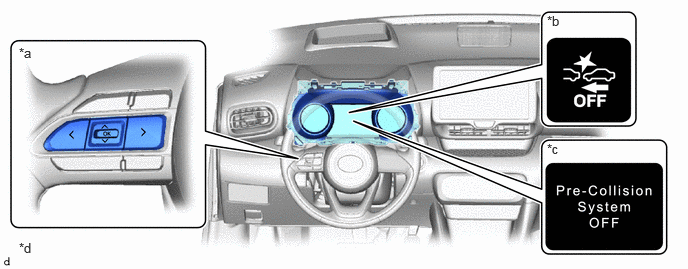
| *a | Steering Pad Switch Assembly | *b | PCS Warning Light |
| *c | Multi-information Display | *d | The illustrations shown are examples only. |
Changing the pre-collision warning timing
The pre-collision warning timing can be changed on setting display screen of the multi-information display.
- HINT:
- ·
The warning timing setting is retained when the ignition switch is turned off. However, if the pre-collision system is disabled and re-enabled, the operation timing will return to the default setting (middle).
·If the pre-collision warning timing is changed, emergency steering assist timing will also be changed accordingly. If late is selected, emergency steering assist would not operate in case of an emergency. (Models with emergency steering assist)
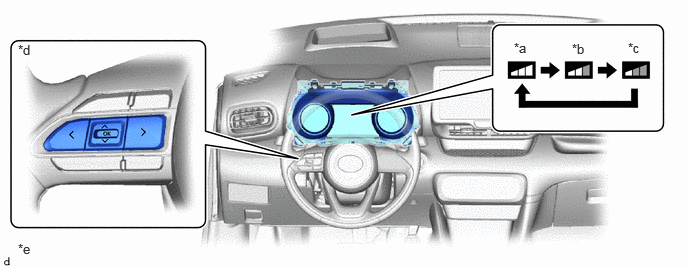
| *a | Early | *b | Middle (This is the default setting.) |
| *c | Late | *d | Steering Pad Switch Assembly |
| *e | The illustrations shown are examples only. | - | - |