LIGHTING (EXT) LIGHTING SYSTEM Front Fog Light Circuit
DESCRIPTION
The main body ECU (multiplex network body ECU) controls the front fog lights.
WIRING DIAGRAM
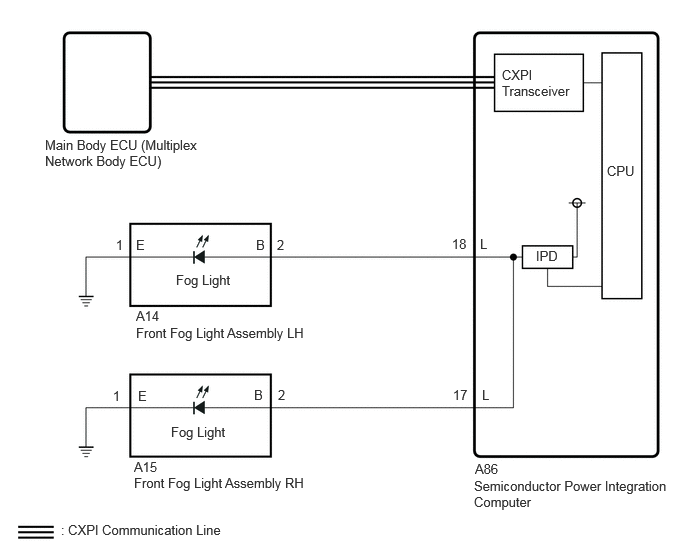
CAUTION / NOTICE / HINT
- NOTICE:
- ·
Before replacing the main body ECU (multiplex network body ECU), refer to Service Bulletin.*1
·First, confirm that there is no malfunction in the power integration system. Refer to the How to Proceed with Troubleshooting procedure.
·First perform the communication function inspections in How to Proceed with Troubleshooting to confirm that there are no CAN communication malfunctions before troubleshooting this symptom.
Click hereVehicle Exterior>LIGHTING (EXT)>LIGHTING SYSTEM>HOW TO PROCEED WITH TROUBLESHOOTING
·First perform the communication function inspections in How to Proceed with Troubleshooting to confirm that there are no CXPI communication malfunctions before troubleshooting this symptom.
Click hereVehicle Exterior>LIGHTING (EXT)>LIGHTING SYSTEM>HOW TO PROCEED WITH TROUBLESHOOTING
*1: w/ Entry and Start System
PROCEDURE
Turn the light control switch to the TAIL position.
Turn the front fog light switch on.
Using the GTS, read the Data List.
- Body Electrical > Power Integration No.1 > Data List
-
Tester Display Measurement Item Range Normal Condition Diagnostic Note Front Fog Light Fuse Shut Off Status Front fog light fuse condition OFF or ON OFF: Front fog light fuse not shut off
ON: Front fog light fuse shut off·Light control switch in tail position
·w/ Front Fog Light
- Body Electrical > Power Integration No.1 > Data List
-
Tester Display Front Fog Light Fuse Shut Off Status - 50003 473 417
- OK:
The Data List value displays "OFF".
- Result:
Proceed to OK NG
OK
NG
Using the GTS, read the Data List.
- Body Electrical > Power Integration No.1 > Data List
-
Tester Display Measurement Item Range Normal Condition Diagnostic Note Front Fog Light Output Signal Front fog light output OFF or ON OFF: Front fog light is not output
ON: Front fog light is output·Light control switch in tail position
·w/ Front Fog Light
- Body Electrical > Power Integration No.1 > Data List
-
Tester Display Front Fog Light Output Signal - 50003 473 415
- OK:
Display changes according to the front fog light switch operation.
- Result:
Proceed to OK NG
OK
NG
Disconnect the A14 front fog light assembly LH connector.
Turn the front fog light switch off.
Turn the front fog light switch on.
Using the GTS, read the Data List.
- Body Electrical > Power Integration No.1 > Data List
-
Tester Display Measurement Item Range Normal Condition Diagnostic Note Front Fog Light Fuse Shut Off Status Front fog light fuse condition OFF or ON OFF: Front fog light fuse not shut off
ON: Front fog light fuse shut off·Light control switch in tail position
·w/ Front Fog Light
- OK:
The Data List value displays "OFF".
- Result:
Proceed to OK NG
OK
NG
Disconnect the A15 front fog light assembly RH connector.
Turn the front fog light switch off.
Turn the front fog light switch on.
Using the GTS, read the Data List.
- Body Electrical > Power Integration No.1 > Data List
-
Tester Display Measurement Item Range Normal Condition Diagnostic Note Front Fog Light Fuse Shut Off Status Front fog light fuse condition OFF or ON OFF: Front fog light fuse not shut off
ON: Front fog light fuse shut off·Light control switch in tail position
·w/ Front Fog Light
- OK:
The Data List value displays "OFF".
- Result:
Proceed to OK NG
OK
NG
Disconnect the A14 front fog light assembly LH connector.
Disconnect the A15 front fog light assembly RH connector.
Disconnect the cable from the negative (-) auxiliary battery terminal.
Disconnect the A86 semiconductor power integration computer connector.
Measure the resistance according to the value(s) in the table below.
- Standard Resistance:
Tester Connection Condition Specified Condition A14-2 (B) or A86-18 (L) - Body ground Always 10 kΩ or higher A15-2 (B) or A86-17 (L) - Body ground Always 10 kΩ or higher
- Result:
Proceed to OK NG
OK
NG