RM36W0E
_51
Engine / Hybrid System
_089410
M15A-FXE STARTING
_0424579
POWER SWITCH
G
M15A-FXE STARTING POWER SWITCH INSPECTION
PROCEDURE

 89611
1.INSPECT POWER SWITCH
a.
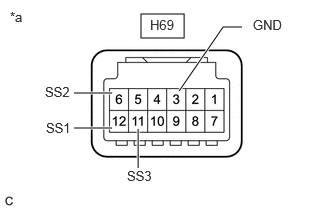
Check the resistance.
i.
1.469,0.146 1.917,0.396
0.448,0.25
1.865,0.948 2.323,0.281
2.323,0.281 2.521,0.281
true
1.167,1.333 0.771,1.333
true
1.438,1.75 1.438,1.344
true
1.167,0.969 0.771,0.969
true
0.104,0.094 0.417,0.25
0.313,0.156
10
false
*a
2.635,0.177 3.344,0.5
0.708,0.323
10
false
GND
0.479,1.25 1.01,1.5
0.531,0.25
10
false
SS1
0.469,0.875 1,1.125
0.531,0.25
10
false
SS2
1.323,1.75 1.854,2
0.531,0.25
10
false
SS3
1.563,0.177 2.271,0.5
0.708,0.323
10
false
H69
| *a | Component without harness connected
(Power Switch) |
Measure the resistance according to the value(s) in the table below.
- Standard Resistance:
Tester Connection Condition Specified Condition H69-12(SS1) - H69-3(GND)
H69-6(SS2) - H69-3(GND)
H69-11(SS3) - H69-3(GND)Not pushed 10 kΩ or higher Pushed Below 1 Ω
If the result is not as specified, replace the power switch.
b.
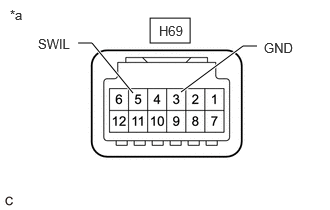
Check the LED illumination.
i.
1.563,0.188 1.979,0.448
0.417,0.26
1.885,0.958 2.531,0.479
2.531,0.479 2.677,0.479
true
1.385,0.969 0.958,0.448
0.958,0.448 0.813,0.448
true
2.75,0.417 3.365,0.615
0.615,0.198
10
false
GND
0.396,0.375 1.01,0.573
0.615,0.198
10
false
SWIL
0.104,0.073 0.719,0.271
0.615,0.198
10
false
*a
1.656,0.24 2.271,0.438
0.615,0.198
10
false
H69
| *a | Component without harness connected
(Power Switch) |
Apply battery voltage between the terminals of the power switch and check the illumination condition of the power switch indicator light.
- OK:
Tester Connection Condition Specified Condition H69-5(SWIL) - H69-3(GND) H69-5(SWIL) - Auxiliary battery positive (+)
H69-3(GND) - Auxiliary battery negative (-)Illuminates
- HINT:
- ·
If the positive (+) lead and the negative (-) lead are incorrectly connected, the power switch indicator light will not illuminate.
·If the voltage is too low, the power switch indicator light will not illuminate.
If the result is not as specified, replace the power switch.