LIGHTING (EXT) LIGHTING SYSTEM Automatic High Beam System does not Operate or Operation Indicator does not Illuminate
DESCRIPTION
The main body ECU (multiplex network body ECU) controls the automatic high beam system based on signals received from the forward recognition camera.
WIRING DIAGRAM
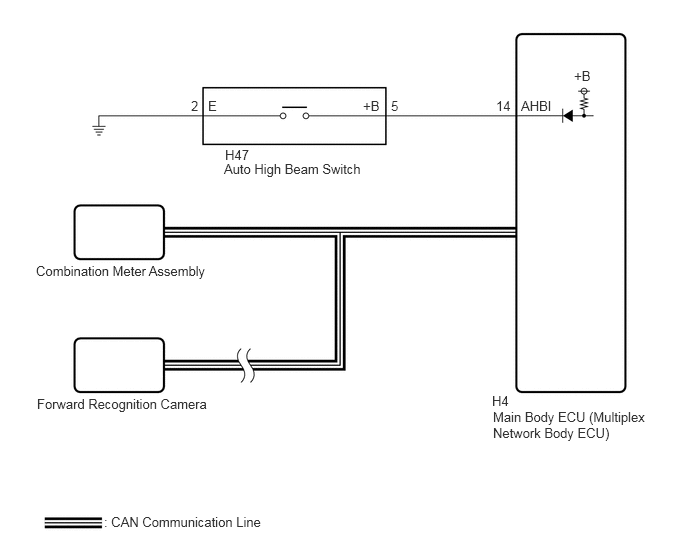
CAUTION / NOTICE / HINT
- NOTICE:
- ·
Before replacing the main body ECU (multiplex network body ECU), refer to Service Bulletin.*1
·When replacing the forward recognition camera, always replace it with a new one. If a forward recognition camera which was installed to another vehicle is used, the information stored in the forward recognition camera will not match the information from the vehicle. As a result, a DTC may be stored.
·If the forward recognition camera has been replaced with a new one, be sure to perform Forward Recognition Camera Learning.
Sequential recognition: Click hereEngine / Hybrid System>CRUISE CONTROL>FRONT CAMERA>TARGET ADJUSTMENT(SEQUENTIAL RECOGNITION)
One time recognition: Click hereEngine / Hybrid System>CRUISE CONTROL>FRONT CAMERA>TARGET ADJUSTMENT(ONE TIME RECOGNITION)
Driving Adjustment: Click hereEngine / Hybrid System>CRUISE CONTROL>FRONT CAMERA>DRIVING ADJUSTMENT
·Before performing troubleshooting, check that the low beam headlights and high beam headlights illuminate correctly.
·When replacing the combination meter assembly, always replace it with a new one. If a combination meter assembly which was installed to another vehicle is used, the information stored in it will not match the information from the vehicle and a DTC may be stored.
·If the forward recognition camera cannot operate due to high vehicle interior temperatures, bad weather (rain, fog, etc.) or fogged up or dirty glass, the automatic high beam system will not operate and the automatic high beam indicator will not illuminate.
·Before performing troubleshooting, check that the front radar sensor system operates correctly.
Click hereEngine / Hybrid System>CRUISE CONTROL>FRONT RADAR SENSOR SYSTEM>HOW TO PROCEED WITH TROUBLESHOOTING
*1: w/ Entry and Start System
PROCEDURE
Enter the following menus: Chassis / Front Recognition Camera / Data List.
Read the Data List according to the display on the GTS.
- Chassis > Front Recognition Camera > Data List
-
Tester Display Measurement Item Range Normal Condition Diagnostic Note Front Recognition Camera High Temperature 2 Forward recognition camera condition Not High Temperature or High Temperature Not High Temperature: 65°C (149°F) or lower
High Temperature: 65°C (149°F) or higherIf this item is "High Temperature", the automatic high beam system will be temporarily unavailable. If this does not improve even if the inside of the vehicle is left cooled for at least 10 minutes, the forward recognition camera may be malfunctioning.
- HINT:
-
In summertime, the windshield glass may reach 100°C (212°F) or higher
- Chassis > Front Recognition Camera > Data List
-
Tester Display Front Recognition Camera High Temperature 2 - 50003 430 13
- OK:
"Not High Temperature" is displayed on the GTS.
- HINT:
-
If "High Temperature" is displayed, move the vehicle to a cool place and allow the temperature of the forward recognition camera to decrease before continuing with troubleshooting.
- Result:
Proceed to OK NG
OK
NG
Check the operation of the automatic high beam indicator light.
Turn the ignition switch to ON.
Turn the light control switch to the AUTO or HEAD position.
Cover the automatic light control sensor to turn the low beam headlights on.
Move the dimmer switch to the low position.
Press the auto high beam switch.
- Result:
Result Proceed to OK (The automatic high beam indicator light and the auto high beam switch indicator illuminate) A NG (Automatic high beam indicator light does not illuminate) B NG (Auto high beam switch indicator does not illuminate) C NG (Automatic high beam indicator light and auto high beam switch indicator do not operate) D
A
B
C
D
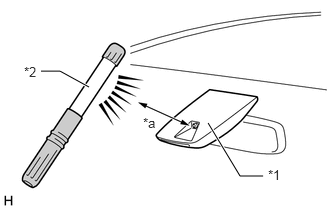
| *1 | Forward Recognition Camera
(Automatic High Beam Sensor) |
| *2 | Work Light or Equivalent |
| *a | 100 mm or less |
Shine a light on the automatic high beam sensor (forward recognition camera).
- HINT:
-
If troubleshooting is being performed in a bright area, such as outside on a sunny day, it will not be necessary to perform this step.
Enter the following menus: Body Electrical / Main Body / Data List.
Read the Data List according to the display on the GTS.
- HINT:
-
As it may take time for the values in the Data List to change, wait at least 10 seconds before reading the Data List.
- Body Electrical > Main Body > Data List
-
Tester Display Measurement Item Range Normal Condition Diagnostic Note Automatic High Beam Headlights Sensor Detection Status Automatic high beam sensor state past 1 Undetected, N/A, No sens, Headlight, Taillight, Speed, Daytime, Village, Other sens, Change, Out of aim, SAE Mod, Aim adjust or LIN Err Condition can be displayed -
- Body Electrical > Main Body > Data List
-
Tester Display Automatic High Beam Headlights Sensor Detection Status - 50003 449 119
- OK:
"Daytime" is displayed on the GTS.
- Result:
Proceed to OK NG
OK
NG
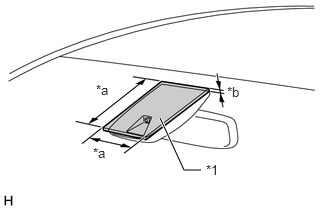
| *1 | Cardboard or Equivalent Object |
| *a | 150 mm or more |
| *b | 3 mm or more |
Cover the automatic high beam sensor with an opaque object, such as cardboard.
- NOTICE:
- ·
Make sure that there is no clearance between the cardboard or equivalent object and the area of the windshield glass in front of the automatic high beam sensor.
·If there is any clearance, light may shine on the automatic high beam sensor and the value of the Data List will not change.
Enter the following menus: Body Electrical / Main Body / Data List.
Read the Data List according to the display on the GTS.
- HINT:
-
As it may take time for the values in the Data List to change, wait at least 10 seconds before reading the Data List.
- Body Electrical > Main Body > Data List
-
Tester Display Measurement Item Range Normal Condition Diagnostic Note Automatic High Beam Headlights Sensor Detection Status Automatic high beam sensor current state Undetected, N/A, No sens, Headlight, Taillight, Speed, Daytime, Village, Other sens, Change, Out of aim, SAE Mod, Aim adjust or LIN Err Condition can be displayed -
- Body Electrical > Main Body > Data List
-
Tester Display Automatic High Beam Headlights Sensor Detection Status - 50003 449 119
- OK:
"Speed" is displayed on the GTS.
- Result:
Proceed to OK NG
OK
Click hereGeneral>INTRODUCTION>HOW TO TROUBLESHOOT ECU CONTROLLED SYSTEMS>HOW TO PROCEED WITH TROUBLESHOOTING
NG
Enter the following menus: Body Electrical / Combination Meter / Active Test.
Perform the Active Test according to the display on the GTS.
- Body Electrical > Combination Meter > Active Test
-
Tester Display Measurement Item Control Range Diagnostic Note Automatic High Beam Indicator (Green) Automatic high beam indicator light OFF or ON -
- Body Electrical > Combination Meter > Active Test
-
Tester Display Automatic High Beam Indicator (Green) - 50004 409 35
- OK:
The automatic high beam indicator illuminates and turns off.
- Result:
Proceed to OK NG
OK
for LHD:
Click herePower Source / Network>POWER DISTRIBUTION>MAIN BODY ECU (for LHD)>REMOVAL
for RHD:
Click herePower Source / Network>POWER DISTRIBUTION>MAIN BODY ECU (for RHD)>REMOVAL
NG
Enter the following menus: Body Electrical / Main Body / Data List.
Read the Data List according to the display on the GTS.
- Body Electrical > Main Body > Data List
-
Tester Display Measurement Item Range Normal Condition Diagnostic Note Auto High Beam Main Switch Auto high beam switch signal OFF or ON OFF: Auto high beam switch not pressed
ON: Auto high beam switch pressed-
- Body Electrical > Main Body > Data List
-
Tester Display Auto High Beam Main Switch - 50003 449 107
- OK:
Normal conditions listed above are displayed.
- Result:
Proceed to OK NG
OK
NG
Enter the following menus: Body Electrical / Main Body / Data List.
Read the Data List according to the display on the GTS.
- Body Electrical > Main Body > Data List
-
Tester Display Measurement Item Range Normal Condition Diagnostic Note Automatic High Beam Headlights Sensor Detection Status Automatic high beam sensor current state Undetected, N/A, Nosens, Headlight,Taillight, Speed,Daytime, Village,Other sens, Change,Out of aim, SAEMod, Aim adjust or LIN Err Condition can be displayed -
- Body Electrical > Main Body > Data List
-
Tester Display Automatic High Beam Headlights Sensor Detection Status - 50003 449 119
- OK:
"Daytime" or "Speed" is displayed on the GTS.
- Result:
Proceed to OK NG
OK
NG
Enter the following menus: Body Electrical / Combination Meter / Active Test.
Perform the Active Test according to the display on the GTS.
- Body Electrical > Combination Meter > Active Test
-
Tester Display Measurement Item Control Range Diagnostic Note Automatic High Beam Indicator (Green) Automatic high beam indicator light OFF or ON -
- Body Electrical > Combination Meter > Active Test
-
Tester Display Automatic High Beam Indicator (Green) - 50004 409 35
- OK:
The automatic high beam indicator illuminates and turns off.
- Result:
Proceed to OK NG
OK
for LHD:
Click herePower Source / Network>POWER DISTRIBUTION>MAIN BODY ECU (for LHD)>REMOVAL
for RHD:
Click herePower Source / Network>POWER DISTRIBUTION>MAIN BODY ECU (for RHD)>REMOVAL
NG
Click hereVehicle Exterior>LIGHTING (EXT)>AUTOMATIC HIGH BEAM MAIN SWITCH>INSPECTION
- Result:
Proceed to OK NG
OK
NG
Disconnect the H4 main body ECU (multiplex network body ECU) connector.
Measure the resistance according to the value(s) in the table below.
- Standard Resistance:
Tester Connection Condition Specified Condition H47-5 (+B) - H4-14 (AHBI) Always Below 1 Ω H47-5 (+B) or H4-14 (AHBI) - Body ground Always 10 kΩ or higher H47-2 (E) - Body ground Always Below 1 Ω
- Result:
Proceed to OK NG
OK
for LHD:
Click herePower Source / Network>POWER DISTRIBUTION>MAIN BODY ECU (for LHD)>REMOVAL
for RHD:
Click herePower Source / Network>POWER DISTRIBUTION>MAIN BODY ECU (for RHD)>REMOVAL
NG