G16E-GTS BATTERY / CHARGING AUXILIARY BATTERY WHEN AUXILIARY BATTERY IS DISCHARGED
WHEN AUXILIARY BATTERY IS DISCHARGED
- NOTICE:
-
Never use a quick charger.
- HINT:
- ·
The following problems indicate that the auxiliary battery is discharged:
-No display appears on the instrument panel when the ignition switch is turned ON.
-The headlights are dim.
-The sound from the horn is weak.
-"12-Volt Battery Charging System Malfunction Stop in a Safe Place See Owner's Manual" is displayed on the multi-information display.
·The booster terminal cannot be used to rescue a vehicle with a discharged auxiliary battery.
Set the shift position to N and engage the parking brake.
Make sure to carry the electrical key transmitter sub-assembly and check that the ignition switch is off.
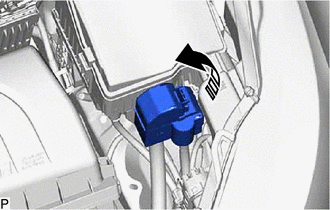

|
Remove in this Direction |
Open the booster terminal cover.
Using booster cables, connect the 12 V auxiliary battery of the rescue vehicle to the auxiliary battery of the stalled vehicle as shown in the illustration.
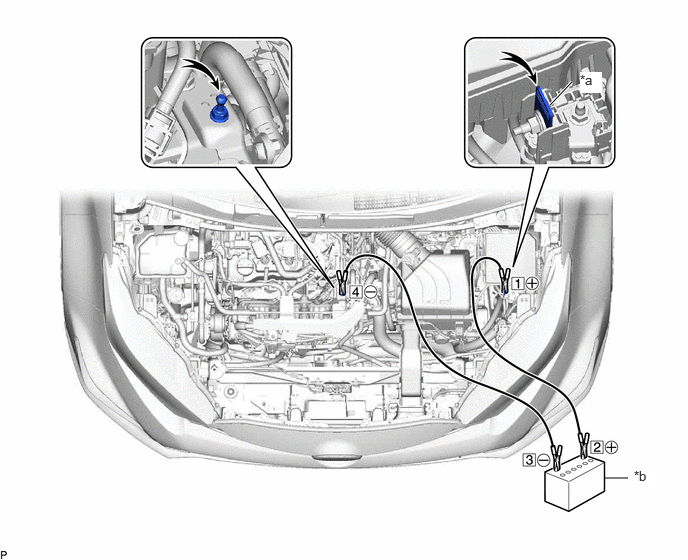
| *a | Booster Terminal | *b | Auxiliary Battery of Rescue Vehicle |
| Connecting Sequence | Connecting Location |
|---|---|
| 1 | Booster terminal of stalled vehicle |
| 2 | Positive (+) auxiliary battery terminal of rescue vehicle |
| 3 | Negative (-) auxiliary battery terminal of rescue vehicle |
| 4 | Position shown in the illustration on stalled vehicle |
Start the engine of the rescue vehicle and run its engine a slightly elevated speed for approximately 5 minutes in order to charge the auxiliary battery of the stalled vehicle.
With the ignition switch off, open and close any door.
With the engine of the rescue vehicle being run at a slightly elevated speed, turn the ignition switch START from ON to start the engine.
- NOTICE:
-
Immediately disconnect the booster cables in the reverse order of connection after the engine has started.
- HINT:
- ·
Make sure to perform all necessary procedures for when the auxiliary battery is returned to normal after being depleted.
Click hereGeneral>SETUP>WHEN DISCONNECTING OR RECONNECTING BATTERY TERMINAL>WORK PROCEDURE
·When disconnecting and reconnecting the battery, there is an automatic learning function thatcompletes learning when the respective system is used.
Click hereGeneral>SETUP>WHEN DISCONNECTING OR RECONNECTING BATTERY TERMINAL>AUTOMATIC LEARNING CHART