 |
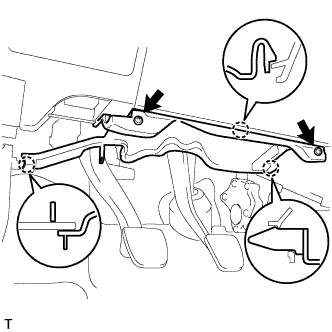
Remove the 2 screws.
CLUTCH PEDAL (for RHD) > REMOVAL |
| 1. DISCONNECT CABLE FROM NEGATIVE BATTERY TERMINAL |
| 2. REMOVE INSTRUMENT PANEL UNDER COVER SUB-ASSEMBLY LH (w/ Instrument Panel Under Cover) |
|
Remove the 2 screws.
Disengage the 3 claws and remove the instrument panel under cover.
| 3. REMOVE CLUTCH PEDAL SPRING |
w/o Clutch Pedal Spring Bracket
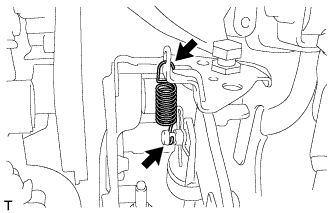 |
Remove the clutch pedal spring from the clutch pedal support and the push rod clevis pin.
w/ Clutch Pedal Spring Bracket
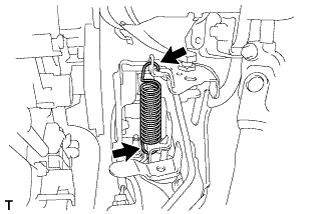 |
Remove the clutch pedal spring from the clutch pedal support and the clutch pedal.
| 4. SEPARATE CLUTCH MASTER CYLINDER ASSEMBLY |
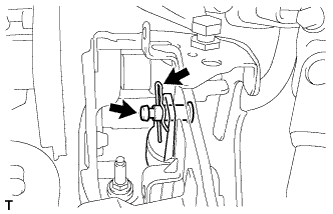 |
Remove the clip from the push rod clevis pin.
Remove the push rod clevis pin and separate the push rod clevis from the clutch pedal.
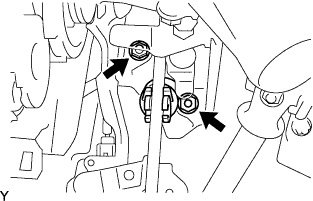 |
Remove the 2 nuts and separate the clutch master cylinder from the clutch pedal support.
| 5. REMOVE CLUTCH PEDAL SUPPORT SUB-ASSEMBLY |
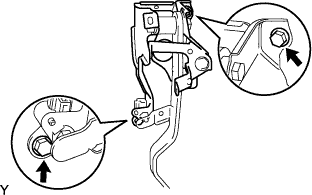 |
Disconnect the clutch start switch connector.
Disengage the wire harness clamp.
Remove the 2 clutch pedal support installation bolts and the clutch pedal support.
| 6. REMOVE CLUTCH PEDAL SUB-ASSEMBLY |
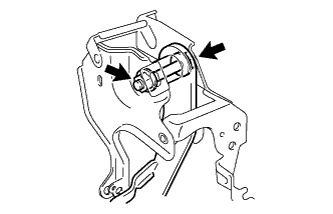 |
Remove the clutch pedal shaft bolt, the nut and the clutch pedal from the clutch pedal support.
| 7. REMOVE CLUTCH PEDAL SHAFT COLLAR |
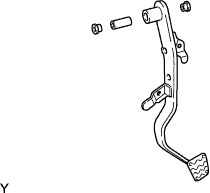 |
Remove the 2 bushes and collar from the clutch pedal.
| 8. REMOVE NO. 1 CLUTCH PEDAL CUSHION |
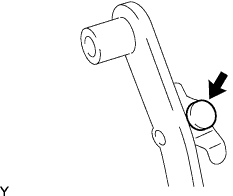 |
Remove the No. 1 clutch pedal cushion from the clutch pedal.
| 9. REMOVE CLUTCH MASTER CYLINDER PUSH ROD CLEVIS BUSH |
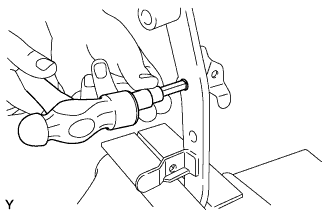 |
Using an 8 mm hexagon wrench and a hammer, remove the clevis bush.
| 10. REMOVE CLUTCH PEDAL PAD |
Remove the clutch pedal pad from the clutch pedal.
| 11. REMOVE CLUTCH PEDAL STOPPER |
| 12. REMOVE CLUTCH START SWITCH ASSEMBLY |
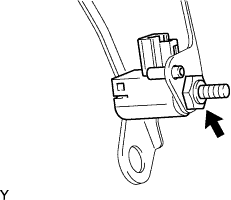 |
Remove the nut and the clutch start switch.
| 13. REMOVE CLUTCH PEDAL STOPPER BOLT |
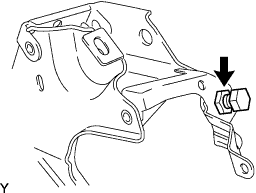 |
Loosen the lock nut and remove the clutch pedal stopper bolt.