 |
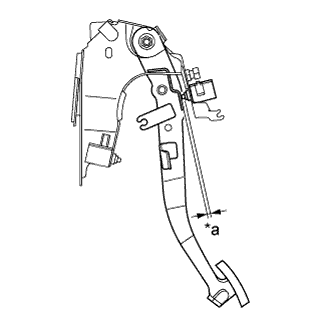
Without depressing the clutch pedal, check that the clearance shown in the illustration is as specified.
| *a | Clearance |
- Standard clearance:
- for 1NZ-FE:
- 0.5 to 3.5 mm (0.020 to 0.138 in.)
- for 2NZ-FE:
- 2.5 to 5.5 mm (0.098 to 0.217 in.)
CLUTCH PEDAL SWITCH > INSTALLATION |
| 1. INSTALL NO. 2 CLUTCH START SWITCH ASSEMBLY |
Install the No. 2 clutch start switch assembly to the clutch pedal support sub-assembly with the nut.
Connect the No. 2 clutch start switch connector.
|
Without depressing the clutch pedal, check that the clearance shown in the illustration is as specified.
| *a | Clearance |
| 2. INSTALL CLUTCH START SWITCH ASSEMBLY |
Install the clutch start switch assembly to the clutch pedal support sub-assembly with the nut.
Connect the clutch start switch connector.
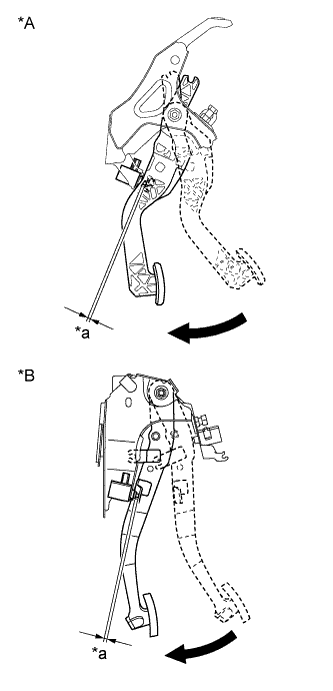 |
With the clutch pedal fully depressed, check that the clearance shown in the illustration is as specified.
| *A | for LHD |
| *B | for RHD |
| *a | Clearance |
 | Fully depressed |
| 3. INSTALL LOWER INSTRUMENT PANEL FINISH PANEL (w/o Knee Airbag) |
for LHD:
Engage the 5 claws and 2 clips and install the instrument panel finish panel.
for RHD:
Engage the 6 claws and 2 clips and install the instrument panel finish panel.
| 4. INSTALL LOWER NO. 1 INSTRUMENT PANEL AIRBAG ASSEMBLY (w/ Knee Airbag) |
| 5. INSTALL LOWER NO. 2 INSTRUMENT PANEL FINISH PANEL (for LHD) |
Engage the 2 claws and 5 clips and install the instrument panel finish panel.
| 6. INSTALL NO. 1 INSTRUMENT PANEL UNDER COVER SUB-ASSEMBLY |
Engage the guide and the claw.
Install the instrument panel under cover with the 2 <A> screws.
| 7. INSPECT CLUTCH START SYSTEM |
Check that the engine does not start when the clutch pedal is released.
Check that the engine starts when the clutch pedal is fully depressed.
If necessary, replace the clutch start switch assembly.