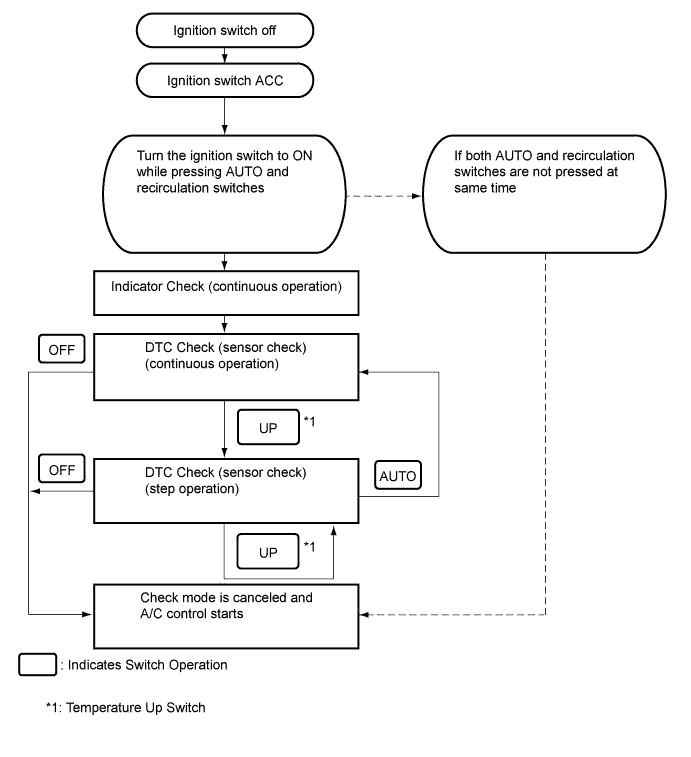
By operating each of the air conditioning control switches as shown in the diagram below, it is possible to enter diagnostic check mode.
AIR CONDITIONING SYSTEM (for Automatic Air Conditioning System) > DIAGNOSIS SYSTEM |
| DESCRIPTION |
Air conditioning system data and Diagnostic Trouble Codes (DTCs) can be read through the Data Link Connector 3 (DLC3) of the vehicle. When the system seems to be malfunctioning, use the intelligent tester to check for malfunctions and perform troubleshooting.
| CHECK DLC3 |
Check the DLC3 (Click here).
| LIST OF OPERATION METHODS |
By operating each of the air conditioning control switches as shown in the diagram below, it is possible to enter diagnostic check mode.
| INDICATOR CHECK |
Turn the ignition switch off.
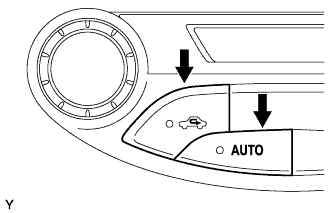 |
Turn the ignition switch to ON while simultaneously pressing the AUTO switch and the recirculation switch.
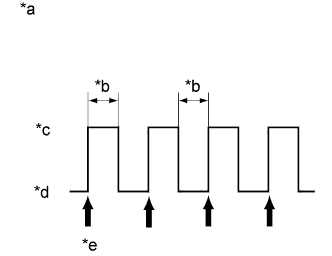 |
Check that all indicators and the display area are turned on and off 4 times in succession at 1-second intervals.
| *a | Blinking Pattern |
| *b | 1 second |
| *c | ON |
| *d | OFF |
| *e | 4 times |
Press the OFF switch to terminate the panel diagnosis.
| DTC CHECK (SENSOR CHECK) |
Perform the indicator check.
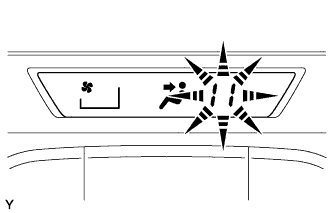 |
Check the sensor check results displayed on the set temperature display.
| Results | Code Display |
| Present malfunction | Blinks |
When any sensor check codes are displayed, refer to the DTC chart (Click here).
Press the OFF switch to terminate the panel diagnosis.
| PANEL DIAGNOSIS (CLEAR SENSOR CHECK CODE) |
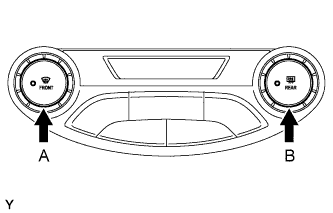 |
Inspect, and repair or replace the malfunctioning parts.
Clear the sensor check codes.
While pressing the DEF switch during sensor check mode, press the Rr DEF switch.
Perform the sensor check and confirm that normal code 00 is displayed.