| INSPECTION |
POWER
WINDOW MAIN SWITCH
| 1. |
Disconnect the negative (-) battery
terminal. |
| 2. |
Remove the front door trim panel. (Refer to
the Body group - front door) |
| 3. |
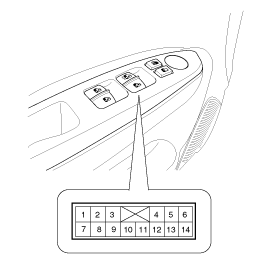
Disconnect the 14P connector from the
switch.
|
| 4. |
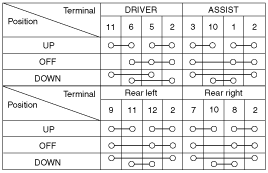
Check for continuity between the terminals
in each switch position according to the table. If the continuity
condition is not normal, replace the switch.
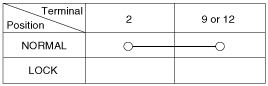
POWER WINDOW LOCK
SWITCH
|
ASSIST/REAR
POWER WINDOW SWITCH
| 1. |
Disconnect the negative (-) battery
terminal. |
| 2. |
Remove the door trim panel. (Refer to the
Body group - door) |
| 3. |
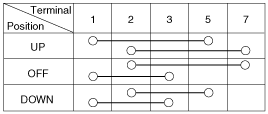
Disconnect the 7P connector from the
switch.
|
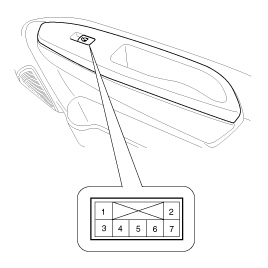
| 4. |
Check for continuity between the terminals
in each switch position according to the table. If the continuity
condition is not normal, replace the switch.
|