| GENERAL DESCRIPTION |
The PCM and the SMARTRA
communicate by dedicated line. During this communication of PCM and
SMARTRA the K line of PCM cannot be used for communication. The PCM
controls the communication either to SMARTRA or to other devices(e.g.
scanner) on K line by switching of a multiplexer and specific
communication procedures. The multiplexer is a part of PCM hard
ware.
| DTC DESCRIPTION |
This DTC indicates that
PCM received invalid tester message / unexpected requests from tester or
PCM Locked by timer (e.g. exceeding the maximum limit of twice ignition On
or teaching trials).
| DTC DETECTING CONDITION |
| Item |
Detecting
Condition |
Possible cause | ||||||||
| Enable
Condition |
|
| ||||||||
| Detecting
Criteria |
|
| MONITOR SCANTOOL DATA |
| 1. |
Ignition "ON" & Engine
"OFF". |
| 2. |
Connect Scan tool and clear the
DTCs. |
| 3. |
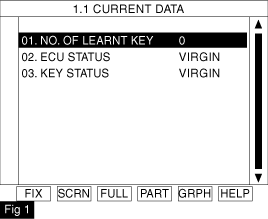
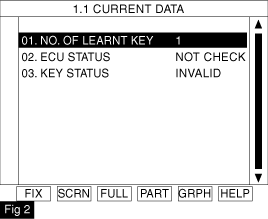
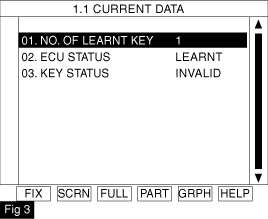
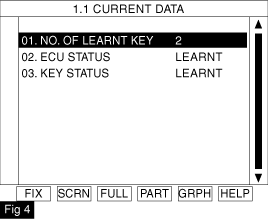
If the DTCs are retrieved again, monitor
"CURRENT DATA" to check No. of Learnt key, PCM and KEY
status.
Fig 1 : PCM has not matched with any Key
yet.
Fig 2 : PCM Internal Failure.
Fig 3 : IG On with unmatched key.
Fig 4 : 2(two) Keys have been matched with
PCM. |
| 4. |
Is the communication possible between scan
tool and Immobilizer system?
If communication between SMARTRA and PCM is
OK, Check PCM status of the current data.
If PCM status is "Lock", Please wait for one
hour with IG Key "ON" and then go to " Verification of Vehicle
Repair" procedure.
Check DLC cable connection between Scanner and
DLC. And, update the scan tool program card with latest version.
Finally try communication between scan tool and Immobilizer
system.
If problem still continues, Substitute with a
known-good scan tool and check for proper operation. If the problem
is corrected, and then go to " Verification of Vehicle Repair"
procedure. |


| VERIFICATION OF VEHICLE REPAIR |
After a repair, it is
essential to verify that the fault has been corrected.
| 1. |
Connect scan tool and monitor CURRENT DATA to
check No. of Learnt key, PCM and KEY
status. |
| 2. |
Select Diagnostic Trouble Codes(DTCs)" mode
and Clear the DTCs. |
| 3. |
Are any DTCs present?
Go to the applicable troubleshooting
procedure.
System is performing to specification at this
time. |