| INSPECTION |
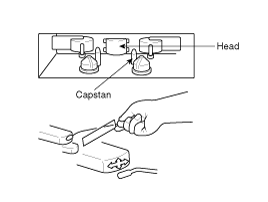
TAPE HEAD AND CAPSTAN CLEANING
| 1. |
To obtain optimum performance, clean the head,
and capstan as often as necessary, depending on frequency of use and
tape cleanness. |
| 2. |
To clean the tape head and capstan, use a
cotton swab dipped in ordinary rubbing an alcohol. Wipe the head and
capstan.
|
| REPLACEMENT |
| 1. |
Disconnect the negative (-) battery
terminal. |
| 2. |
Remove the crash pad center garnish.( Refer to
the Body group - Crash pad) |
| 3. |
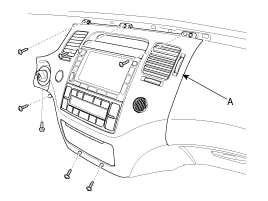
Remove the center facia panel (A) after
loosening the screws. Avoid damaging retaining clips.
|
| 4. |
Remove the connectors of digital clock and
hazard switch. |
| 5. |
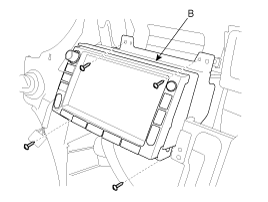
Remove the mounting screws then remove the
audio unit (B).
|
| 6. |
Installation is the reverse of
removal. |