| GENERAL DESCRIPTION |
The SMARTRA carries out
communication with the built-in transponder of the ignition key. This
wireless communication runs on RF (Radio frequency of 125 kHz). The
SMARTRA is mounted at the ignition lock close to the antenna coil for RF
transmission and receiving.
The RF signal from the
transponder received by the antenna coil is converted into messages for
serial communication by the SMARTRA device. And the received messages from
the PCM are converted into an RF signal, which is transmitted, to the
transponder by the antenna. The SMARTRA does not carry out the validity
check of transponder or the calculation of encryption algorithm. This
device is only an advanced interface, which converts the RF data flow of
the transponder into serial communication to PCM and vice
versa.
SMARTRA : SMARt
TRansponder Antenna
| DTC DESCRIPTION |
This DTC indaicates that
message from SMARTRA to PCM is invalid.
| DTC DETECTING CONDITION |
| Item |
Detecting
Condition |
Possible cause | ||||||
| Enable
Condition |
|
| ||||||
| Detecting
Criteria |
|
| MONITOR SCANTOOL DATA |
| 1. |
Ignition "ON" & Engine
"OFF". |
| 2. |
Connect Scan tool and clear the
DTCs. |
| 3. |
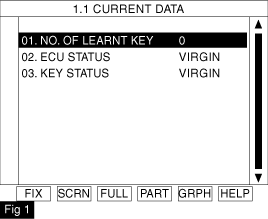
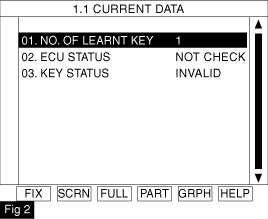
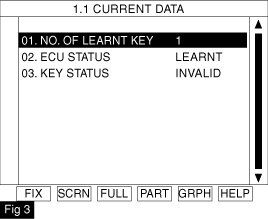
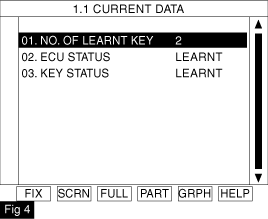
If the DTCs are retrieved again, monitor
"CURRENT DATA" to check No. of Learnt key, PCM and KEY
status.
Fig 1 : PCM has not matched with any Key
yet.
Fig 2 : PCM Internal Failure.
Fig 3 : IG On with unmatched key.
Fig 4 : 2(two) Keys have been matched with
PCM. |
| 4. |
Are both Key and PCM status
learnt?
Fault is intermittent caused by poor contact
in the SMARTRA's and/or PCM's connector or was repaired and PCM
memory was not cleared. Thoroughly check connectors for looseness,
poor connection, bending, corrosion, contamination, deterioration,
or damage.
Repair or replace as necessary and then go to
"Verification of Vehicle Repair" procedure.
Go to "Component Inspection"
procedure. |


| COMPONENT INSPECTION |
| 1. |
Check Transponder
|

| VERIFICATION OF VEHICLE REPAIR |
After a repair, it is
essential to verify that the fault has been corrected.
| 1. |
Connect scan tool and monitor CURRENT DATA to
check No. of Learnt key, PCM and KEY
status. |
| 2. |
Select Diagnostic Trouble Codes(DTCs)" mode
and Clear the DTCs. |
| 3. |
Are any DTCs present?
Go to the applicable troubleshooting
procedure.
System is performing to specification at this
time. |