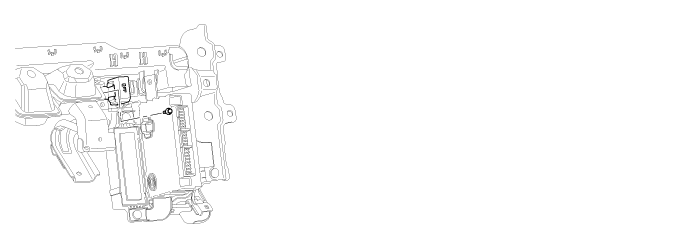
The SMARTRA carries out
the communication with the built-in transponder of the ignition key. This
wireless communication runs by RF (Radio frequency of 125 kHz). The
SMARTRA is mounted at the ignition lock close to the antenna coil for RF
transmission and receiving. The RF signal from the transponder received by
the antenna coil is converted into messages for serial communication by
the SMARTRA device. And the received messages from the EMS are converted
into the RF signal, which is transmitted, to the transponder by
antenna.
The SMATRA executes the
encryption algorithm and transmits the encryption result. And SMARTRA is
in charge of relaying from EMS to Transponder.
The SMARTRA is taught in
key learning process and stores the DPN(converted from PIN) in memory
inside SMARTRA. This DPN(converted from PIN) is used in encryption
algorithm between EMS and SMARTRA and to neutralize the SMARTRA. When
SMARTRA is neutral, old DPN(converted from PIN) and SEK(generated from
DPN) are deleted.New DPN(converted from PIN) can be stored in Neutral
SMARTRA.
The SMATRA Learning is
possible in case that the status of SMARTAR is "virgin" or "neutral". In
case that the SMARTRA3 is "learnt", the SMARTRA will transmits the
information whether DPN(converted from PIN) inputted from tester is same
as the DPN(converted from PIN) in SMARTRA.
The SMARTRA Learning is
possible regardless of key status.The SEK (generated from DPN) is used in
encrypted communication between SMARTRA and EMS. The SEK(generated from
DPN) is made from DPN(converted from PIN) inputted during SMARTRA3
Learning.If the SMARTRA is learnt, the SEK(generated from DPN) will be
stored in EEPROM. The EMS stores the SEK(generated from DPN) in EEPROM in
case that one more key is taught validly.
If the DPN(converted
from PIN) inputted from EMS fail over 3 trials (3trials: continuously or
intermittently), the EMS will not accept the request of key Learning for
an hour. Disconnecting the battery or other manipulation cannot reduce
this time. After the connecting of battery to EMS the timer starts again
for one hour
The ECM sets DTC P1690
if there's No Response from SMARTRA.
Item
|
Detecting
Condition
|
Possible Cause
|
DTC
Strategy
|
|
| •
|
Open Circuit in signal
harness |
| •
|
Short Circuit in signal
harness |
|
Enable
Conditions
|
|
Threshold
value
|
|
Detecting
time
|
|
FAIL
SAFE
|
|
| 1. |
Connect scantool to Data Link
Connector(DLC). |
| 2. |
IGN "ON" & Engine
"OFF" |
| 3. |
Monitor the "KEY STATUS","SMARTRA STATUS" and
"ECU STATUS" Parameter on the Scantool.
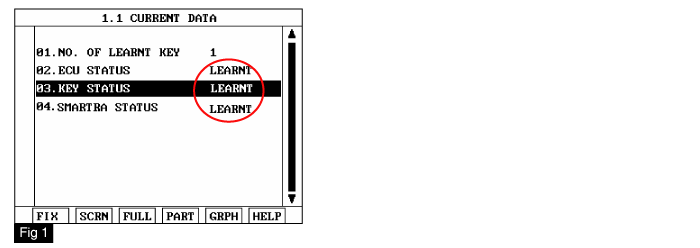
Fig1) The current data in normal
state |
| 4. |
Are "KEY STATUS", "SMARTRA STATUS" and "ECU
STATUS" Parameter within specifications?

▶ Check connectors for looseness, poor
connection, bending, corrosion, contamination, deterioration, or
damage. Repair or replace as necessary and then go to "Verification
of Vehicle Repair" procedure.

▶ Go to "Inspection & Repair"
procedure |
| Terminal and Connector
Inspection |
| 1. |
Many malfunctions in the electrical system are
caused by poor harness and terminals.
Faults can also be caused by interference from
other electrical systems, and mechanical or chemical
damage. |
| 2. |
Thoroughly check connectors for looseness,
poor connection, bending, corrosion, contamination, deterioration,
or damage. |
| 3. |
Has a problem been found?
▶ Repair as necessary and go to "Verification
Vehicle Repair" procedure
▶ Go to "W/Harness Inspection"
procedure |
| 1. |
Check for open in harness
| (3) |
Ignition "ON" & Engine
"OFF" |
| (4) |
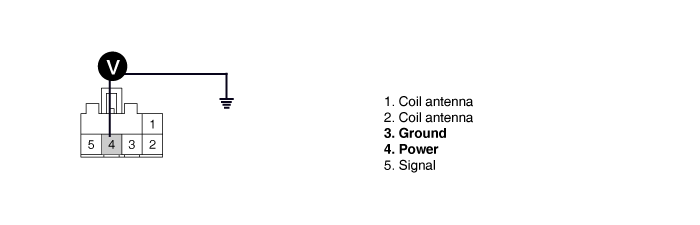
Measure voltage value between terminal
"4" of SMARTRA and chassis ground.
|
| (5) |
Is the measured voltage within
specifications?
▶ Go to "Signal circuit Inspection"
procedure
▶ Check for open or short in harness.
Repair as necessary and go to "Verification of Vehicle Repair"
procedure. | |
| Signal circuit
Inspection |
| 1. |
Check for open in harness
| (3) |
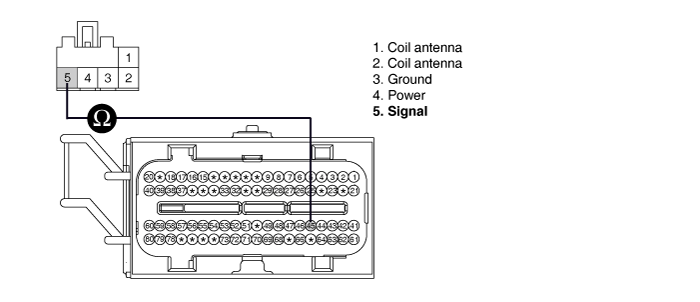
Measure resistance between terminal "5"
of SMARTRA and terminal "45" of ECM
Specification : 1Ω or
less
|
|
| (4) |
Is the measured resistance within
specifications?
▶ Go to "Check for short in harness"
procedure.
▶ Check for open in harness. Repair as
necessary and go to "Verification of Vehicle Repair"
procedure. | |
| 2. |
Check for short in harness
| (3) |
Ignition "ON" & Engine
"OFF" |
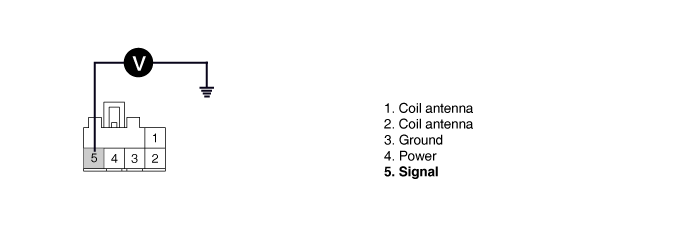
| (4) |
Measure voltage value between terminal
"5" of SMARTRA and chassis ground.
Specification : Approx.
5.48V
|
|
| (5) |
Is the measured voltage within
specifications?
▶ Go to "Ground circuit Inspection"
procedure
▶ Check for short in harness. Repair as
necessary and go to "Verification of Vehicle Repair"
procedure. | |
| Ground circuit
Inspection |
| 1. |
Check for open in ground harness
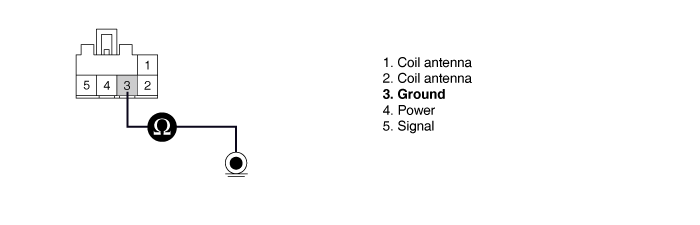
| (3) |
Measure resistance between terminal "3"
of SMARTRA and chassis ground.
Specification : 1Ω or
less
|
|
| (4) |
Is the measured resistance within
specifications?
▶ Check connectors for looseness, poor
connection, bending, corrosion, contamination, deterioration,
or damage. Repair or replace as necessary and then go to
"Component Inspection" procedure.
▶ Check for open in harness. Repair as
necessary and go to "Verification of Vehicle Repair"
procedure. | |
| 1. |
Check SMARTRA
| (1) |
IGN "ON" & Engine
"OFF" |
| (2) |
Neutralize "SMARTRA" and Register
transponder key by scantool.
|
Pin code is requied to Neutralize
SMARTRA and to Register transponder
key | |
| (3) |
Are Neutralizing and Registering
completed normally ?
▶ Perform all the key teaching procedure
with scantool. (All the keys must be retaught) and then, go to
"Verification of Vehicle Repair" Procedure.
Note) Never change the password after
SMARTRA is neutralized with scantool Otherwise, Virgin TP only
possible to register.
▶ Substitute with a known-good SMARTRA
and check for proper operation.
If the problem is corrected, replace
SMARTRA and then go to "Verification of Vehicle Repair"
procedure. | |
| Verification of Vehicle
Repair |
After a repair, it is
essential to verify that the fault has been corrected.
| 1. |
Connect scantool and selet "Diagnostic Trouble
Codes(DTCs)" mode and then clear
DTC. |
| 2. |
Operate the vehicle and monitor the DTC on the
scantool |
| 3. |
Are any DTCs present?
▶ Go to the applicable troubleshooting
procedure
▶ System is performing to specification at
this
time. |
