The evaporative
emission control system prevents hydrocarbon vapors from escaping from the
fuel tank into the atmosphere where they could form photochemical smog.
Gasoline vapors are collected in the charcoal canister. The Fuel Tank
Pressure Sensor (FTPS) is an integral part of the evaporative monitoring
system. The PCM monitors the FTPS signal to detect vacuum decay and excess
vacuum. The FTPS measures the difference between the air pressure inside
the fuel tank and outside air pressure to check the purge control solenoid
valve operation and for leak detection in the evaporative emission control
system by monitoring pressure and vacuum levels in the fuel tank during
the purge control solenoid valve operating cycles.
Checking output
signals from FTPS under detecting condition, if the FTPS indicates
pressure momentarily increased more than 5.6 reading displaying on
scantool, PCM sets P0454. MIL(Malfunction Indication Lamp) turns on when
the malfunction lasts till consecutive 2 driving cycle.
Item
|
Detecting Condition
|
Possible
cause
|
DTC
Strategy
|
| •
|
Monitors the fuel tank
pressure | |
|
Enable
condition
|
| •
|
Intake Air Temperature ≥ -4°C( 24.8
°F) |
|
Threshold
Value
|
| •
|
Tank Pressure > 5.6 reading
displaying on scantool | |
Dagnosis
Tme
|
| •
|
Continuous (Within 10
sec.) | |
MIL On
Condition
|
|
Pressure
(kPa)
|
Output
Voltage (V)
|
-6.67
|
0.5
|
0
|
2.5
|
6.67
|
4.5
|
| 1. |
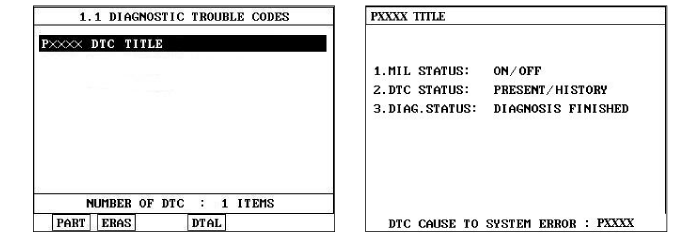
Connect scantool to Data Link
Connector(DLC). |
| 3. |
Select "Diagnostic Trouble Codes(DTCs)"
mode, and then Press F4(DTAL) to check DTC’s information from the
DTCs menu |
| 4. |
Read "DTC Status" parameter.
|
| 5. |
Is parameter displayed "Present
fault"?
|

|
▶ Go to "Terminal
and Connector inspection" procedure.
|
|

|
▶ Fault is
intermittent caused by poor contact in the sensor’s and/or
PCM’s connector or was repaired and PCM memory was not
cleared. Thoroughly check connectors for looseness, poor
connection, ending, corrosion, contamination, deterioration,
or damage. Repair or replace as necessary and go to
"Verification of Vehicle Repair"
procedure.
|
|
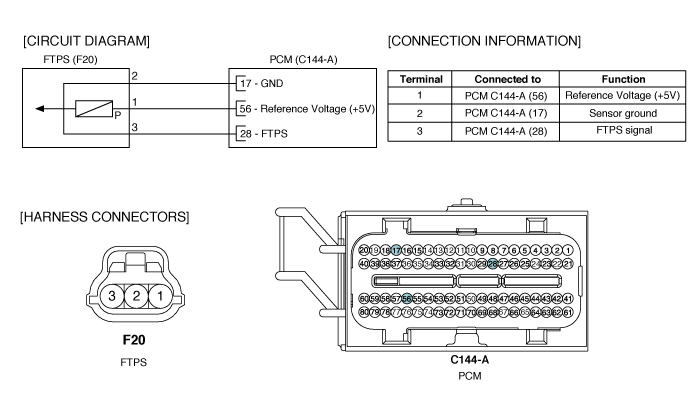
| Terminal and Connector
Inspection |
| 1. |
Many malfunctions in the electrical system
are caused by poor harness and terminals. Faults can also be caused
by interference from other electrical systems, and mechanical or
chemical damage. |
| 2. |
Thoroughly check connectors for looseness,
poor connection, bending, corrosion, contamination, deterioration,
or damage. |
| 3. |
Has a problem been found?
|
|
▶ Repair as
necessary and go to "Verification of Vehicle Repair"
procedure
|
|
|
▶ Go to " Component
Inspection "
procedure
|
|
| 1. |
Check FTPS
| (1) |
IG "OFF" and connect scatool to
DLC(Data Link Connector). |
| (2) |
Monitor "FTPS" parameter with
accelleration on service data.
Specification
Pressure
(kPa)
|
Output
Voltage (V)
|
-6.67
|
0.5
|
0
|
2.5
|
6.67
|
4.5
|
|
| (3) |
Does the "FTPS" parameter change after
accelleration ?
|
|
▶ Fault is
intermittent. Drive the vehicle to satisfy the enable
codition then, go to "Verification of Vehicle Repair "
procedure.
|
|
|
▶ Substitute
with a known - good FTPS and check for proper operation.
If the problem is corrected, replace FTPS and go to
"Verification of Vehicle Repair"
procedure.
|
| |
| Verification of Vehicle
Repair |
After a repair, it is
essential to verify that the fault has been corrected.
| 1. |
Connect scan tool and select "Diagnostic
Trouble Codes(DTCs)" mode |
| 2. |
Press F4(DTAL) and confirm that "DTC
Readiness Flag" indicates "Complete". If not, drive the vehicle
within conditions noted in the freeze frame data or enable
conditions |
| 3. |
Read "DTC Status"
parameter |
| 4. |
Is parameter displayed "History(Not Present)
fault"?
|
|
▶ System performing
to specification at this time. Clear the DTC
|
|
|
▶ Go to the
applicable troubleshooting
procedure
|
|