Rear Side Impact
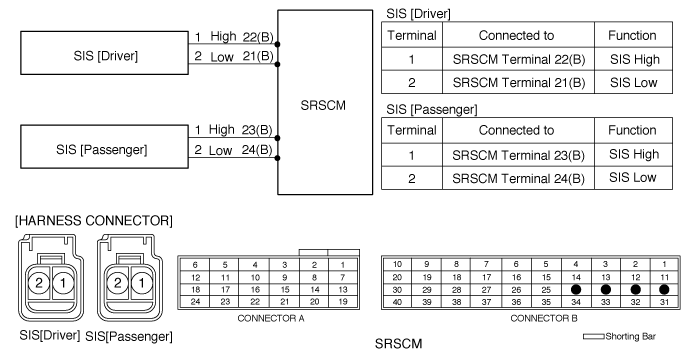
Sensor(RSIS) is located in both side of rear seat back panel detects rear
side collision. When RSIS delivers collision signal to SRSCM, SRSCM checks
whether safing sensor located in SRSCM detects collusion. and if both RSIS
and safing sensor detects collision simultaneously, SRSCM operates rear
side air bag.
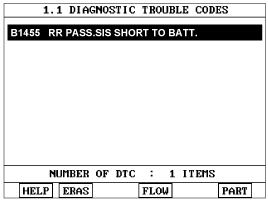
The SRSCM sets DTC B1455
if there is short to power harness in RPSIS harness.
Item
|
Detecting
Condition
|
Possible cause
|
DTC
Strategy
|
| •
|
Check current(PWM
type) | |
| •
|
Short to power in RPSIS harness.
|
|
Enable Conditions
|
|
Threshold Value
|
|
Diagnostic Time
|
Qualification
|
|
De-Qualification
|
|
Test Condition
|
Resistance
|
Ignition
OFF
|
Rs
>1kΩ
|
| 1. |
Ignition "OFF", connect
scantool. |
| 2. |
Ignition "ON"& Engine "OFF", select
"Diagnostic Trouble Codes(DTC)"
mode. |
| 3. |
Monitor diagnostic trouble code and present of
trouble code. |
| 4. |
Using a scan tool, clear the DTC.
|
- H : Historical fault
- P : Present
fault | |
| 5. |
Is DTC present problem ?
|

|
▶ Go to
"W/Harness Inspection" procedure.
|
|

|
▶
Displaying nothing(no DTC) or DTC with label "H"(historical)
shows that Fault is intermittent caused by poor contact in the
part's and/or SRSCM connector or was repaired and SRSCM memory
was not cleared.
Thoroughly check
connectors for looseness, poor connection, bending, corrosion,
contamination, deterioration, or damage.
▶ Repair or replace as necessary and then go to
"Verification of Vehicle Repair"
procedure.
|
|
| Terminal and Connector
Inspection |
| 1. |
Many malfunctions in the electrical system are
caused by poor harness and terminals.
Faults can also be caused by interference from
other electrical systems, and mechanical or chemical
damage. |
| 2. |
Thoroughly check connectors for looseness,
poor connection, bending, corrosion, contamination, deterioration,
or damage. |
| 3. |
Has a problem been found?
|
|
▶ Repair as
necessary and then go to "Verification of Vehicle Repair"
procedure.
|
|
|
▶ Go to
"Main harness circuit inspection"
procedure.
|
|
| Main harness Circuit
Inspection |
| 2. |
Disconnect the battery (-) terminal cable from
the battery, and wait at least one minutes.
|
| 3. |
Disconnect RPSIS connector and SRSCM main
harness connector. |
| 4. |
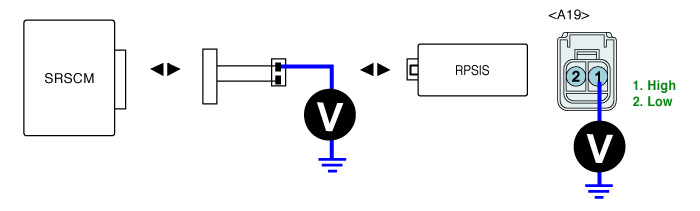
Measure Voltage between terminal "1" or "2" of
the RPSIS harness connector and chassis ground.
|
| 5. |
Is the measured Voltage within
specifications?
|
|
▶ Go to
"Component Inspection" procedure.
|
|
|
▶
Substitute the SRSCM main harness and check for proper
operation.
If the problem is
corrected, replace SRSCM main harness and then go to
"Verification of Vehicle Repair"
procedure.
|
|
| 1. |
Ignition "ON" & Engine "OFF" and Using a
scan tool, clear the DTC. |
| 3. |
Disconnect the battery (-) terminal cable from
the battery, and wait at least one
minutes. |
| 4. |
Disconnect RPSIS connector
. |
| 5. |
Substitute the RPSIS and check for proper
operation. |
| 6. |
Is DTC present problem ?
|
|
▶
Substitute a known-good SRSCM, and check for proper operation.
If the problem is corrected,
replace SRSCM and then go to "Verification of Vehicle Repair"
procedure.
|
|
|
▶
Substitute a known-good RPSIS, and check for proper operation.
If the problem is corrected,
replace RPSIS and then go to "Verification of Vehicle Repair"
procedure.
|
|
| Verification of Vehicle
Repair |
After a repair, it is
essential to verify that the fault has been corrected.
| 1. |
Connect scan tool and select "Diagnostic
Trouble Codes(DTC)" mode |
| 2. |
Using a scan tool, clear the
DTC. |
| 3. |
Operate the vehicle within DTC Enable
conditions in General information. |
| 4. |
Are any DTC present ?
|
|
▶ Go to the
applicable troubleshooting procedure.
|
|
|
▶ System is
performing to specification at this
time.
|
|
