The system is intended
to classify the occupancy status of the front passenger seat in a motor
vehicle based upon the measured force on the bottom seat
cushion.
The system also
communicates to the SRSCM whether to allow or inhibit the deployment of
the passenger airbags and/or pretensioner based upon this
status.
The System also measured
dynamic responses of the occupant.
This information is used
to idenitify when a child seat is cinched down tightly with the seat belt,
and to also determine if the seat is unoccupied.
However, the dynamic
measurements are not intended, nor capable of monitoring the seating
position of the occupant,nor can they determine the proximity of the
occupant to the inflator modules.
The system should not be
confused with an occupant position recognition system, or any other
occupant proximity sensor.
The Passenger Occupant
Detecting System (PODS) utilizes bladder placed between the passenger seat
cushion and suspension to measure the occupant’s loading force on the
vehicle seat.
The bladder is connected
to pressure sensor and ultimately to an electronic control unit (ECU),
both of which are mounted under the seat pan.
The quantitative force
determined by the system is compared to a given threshold for
determination of passenger airbag suppression.
*Especially, do not
forget to initialize PODS using "PODS RESET FUNCTION" of scantool when
replacing cushion assembly or PODS ECU.
When unable to control
SRS system due to internal fault in PODS module assembly.
Item
|
Detecting
Condition
|
Possible cause
|
DTC
Strategy
|
| •
|
Internal fault in PODS
module | |
|
Enable Conditions
|
|
Threshold Value
|
| •
|
PODS sends this message for 2
times | |
Diagnostic Time
|
Qualification
|
|
De-Qualification
|
|
| 1. |
Ignition "OFF", connect
scantool. |
| 2. |
Ignition "ON"& Engine "OFF", select
"Diagnostic Trouble Codes(DTC)"
mode. |
| 3. |
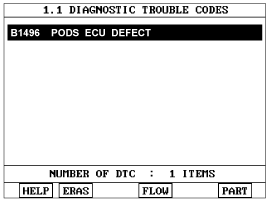
Monitor diagnostic trouble code and present of
trouble code. |
| 4. |
Using a scan tool, clear the DTC.
|
- H : Historical fault
- P : Present
fault | |
| 5. |
Is DTC present problem ?
|

|
▶
Substitute with a PODS ECU and check for proper operation. If
the problem is corrected, replace PODS ECU and then go to
"Verification of Vehicle Repair" procedure.
|
|

|
▶
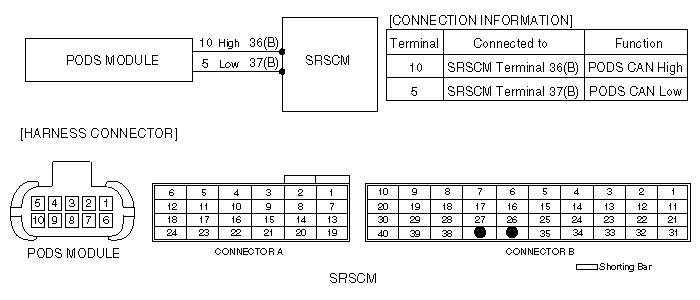
Thoroughly check connectors for looseness, poor connection,
bending, corrosion, contamination, deterioration, or damage.
▶ Repair or replace as necessary
and then go to "Verification of Vehicle Repair"
procedure.
|
|
| Verification of Vehicle
Repair |
After a repair, it is
essential to verify that the fault has been corrected.
| 1. |
Initialize PODS using scantool when replacing
PODS ECU. |
| 2. |
Connect scan tool and select "Diagnostic
Trouble Codes(DTCs)" mode |
| 3. |
Using a scan tool, clear the DTCs
|
| 4. |
Operate the vehicle within DTC Enable
conditions in General information. |
| 5. |
Are any DTC present ?
|
|
▶ Go to the
applicable troubleshooting procedure.
|
|
|
▶ System is
performing to specification at this
time.
|
|
