Driver can inhibit the
ESC control by ESC switch.
When switch signal send
into HECU, ESC warning lamp go ON and ESC control is stopped and if next
switch signal is inputted again, ESC control is ready.
This function is used
for sporty driving or vehicle inspection.
Trouble code is set when
the condition that the level of ESC switch is high is continued for
60sec.
When the ESC switch
failure is set there is no signal in the warning lamp and HECU inhibit the
ESC control and allow the ABS/EBD control.
Item
|
Detecting
Condition
|
Possible cause
|
DTC
Strategy
|
| •
|
Short circuit
monitoring | |
| •
|
Open or short ESC
switch | |
Detect
Mode
|
|
Enable
Conditions
|
| •
|
When the ESC switch is ON for
60sec. | |
Fail
Safe
|
| •
|
Inhibit the ESC control and allow the
ABS/EBD control. |
| •
|
The ESC warning lamps are activated.
| |
| 1. |
Connect scantool to Data Link
Connector(DLC). |
| 2. |
Ignition "ON" & Engine
"OFF". |
| 4. |
Monitor the "ESC OFF SWITCH" parameter on the
scantool.
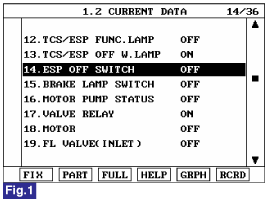
Fig 1) Test Condition : Ignition "ON" &
Engine "OFF".
Normal data |
| 5. |
Whenever the switch is pushed up/down, is the
ESC off switch’s scantool data changed ON/OFF?
|

|
▶ Fault is
intermittent caused by poor connection in ESC switch line or
was repaired and HECU memory was not cleared. Thoroughly check
connectors for looseness, poor connection, bending, corrosion,
contamination, deterioration, or damage. Repair or replace as
necessary and then go to "Verification of Vehicle Repair"
procedure.
|
|

|
▶ Go to
"W/Harness Inspection"
procedure.
|
|
| Terminal and Connector
Inspection |
| 1. |
Many malfunctions in the electrical system are
caused by poor harness(es) and terminals. Faults can also be caused
by interference from other electrical systems, and mechanical or
chemical damage. |
| 2. |
Thoroughly check connectors for looseness,
poor connection, bending, corrosion, contamination, deterioration,
or damage. |
| 3. |
Has a problem been found?
|
|
▶ Repair as
necessary and then go to "Verification of Vehicle Repair"
procedure.
|
|
|
▶ Go to
"Signal Circuit Inspection"
procedure.
|
|
| Signal Circuit
Inspection |
| 1. |
Ignition "ON" & Engine "OFF" & ESC
Switch"ON". |
| 2. |
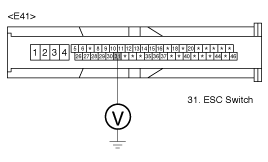
Measure voltage between terminal "31" of the
HECU harness connector and chassis ground.
Specification
: Approx B+
|
|
| 3. |
Is the measured voltage within
specifications?
|
|
▶ Fault is
intermittent caused by poor connection in ESC switch line or
was repaired and HECU memory was not cleared. Thoroughly check
connectors for looseness, poor connection, bending, corrosion,
contamination, deterioration, or damage. Repair or replace as
necessary and then go to "Verification of Vehicle Repair"
procedure.
|
|
|
▶ Check for
damaged harness and poor connection in the power harness
between the battery terminal(+) and the terminal "31" of the
HECU harness connector . Check for open or blown 10A fuse
referring to "Circuit Diagram". Repair as necessary and then
go to "Verification of vehicle Repair"
procedure.
|
|
| 2. |
Disconnect ESC switch
connector. |
| 4. |
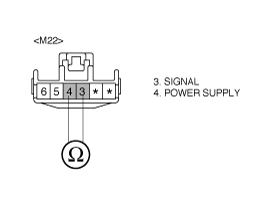
Measure resistance between terminal "3" of the
ESC switch harness connector and terminal "4" of the ESC switch
harness connector.
Specification
: Approx. below 1Ω
|
|
| 5. |
Is the measured resistance within
specifications?
|
|
▶ Fault is
intermittent caused by poor connection in ESC switch line or
was repaired and HECU memory was not cleared. Thoroughly check
connectors for looseness, poor connection, bending, corrosion,
contamination, deterioration, or damage. Repair or replace as
necessary and then go to "Verification of Vehicle Repair"
procedure.
|
|
|
▶
Substitute with a known-good ESC switch and check for proper
operation. If problem is corrected, replace ESC switch and
then go to "Verification of Vehicle Repair" procedure.
|
|
| Verification of Vehicle
Repair |
After a repair, it is
essential to verify that the fault has been corrected.
| 1. |
Connect scantool and select "Diagnostic
Trouble Codes(DTCs)" mode |
| 2. |
Using a scantool, Clear
DTC. |
| 3. |
Operate the vehicle within DTC Detecting
Condition in General Information. |
| 4. |
Are any DTCs present ?
|
|
▶ Go to the
applicable troubleshooting procedure.
|
|
|
▶ System
performing to specification at this
time.
|
|