| Description |
The smart cruise
control system allows a driver to program the vehicle to control the speed
and following distance detecting the vehicle ahead without depressing the
brake pedal and the accelerator pedal.
| 1. |
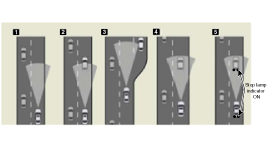
Cruise speed control: The vehicle maintains
the selected speed if there are not vehicles
ahead. |
| 2. |
Retardation control: The vehicle decelerates
if a vehicle ahead is detected. |
| 3. |
Following distance control: The vehicle
maintains the selected following
distance. |
| 4. |
Acceleration control: The vehicle
accelerates to the selected speed if a vehicle ahead is not
detected. |
| 5. |
Congested area control : In traffic, your
vehicle will stop if the vehicle ahead of you stops. Also, if the
vehicle ahead of you starts moving, your vehicle will start as well.
However, if the vehicle stops for more than 3 seconds, you must
depress the accelerator pedal or push the RES+ switch to start
driving.
|
| 6. |
Control on curves
|
| 7. |
Warning alarm
If the vehicle equipped the SCC decelerates
because a vehicle ahead decelerates or moves into your lane, the
warning will operate.
|
| 8. |
Accelerating by driver
Even the vehicle is being decelerated by the
SCC system, the vehicle can be accelerated by applying the
accelerator pedal. If the vehicle is accelerated above the set
speed, the indicator in the cluster will blink.
|

| 9. |
Function of cruise control
The driver may choose to only use the cruise
control mode (speed control function) by doing as
follows:
With the smart cruise control system on (the
cruise indicator light will be on but the system will not be
activated), push the distance to distance switch for more than 2
seconds. "Smart cruise control (SCC) mode" and "Cruise control (CC)
mode" can be selected.The speed control of the cruise control mode
is the same as that of the smart cruise control mode.
When using the cruise control mode, the
driver must manually access the distance to other vehicles as the
system will not automatically brake to slow down for other
vehicles. |
Cruise
main switch (ON/OFF)
The smart cruise
control system is engaged by pressing the cruise "ON/OFF" main switch.
When the smart cruise control system is engaged, the CRUISE indicator in
the cluster illuminates.
Set/Coast
switch (SET/–)
The "SET/–" switch
located on right of steering wheel column has two functions.
The set function -
Push the "SET/–" switch and release it at the desired speed. The SET
indicator light in the instrument cluster will illuminate. Release the
accelerator pedal. The desired speed will automatically be
maintained.
At low speed of 0 ~ 30
km/h (0 ~ 18.6 mph), there should be a vehicle in front of driver’s
vehicle with a distance of 2 ~ 15 m (6.6 ~ 49.2 ft). The target speed is
set to 30km/h (18.6 mph).
The coast function -
Push the "SET/–" switch and hold it when the smart cruise control is on.
The vehicle will gradually slow down. Release the switch at the desired
speed.
The desired speed will
be maintained.Push the "SET/–" switch and release it quickly.
The cruising speed
will decrease by 1.0km/h or 1.0mph.
If the vehicle speed is above the set speed
by applying the accelerator pedal, the vehicle speed will be the set
speed. |
Resume/Accel
switch (RES/+)
The "RES/+" switch
located on right of steering wheel column has two functions.
The resume function -
If any method other than the cruise "ON/OFF" main switch was used to
cancel cruising speed temporarily and the system is still activated, the
most recent set speed will automatically resume when the "RES/+" switch is
pushed.
The accel function -
Push the "RES/+" switch and hold it when the smart cruise control is on.
The vehicle will gradually accelerate. Release the switch at the desired
speed. The desired speed will be maintained.
Push the "RES/+"
switch and release it quickly. The cruising speed will increase by 1.0km/h
or 1.0mph.
Cancel
switch (CANCEL)
The cruise control
system is temporarily disengaged by pushing the "CANCEL"
switch.
Following
distance control switch
This system assists
you can set the distance from the vehicle ahead and maintain the selected
distance even if you did not push the accelerator or the brake
pedal.
Select the appropriate
following distance according to road conditions and vehicle
speed.
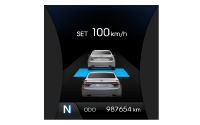
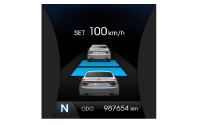
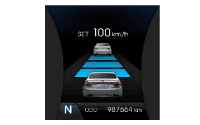
Each time the button
is pressed, the following distance changes as follows:
Ex) Distance 4 →
Distance 3 → Distance 2 → Distance 1→ Distance 4
If you drive at 80
km/h (49.7mph), the distance maintain as follows;
Distance 4 -
approximately 47m (154.2ft)
Distance 3 -
approximately 36m (118.1ft)
Distance 2 -
approximately 27m (88.6ft)
Distance 1 -
approximately 22m (72.2ft)
The following distance
of each stage is changed according to the speed of the vehicle
ahead.
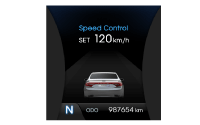
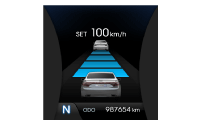
Display
in the cluster
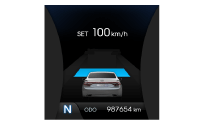
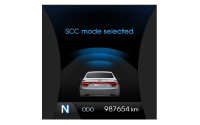
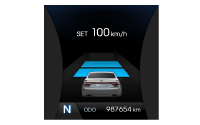
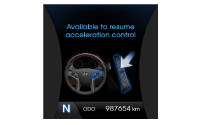
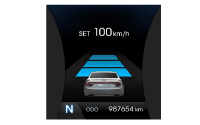
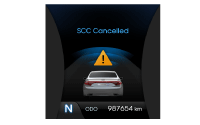
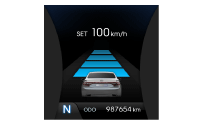
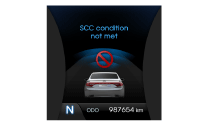
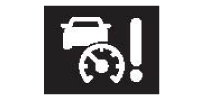
| Display |
Description |
Display |
Description |
|
|
Distance 1 - without a
vehicle ahead |
|
SCC
selecte |
|
|
Distance 2 - without a
vehicle ahead |
|
Over 3 second-auto stop
by SCC |
|
|
Distance 3 - without a
vehicle ahead |
|
SCC
cancelled |
|
|
Distance 4 - without a
vehicle ahead |
|
SCC set condition is not
met |
|
|
Distance 1 - with a
vehicle ahead |
|
SCC system
malfunction |
|
|
Distance 2 - with a
vehicle ahead |
|
SCC sensor
malfunction |
|
|
Distance 3 - with a
vehicle ahead |
|
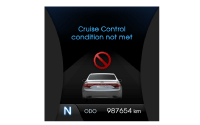
Cruise control
selected |
|
|
Distance 4 - with a
vehicle ahead |
|
Cruise control set
condition is not met |
|
|
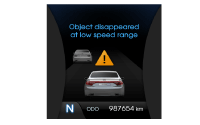
Object disappeared at low
speed range |