| 2. |
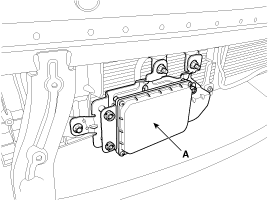
Loosen the bolts and nuts and then remove
the smart cruise control unit assembly (A) from the
vehicle.
|
| 3. |
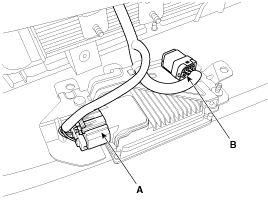
Disconnect the FEM joint connector (B) band
cable and smart cruise control unit connector (A).
|
| 1. |
Fix the band cable of FEM joint connector
(B) and connect the smart cruise control unit connector
(A).
|
| 2. |
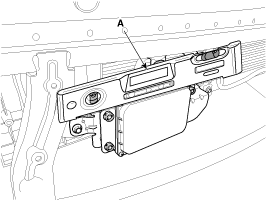
Install the smart cruise control unit
assembly (A) on the vehicle.
Tightening
torque
Bolts :
7.8 ~ 11.8 N.m(0.8 ~ 1.2kgf.m, 5.8 ~
8.7lb-ft)
Nuts :
6.9 ~ 10.8N.m (0.7 ~ 1.1kgf.m, 5.1 ~
8.0lb-ft)
|
|
When installing the sensor, align the
direction of sensor with the vehicle motion vector and adjust
the upside of sensor horizontally using level meter (A).
|
|
| 3. |
Align the smart cruise control sensor.
(Refer to Smart Cruise Control System -
"Smart Cruise Control (SCC)
SensorAlignment") |
| Smart Cruise Control (SCC) Sensor
Alignment |
The objective of the
alignment is to ensure correct SCC performance. In order for the sensor to
perform correctly, the sensor must be aligned correctly. The sensor
alignment has major impact on road estimation, lane prediction, and target
processing. When the sensor is misaligned, the performance of SCC cannot
be guaranteed. Therefore, when the sensor is reinstalled or a new sensor
is installed on a vehicle, the sensor shall be aligned by service
personnel.
|
The sensor must be aligned
when;
| •
|
The sensor is reinstalled after
removing. |
| •
|
A new sensor is installed on a
vehicle. |
| •
|
The sensor or nearby parts are
impacted in a collision. |
| •
|
The sensor can not recognize a vehicle
ahead. | |
|
The sensor can not recognize a vehicle
ahead.
| •
|
Remove heavy objects, such as luggage
in the trunk, from the vehicle.
|
| •
|
Remove heavy objects, such as luggage
in the trunk, from the vehicle.
|
| •
|
Check the pollution condition of
sensor
cover | |
Check
the pollution condition of sensor cover
Radar sensor should be
aligned in vertical and horizontal direction. Vertical alignment should be
performed using level/tilt meter and horizontal alignment should be
performed by driving on a road.
| 1. |
To maintain the horizontal condition between
a vehicle and ground, park a vehicle on a lift or level
ground. |
| 3. |
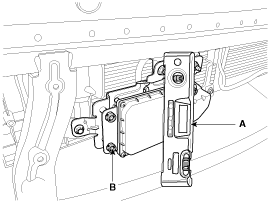
Check out the vertical alignment of sensor
using a level/tilt meter. (Tolerance: ±1.25° less)
If verticality of the sensor is out of the
tolerance, turn the adjustment screw (B) to adjust it within the
tolerance.
|
For the vertical sensor alignment, use
a digital tilt meter for better accuracy. If not available, a
bubble meter can be
used. | |
| 5. |
To perform the horizontal sensor alignment,
connect GDS after starting the engine and choose "SCC
Alignment"
|
Erase the DTC code before the sensor
alignment
procedure. | |
| 6. |
Select "Driving Mode" to start sensor
alignment.
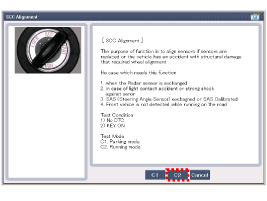
|
| 7. |
Drive the vehicle after checking the
alignment start on the GDS. Check the red light of instrument
cluster is on.
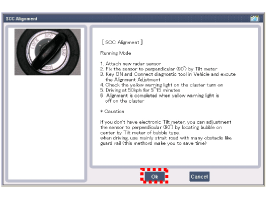
|
The sensor alignment will last about
5~15 minutes. Depending on the traffic situation or road
condition, the duration of the procedure can shorten or
extend.
To complete the alignment in minimum
time, if it is possible, drive the vehicle considering the
driving/road conditions as follows.
| • |
To shorten the duration of the
alignment; |
| - |
Drive at more than 65km/h
(40.4mph). |
| - |
Drive on a straight road without
any curve and incline. |
| - |
Drive on a thick and wide
asphalt road. |
| - |
Drive on a road with repetitive
static targets. |
| - |
– Drive on a dry and good road
without rain and snow. |
| • |
The alignment process can be
interrupted when the following condition exists;
|
| - |
When the vehicle encounter
curves with a radius smaller than 100m (328.0ft).
|
| - |
Drive below minimum demand speed
or stop (waiting at a red light,
etc.) |
| - |
When the vehicle is in a tunnel
or under overpass. |
| - |
When there are excessive
steering wheel actions such as turning to the right or
left and sudden lane
change. |
| - |
Drive on a road with few
repetitive static
targets. | |
|
Be careful when driving the vehicle
for sensor alignment as follows;
| • |
Observe a regulation speed on
the road. |
| • |
Do not stick to the previous
driving/road conditions excessively to shorten the
duration of the alignment and drive the vehicle safely
considering traffic situations.
|
| • |
When driving the vehicle, do not
operate the GDS and look at the GDS display for a long
time. You can lose your steering control.
|
| • |
Operate the GDS only when the
vehicle
stops. | | |
| 8. |
After the sensor alignment is completed, the
instrument cluster warning light is off.
|
If sensor alignment has not completed,
check horizontal angle using GDS.
If the vertical angle of the sensor is
out of ±3°, check the back beam or mounting area. If there is
no abnormality, replace the SCC unit with new
one.
After replacing the SCC unit with new
one, align the sensor
again. | |

