Symptom
|
Suspected
area
|
Repairment
|
Pressing power switch
does not turn on system
|
AVN head unit receiver
power source circuit
|
R-2
|
AVN monitor
|
R-15
|
Panel switch does not
function
|
Steering pad switch
circuit
|
R-3
|
AVN H/U front PCB
assembly
|
R-1
|
AVN head unit receiver
power source circuit
|
R-2
|
No sound can be heard
from speakers
|
AVN head unit receiver
power source circuit
|
R-2
|
EXT. AMP
I/F
|
R-4
|
R-6
|
R-7
|
EXT. AMP power
source
|
R-5
|
Check the wiring between
speakers and AVN head unit
|
R-8
|
Noise
occurs
|
Proceed to "noise
occurs"
|
R-14
|
AVN head unit broadcast
cannot be received
|
Proceed to "AVN head unit
broadcast cannot be received (poor reception)"
|
R-9
|
Disc cannot be inserted
or is ejected right after insertion
|
Disc cannot be inserted
or is ejected right after insertion
|
R-10
|
Disc cannot be
ejected.
|
AVN head unit receiver
power source circuit
|
R-2
|
Illumination for AVN head
unit receiver does not come on whth light
|
Illumination
circuit
|
R-11
|
control switch
on.
|
AVN head unit receiver
power source circuit
|
R-2
|
Display does not dim with
light control switch turned on
|
Illumination
circuit
|
R-11
|
Power does not turn
off
|
AVN head
unit
|
R-1
|
BLUETOOTH voice
recongnition fault
|
AVN head
unit
|
R-1
|
MIC input
|
R-12
|
USB I/F
error
|
AVN head
unit
|
R-1
|
USB device
fault
|
R-13
|
Check the multimedia
connector
|
R-13
|
iPod I/F
error
|
AVN head
unit
|
R-1
|
iPod fault
|
R-13
|
Check the multimedia
connector
|
R-13
|
AUX connection
error
|
AVN head
unit
|
R-1
|
Check the multimedia
connector
|
R-13
|
AVN monitor
error
|
AVN monitor
unit
|
R-15
|
AVN monitor unit receiver
power source circuit
|
R-16
|
R-1
: Replace the AVN head unit
| 1. |
Check the same problems after replaceing the
AVN head unit
OK
|
▶ If AVN is normal
operating, replace the AVN head unit
|
NG
|
▶ Check the vehicle
wiring. (Refer to removal procedure.
R-2)
|
|
R-2
: Check the power connection of AVN head unit.
| 1. |
Remove the AVN head
unit. |
| 2. |
Check the specified condition of
terminal.
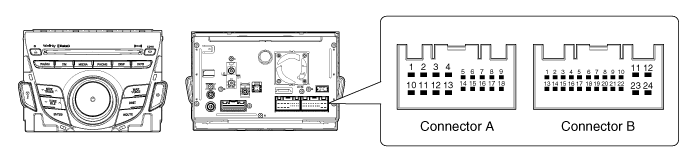
OK
|
Tester
Connection
|
Condition
|
Specified
Condition
|
CON-B11 ↔
GND
|
Always
|
9~16
V
|
CON-B12 ↔
GND
|
Always
|
9~16
V
|
CON-B24 ↔
GND
|
Always
|
Below
1Ω
|
|
NG
|
▶ Check again after
repairing or replacing the Cable harness or
Connector.
|
|
R-3
: Check the steering wheel remote control
| 1. |
Check the steering wheel remote control
connector specification (Refer to "Audio remote control -
inspection")
OK
|
▶ Replace the AVN
head unit. (Refer to R-1)
|
NG
|
▶ Replace the
steering wheel remote control
switch.
|
|
R-4
: Replace the external amplifier
| 1. |
Check the same problems after replaceing the
external amplifier
OK
|
▶ If AVN is normal
operating, replace the external amplifier
|
NG
|
▶ Check the
connectors of external amplifier power and interface (Refer to
R-5,R-6 and R-7)
|
|
R-5
: Check the external amplifier power cable
| 1. |
Remove the external
amplifier |
| 2. |
Check the specified condition of
terminal.
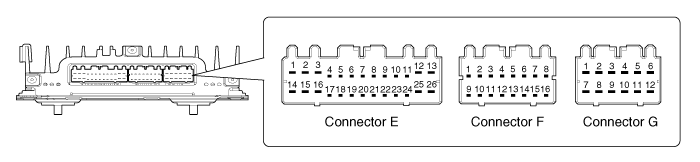
OK
|
Tester
Connection
|
Condition
|
Specified
Condition
|
CON-E1 ↔
GND
|
Always
|
9~16
V
|
CON-E7 ↔
GND
|
Always
|
9~16
V
|
CON-E14 ↔
GND
|
Always
|
Below
1Ω
|
|
NG
|
▶ Check again after
repairing or replacing the Cable harness or
Connector.
|
|
R-6
: Check the external amplifier CAN interface
| 1. |
Remove the AVN head
Unit. |
| 2. |
Remove the external
amplifier |
| 3. |
Check the specified condition of
terminal.
Tester
Connection
|
Condition
|
Specified
Condition
|
CON-B1 ↔
CON-E5
|
Always
|
Below
1Ω
|
CON-B1 ↔
GND
CON-E5 ↔ GND
|
Always
|
OPEN
|
CON-B13 ↔
CON-E6
|
Always
|
Below
1Ω
|
CON-B13 ↔
GND
CON-E6 ↔ GND
|
Always
|
OPEN
|
NG
|
▶ Check again after
repairing or replacing the Cable harness or
Connector.
|
|
R-7
: Check the external amplifier S/PDIF connection
| 1. |
Remove the audio head
unit. |
| 2. |
Remove the external
amplifier |
| 3. |
Check the specified condition of
terminal.
Tester
Connection
|
Condition
|
Specified
Condition
|
CON-A6 ↔
CON-E18
|
Always
|
Below
1Ω
|
CON-A6 ↔
GND
CON-E18↔ GND
|
Always
|
OPEN
|
CON-A15 ↔
CON-E1
|
Always
|
Below
1Ω
|
CON-A15 ↔
GND
CON-E19 ↔ GND
|
Always
|
OPEN
|
NG
|
▶ Check again after
repairing or replacing the Cable harness or
Connector.
|
|
R-8
: Check the wiring harness and connector
| 1. |
Remove the AVN head
unit |
| 2. |
Remove the external amplifier
Tester
Connection
|
Condition
|
Specified
Condition
|
CON-E12 ↔ SUB
WOOFER2 +
|
Always
|
Below
1Ω
|
CON-E25 ↔ SUB
WOOFER2 -
|
Always
|
Below
1Ω
|
CON-E13 ↔ SUB
WOOFER1 +
|
Always
|
Below
1Ω
|
CON-E26 ↔ SUB
WOOFER1 -
|
Always
|
Below
1Ω
|
CON-G1 ↔ RR DOOR
SPK +
|
Always
|
Below
1Ω
|
CON-G7 ↔ RR DOOR
SPK -
|
Always
|
Below
1Ω
|
CON-G2 ↔ RL DOOR
SPK +
|
Always
|
Below
1Ω
|
CON-G8 ↔ RL DOORSPK
-
|
Always
|
Below
1Ω
|
CON-G3 ↔ FR SPK
+
|
Always
|
Below
1Ω
|
CON-G9 ↔ FR SPK
-
|
Always
|
Below
1Ω
|
CON-G4 ↔ FL SPK
+
|
Always
|
Below
1Ω
|
CON-G10 ↔ FL SPK
-
|
Always
|
Below
1Ω
|
CON-G5 ↔ FR DOOR
SPK +
|
Always
|
Below
1Ω
|
CON-G11 ↔ FR DOOR
SPK -
|
Always
|
Below
1Ω
|
CON-G6 ↔ FL DOOR
SPK +
|
Always
|
Below
1Ω
|
CON-G12 ↔ FL DOOR
SPK -
|
Always
|
Below
1Ω
|
CON-F1 ↔ Surround
Right +
|
Always
|
Below
1Ω
|
CON-F9 ↔ Surround
Right -
|
Always
|
Below
1Ω
|
CON-F2 ↔ Surround
Left +
|
Always
|
Below
1Ω
|
CON-F10 ↔ Surround
Left -
|
Always
|
Below
1Ω
|
CON-F7 ↔ Center SPK
+
|
Always
|
Below
1Ω
|
CON-F15 ↔ Center
SPK -
|
Always
|
Below
1Ω
|
CON-E12,13,25,26/
F1,2,7,9,10,15/ G1,2,3,4,5,6,7,8,9,10,11,12 ↔
GND
|
Always
|
OPEN
|
NG
|
▶ Check again after
repairing or replacing the Cable harness or
Connector.
|
|
R-9
: Radio Broadcast cannot be Received (Bad reception)
| 1. |
Check the radio broadcast reception after
replacing the AVN head unit
OK
|
▶ If AVN is normal
operating, replace the AVN head
unit
|
|
| 2. |
Check the antenna jack
NG
|
▶ Check again the
radio broadcast reception after connecting the antenna
jack
|
|
| 3. |
Check the antenna amp input voltage (Refer
to "Antenna - Glass antenna circuit inspection")
NG
|
▶ Check the antenna
amp input voltage (Refer to "Antenna - Antenna
cable")
|
|
| 4. |
Check the feeder cable connection (Refer to
"Antenna - Antenna cable")
NG
|
▶ Check again after
repairing or replacing the antenna feeder
cable.
|
|
| 5. |
Check again the radio broadcast reception
after replacing the external amplifier
OK
|
▶ If Audio is
normal operating, replace the external
amplifier
|
|
| 6. |
Check and repair the glass antenna. (Refer
to "Antenna - Glass antenna test") |
R-10
: Disc cannot be inserted or ejected right after insertion
| 1. |
Is the ignition key at ACC or
ON?
|
| 2. |
Power ON reset. Disconnect the 2 audio
fuses, wait 5 minutes with ignition switch off. And then insert both
fuse. Then turn the ignition key ON. Is CD ejected?
OK
|
▶ Loock for foreign
matters in CD player. Such as paper lables, coins
etc.
|
|
| 3. |
If CD does not eject, don't try removing it.
The player may be damaged. Please replace the CD
player. |
R-11
: Check again after replacing the AVN head unit
OK
|
▶ Remove the audio head
unit
|
| 1. |
Check the input signal of Illumination
(+)
Tester
Connection
|
Condition
|
Specified
Condition
|
CON-A8 ↔
GND
|
Always
|
9~16
V
|
NG
|
▶ Check the vehicle
wiring
|
|
| 2. |
Check the illumination (-) input signal
using the oscilloscope
Tester
Connection
|
Condition
|
Specified
Condition
|
CON-A17 ↔
GND
|
Always
|
Check the PWM
waveform
|
NG
|
▶ Check the vehicle
wiring and cluster PWM
output.
|
|
| 3. |
Check the vehicle illumination control
unit. |
R-12
: Check the mic input condition.
Tester
Connection
|
Condition
|
Specified
Condition
|
CON-B10 ↔
MIC+
|
Always
|
Below 1Ω
|
CON-B22 ↔
MIC-
|
Always
|
Below 1Ω
|
CON-B22 ↔
GND
|
Always
|
OPEN
|
NG
|
▶ Check the vehicle
wiring and mic
|
| 1. |
Test again after replacing the
mic |
R-13
: Test after replacing the AVN head unit
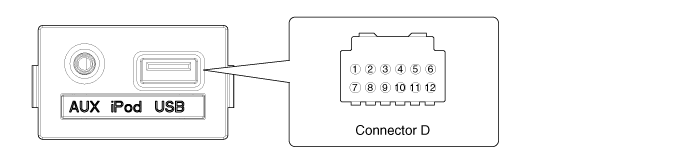
OK
|
▶ Replace the AVN head
unit
|
| 1. |
Test after replacing the multimedia
jack.
OK
|
▶ Replace the
multimedia jack .
|
|
| 2. |
Check the multimedia jack
connector.
Tester
Connection
|
Condition
|
Specified
Condition
|
CON-B7 ↔
CON-D4
|
Always
|
Below
1Ω
|
CON-B8 ↔
CON-D1
|
Always
|
Below
1Ω
|
CON-B9 ↔
CON-D7
|
Always
|
Below
1Ω
|
CON-B19 ↔
COND10
|
Always
|
Below
1Ω
|
CON-B20 ↔
CON-D3
|
Always
|
Below
1Ω
|
CON-B21 ↔
CON-D2
|
Always
|
Below
1Ω
|
CON-B23 ↔
CON-D12
|
Always
|
Below
1Ω
|
NG
|
▶ Check the vehicle
wiring
|
|
| 3. |
Check again after replacing the external
input device with another one. |
R-14
: Sound sometimes skips when parking
| 1. |
Is CD face scratched or dirty?
OK
|
▶ CD is defective,
or clean CD
|
|
| 2. |
Does it play properly if CD is replaced with
an existing proper CD?
NG
|
▶ Repair or replace
CD
player
|
|
R-15
: Replace the AVN monitor
| 1. |
Check the same problems after replaceing
the AVN monitor
OK
|
▶ If AVN is normal
operating, replace the AVN
monitor.
|
NG
|
▶ Check the vehicle
wiring and LVDS cable. (Refer to removal procedure.
R-16)
|
|
R-16
:Check the power connection of AVN monitor
| 1. |
Remove the AVN
monitor. |
| 2. |
Check the specified condition of
terminal.
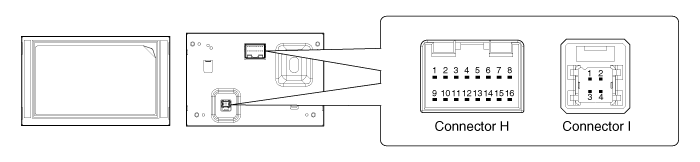
OK
|
Tester
Connection
|
Condition
|
Specified
Condition
|
CON-H1 ↔
GND
|
Always
|
9~16
V
|
CON-H5 ↔
GND
|
Always
|
9~16
V
|
CON-H9 ↔
GND
|
Always
|
Below
1Ω
|
|
NG
|
▶ Check again after
repairing or replacing the Cable harness or
Connector
|
|