| COMPONENT LOCATION |

| General Description |
The Steering angle
sensor(SAS) is joined to the multi function switch and uses a CAN
communication. The SAS is used to determine turning direction and speed of
the steering wheel. The HECU uses the signals from the SAS when performing
ESC-related calculations.
| DTC Description |
The SAS used for ESC
control needs zero point adjustment because the SAS measures an absolute
angle. Zero point adjustment is done by using the scantool device. If
abnormal zero point adjustment is detected, a failure is
recognized.
| DTC Detecting Condition |
| Item |
Detecting
Condition |
Possible cause | ||||
| DTC
Strategy |
|
| ||||
| Monitoring
Period |
| |||||
| Enable
Conditions |
| |||||
| Fail
Safe |
|
| Monitor Scantool Data |
| 1. |
Connect scantool to Data Link
Connector(DLC). |
| 2. |
Ignition "ON" & Engine
"ON". |
| 3. |
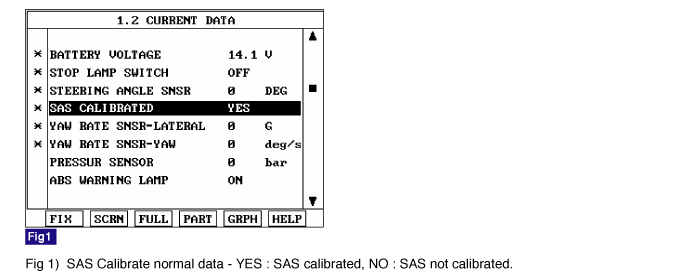
Monitor the "SAS CALIBRATED" parameters on the
Scantool.
|
| 4. |
Is parameter displayed within
specifications?
▶ Fault is caused by having been repaired and
HECU memory was not cleared. Clear the DTC and then go to
"Verification Of Vehicle Repair" procedure.
▶ Go to "Component Inspection"
procedure. |


| Component Inspection |
| 1. |
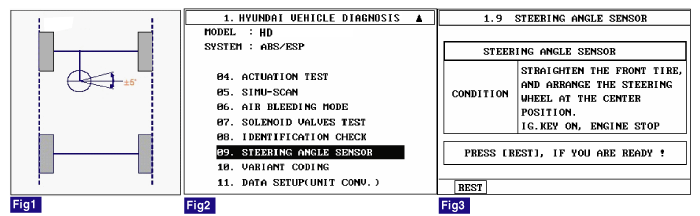
Line up wheels like (figure 1).
|
| 2. |
Connect scantool to Data Link
Connector(DLC). |
| 3. |
Go in Anti-Lock brake system. (figure
2). |
| 4. |
Perform steering angle sensor calibration.
(figure 3). |
| 5. |
Disconnect
scantool. |
| 6. |
Check the condition of SAS zero point
adjustment by operating the vehicle (turn right and left at least 1
time)
|
| 7. |
Is zero point adjustment
completed?
▶ Go to "Verification Of Vehicle Repair"
procedure.
▶ Substitute with a known-good HECU and check
for proper operation. If problem is corrected, replace HECU and then
go to "Verification Of Vehicle Repair"
procedure. |
| Verification of Vehicle Repair |
After a repair, it is
essential to verify that the fault has been corrected.
| 1. |
Connect scantool and select "Diagnostic
Trouble Codes (DTCs)" mode |
| 2. |
Using a scantool, Clear
DTC. |
| 3. |
Operate the vehicle within DTC Detecting
Condition in General Information |
| 4. |
Are any DTCs present?
▶ Go to the applicable troubleshooting
procedure.
▶ System performing to specification at this
time. |